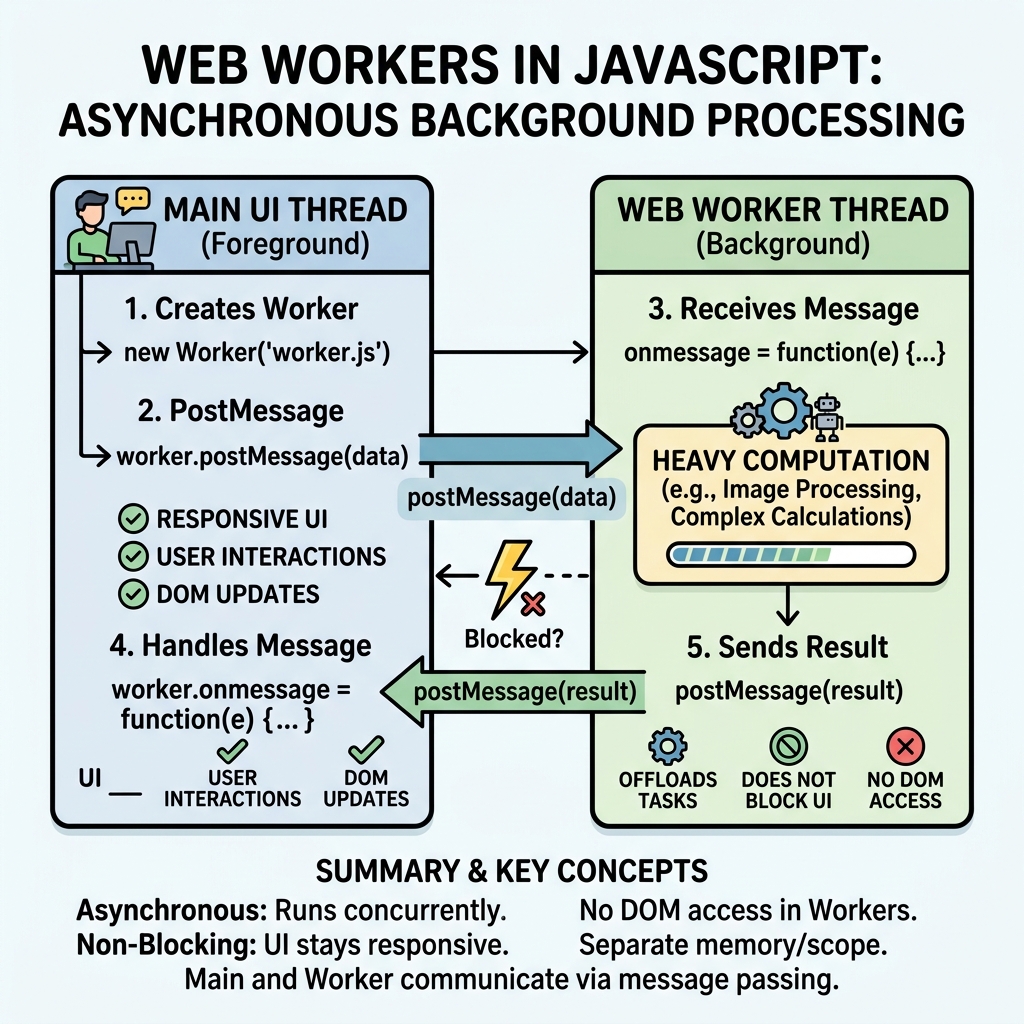
Web Workers enable JavaScript to run scripts in background threads, separate from the main execution thread. This allows heavy computations or continuous tasks without freezing the user interface.
💡 Key Concept
Web Workers run in parallel to the main thread, improving performance by offloading intensive tasks.
Why Use Web Workers?
- Keep the UI responsive during heavy computations.
- Perform parallel processing in browsers.
- Handle tasks like data processing, file parsing, or network requests without blocking.
Creating a Web Worker
A worker is created by passing a JavaScript file URL to the Worker constructor:
📌 Deep Dive: Creating and Communicating with a Web Worker
const worker = new Worker('worker.js');

// Send data to the worker
worker.postMessage('Hello Worker');

// Receive messages from the worker
worker.onmessage = (event) => {
  console.log('Message from worker:', event.data);
};
The worker.js file contains the code running in the background thread:
📌 Deep Dive: Worker Script Example
self.onmessage = (event) => {
  const message = event.data;
  // Perform some work
  const result = message.toUpperCase();

  // Send result back to main thread
  self.postMessage(result);
};
Communication Model
- Main thread and worker exchange messages via
postMessage(). - Messages are copied, not shared — no direct access to variables.
- Data passed must be serializable (e.g., strings, objects, arrays).
⚠️ Limitations
Workers cannot access the DOM, window, or document objects. They operate in an isolated context.
Types of Web Workers
| Type | Description |
|---|---|
| Dedicated Worker | Used by a single script. Created via new Worker(). |
| Shared Worker | Can be accessed by multiple scripts, even across browser tabs. |
| Service Worker | Acts as a proxy between web app and network, mainly for offline caching. |
Terminating a Worker
To stop a worker and free resources:
- From main thread:
worker.terminate() - From inside worker:
self.close()
💡 Best Practice
Always terminate workers when no longer needed to avoid memory leaks.
Example Use Case: Heavy Calculation
Without workers, a heavy loop blocks UI. Using a worker, it runs smoothly:
📌 Deep Dive: Heavy Calculation in Worker
// Main thread
const worker = new Worker('calcWorker.js');
worker.postMessage(1000000000); // large number

worker.onmessage = e => {
  console.log('Sum:', e.data);
  worker.terminate();
};

// Worker calcWorker.js
self.onmessage = e => {
  const n = e.data;
  let sum = 0;
  for (let i = 1; i <= n; i++) {
    sum += i;
  }
  self.postMessage(sum);
  self.close();
};
💡 Summary
- Web Workers allow concurrent JS execution.
- Communication is via message passing.
- Workers improve app responsiveness for heavy tasks.
Quick Knowledge Check
Test what you just learned
Question 1 of 2
How do Web Workers communicate with the main JavaScript thread?
Question 2 of 2
Which of the following can a Web Worker NOT access?
Loading results...