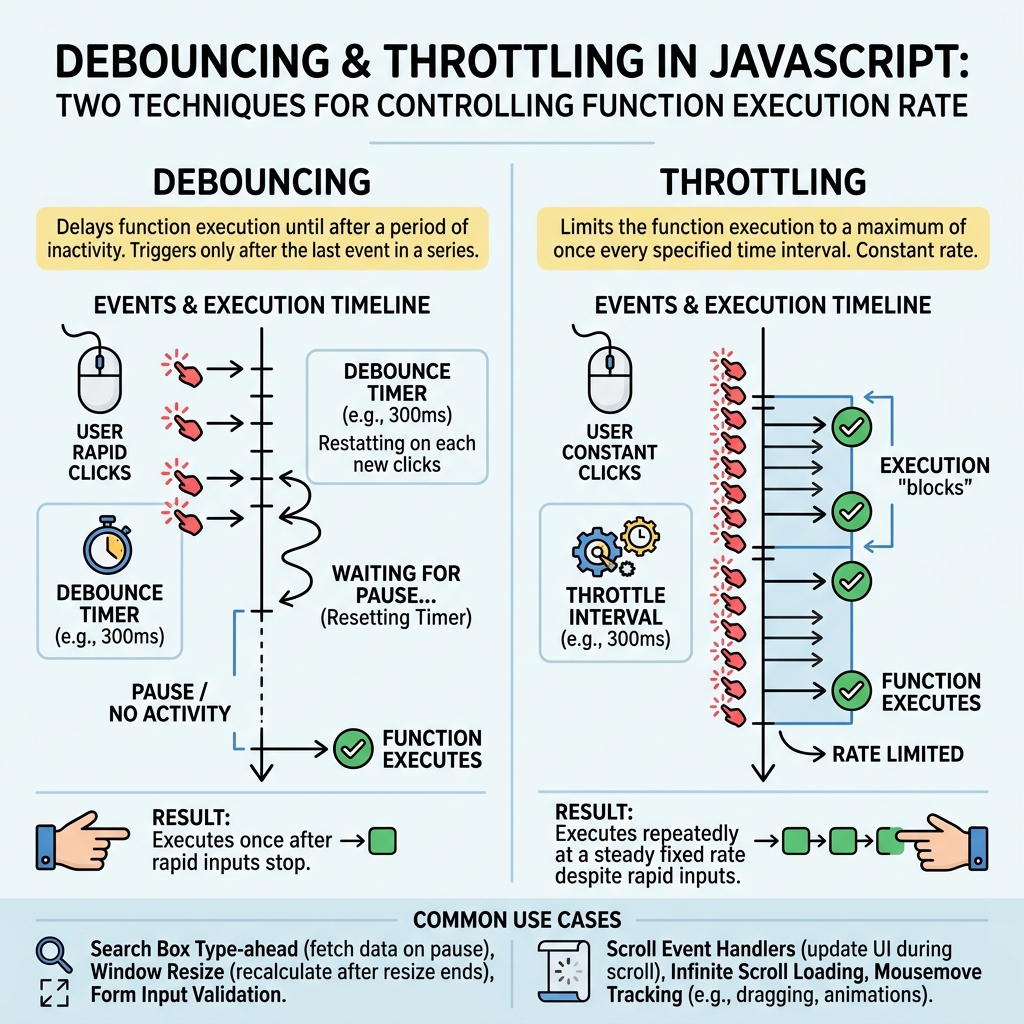
In JavaScript, debouncing and throttling are techniques to control how often a function is executed, especially during high-frequency events like scrolling or typing.
💡 Why Use Them?
They improve performance and user experience by limiting the number of times a costly operation runs.
Debouncing
Debouncing delays the execution of a function until a specified time has passed since it was last invoked. It ensures the function runs only after the user has stopped triggering the event.
- Useful for: search input autocomplete, resize events, form validation after typing stops.
- Mechanism: resets timer every time event fires, only calls function when no new event occurs before delay.
📌 Deep Dive: Debounce Implementation
function debounce(fn, delay) {
  let timeoutId;
  return function(...args) {
    clearTimeout(timeoutId);
    timeoutId = setTimeout(() => fn.apply(this, args), delay);
  };
}

// Usage: fires only if 300ms passed without new calls
const processInput = debounce(() => {
  console.log('Input processed');
}, 300);
Throttling
Throttling ensures a function is called at most once every specified interval. It limits the function calls to a fixed rate regardless of how many events occur.
- Useful for: scroll events, window resizing, button click rate limiting.
- Mechanism: executes immediately, then blocks new calls until interval expires.
📌 Deep Dive: Throttle Implementation
function throttle(fn, limit) {
  let lastCall = 0;
  return function(...args) {
    const now = Date.now();
    if (now - lastCall >= limit) {
      lastCall = now;
      fn.apply(this, args);
    }
  };
}

// Usage: fires at most once every 500ms during scroll
const handleScroll = throttle(() => {
  console.log('Scroll event handled');
}, 500);| Aspect | Debouncing | Throttling |
|---|---|---|
| When function runs | After user stops triggering event | At regular intervals during event |
| Use case | Search input, resize end | Scroll, resize, button clicks |
| Example delay | Wait 300ms after last call | Allow once every 500ms |
| Effect on performance | Reduces number of calls after burst | Limits calls to fixed rate |
⚠️ Common Pitfall
Using debouncing or throttling incorrectly can cause delayed or missed responses. Always test with your specific event and UI needs.
Quick Knowledge Check
Test what you just learned
Question 1 of 2
Which technique waits until the user stops triggering an event before running the function?
Question 2 of 2
Which method limits a function to execute at most once every fixed interval?
Loading results...