JSON (JavaScript Object Notation) is a lightweight data-interchange format that's easy for humans to read and write and easy for machines to parse and generate. It is widely used for data exchange between a server and a web application.
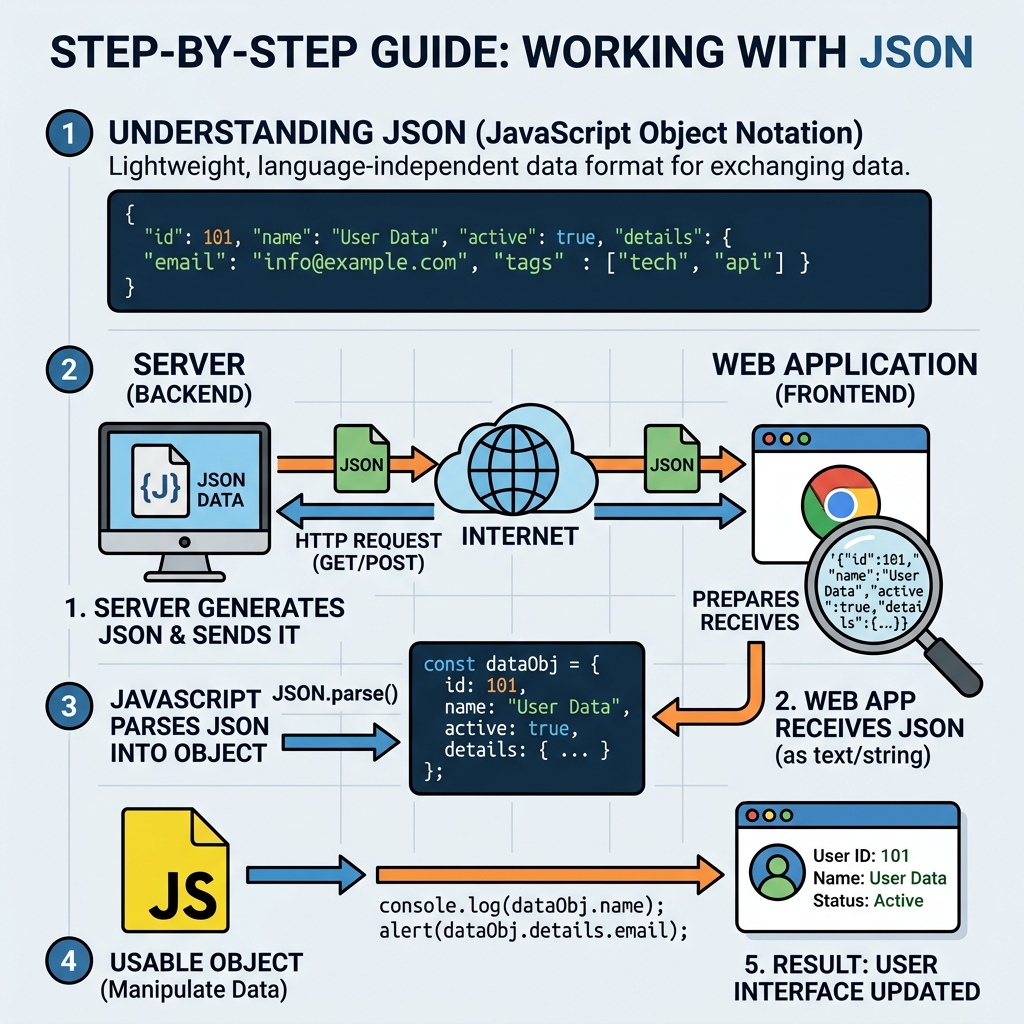
Key Concepts
- JSON Structure: Data represented as key-value pairs (objects) and ordered lists (arrays).
- Data Types Supported: Strings, numbers, booleans, null, arrays, and objects.
- Common Uses: Configuration files, API responses, and client-server communication.
Converting Between JSON and JavaScript Objects
JavaScript provides two main methods:
JSON.stringify()converts a JavaScript object or value to a JSON string.JSON.parse()parses a JSON string and converts it into a JavaScript object.
💡 Important
Always ensure the JSON string is well-formed before parsing to avoid runtime errors.
📌 Deep Dive: JSON.stringify()
const user = {
  name: "Alice",
  age: 30,
  active: true
};

const jsonString = JSON.stringify(user);
console.log(jsonString);📌 Deep Dive: JSON.parse()
const jsonString = '{"name":"Alice","age":30,"active":true}';

const userObj = JSON.parse(jsonString);
console.log(userObj.name); // AliceJSON vs JavaScript Objects
| Aspect | JSON | JavaScript Object |
|---|---|---|
| Data format | String (text) | In-memory object |
| Keys | Always double-quoted strings | Strings without quotes allowed (if valid identifiers) |
| Functions | Not supported | Allowed |
| Comments | Not supported | Allowed |
⚠️ Common Pitfall
JSON does not support functions or undefined values. These will be omitted or cause errors during conversion.
Tips for Working with JSON
- Use
JSON.stringify()to serialize objects before sending data over a network. - Use
JSON.parse()to deserialize JSON strings received from APIs. - Validate JSON strings if they come from untrusted sources to avoid errors or security issues.
- Format JSON strings with indentation for readability using
JSON.stringify(obj, null, 2).
📌 Deep Dive: Pretty-print JSON
const data = { message: "Hello, world!", count: 5 };

const prettyJSON = JSON.stringify(data, null, 2);
console.log(prettyJSON);💡 Summary
Mastering JSON methods stringify and parse is essential for efficient data interchange in modern JavaScript applications.
Quick Knowledge Check
Test what you just learned
Question 1 of 2
Which method converts a JavaScript object to a JSON string?
Question 2 of 2
Which of the following is not supported in JSON?
Loading results...