The DOM stands for Document Object Model. It is a programming interface for web documents, representing the page so that programs can change the document structure, style, and content.
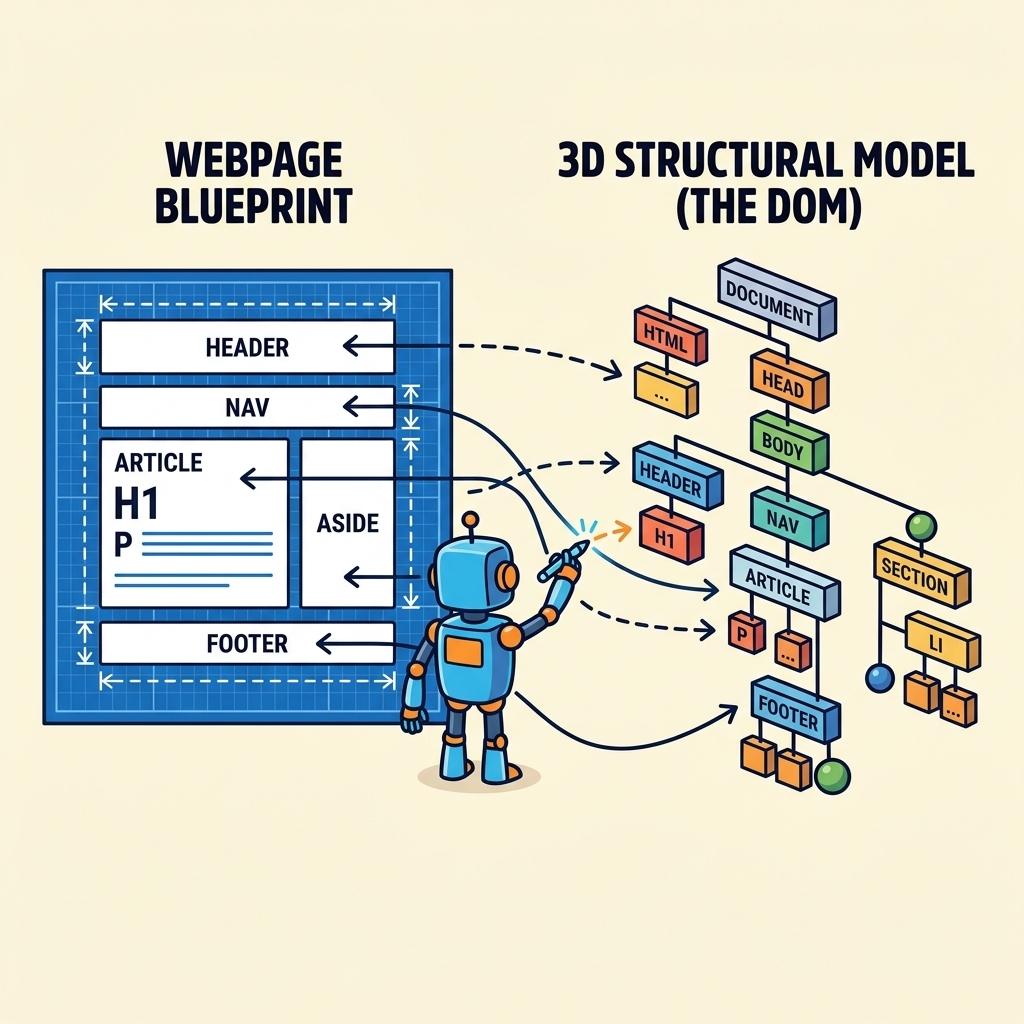
💡 Key Concept
The DOM is a tree-like structure where each part of the HTML document is a node (elements, attributes, text).
Think of the DOM as a bridge between HTML and JavaScript, allowing scripts to dynamically access and update the content, structure, and styles of a webpage.
| HTML | DOM |
|---|---|
| Static markup language | Dynamic, object-based representation |
| Text in a file or server response | Tree structure in the browser memory |
| Not programmable | Allows scripting and interaction |
Every element, attribute, and piece of text in HTML becomes a node in the DOM tree. JavaScript can then manipulate these nodes to update the page without reloading.
💡 DOM Tree Example
For HTML like <h1>Hello</h1>, the DOM will have a node representing the <h1> element and a child text node containing "Hello".
📌 Deep Dive: Accessing the DOM
const heading = document.querySelector('h1');
console.log(heading.textContent); // Outputs the text inside <h1>Here, document is the root of the DOM tree representing the entire HTML document. Using DOM methods like querySelector, you can select and manipulate specific elements.
⚠️ Important
The DOM exists only while the page is loaded in the browser. It is not part of the original HTML text but a live object representing it.
Quick Knowledge Check
Test what you just learned
Question 1 of 2
What does DOM stand for?
Question 2 of 2
Which of the following is true about the DOM?
Loading results...