Package managers simplify the process of installing, updating, and managing third-party libraries in JavaScript projects. The two most popular package managers are npm and Yarn.
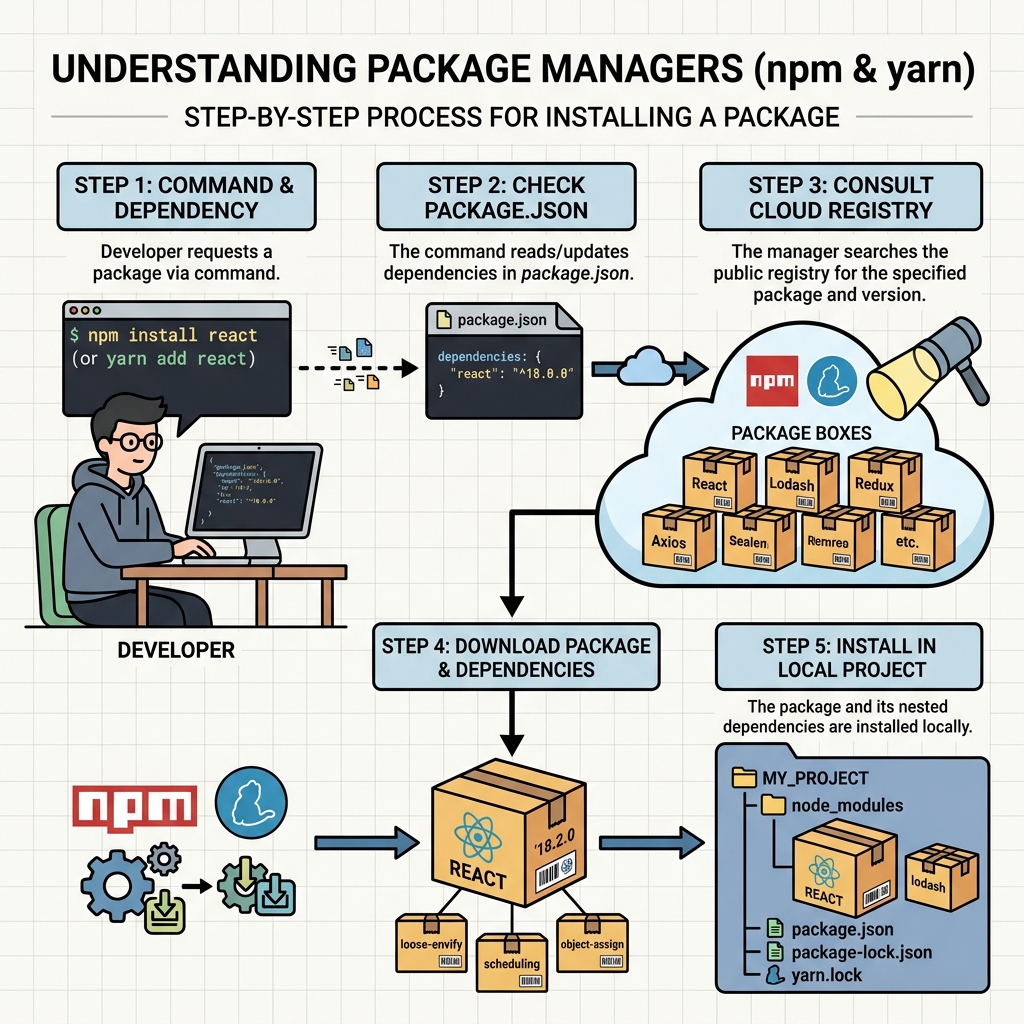
💡 What is a Package Manager?
A tool that automates the installation, upgrading, configuration, and removal of software packages (libraries/modules) for your project.
Why Use Package Managers?
- Automatically handle dependencies and their versions.
- Maintain a manifest file (
package.json) listing all dependencies. - Simplify sharing and collaboration across teams.
- Enable easy scripts to run tasks like testing or building.
npm (Node Package Manager)
npm is the default package manager for Node.js. It comes bundled with Node.js installations.
npm init- creates apackage.jsonfile.npm install <package>(ornpm i <package>) - installs a package and adds it to dependencies.npm install- installs all dependencies frompackage.json.npm update- updates installed packages.npm uninstall <package>- removes a package.
Yarn
Yarn is an alternative package manager developed by Facebook, designed to be fast and deterministic.
yarn init- creates apackage.jsonfile.yarn add <package>- installs a package and adds it to dependencies.yarn install- installs all dependencies listed inpackage.json.yarn remove <package>- removes a package.- Uses
yarn.lockfile for consistent installs across machines.
| Action | npm Command | Yarn Command |
|---|---|---|
| Initialize project | npm init | yarn init |
| Install all dependencies | npm install | yarn install |
| Install a package | npm install package | yarn add package |
| Remove a package | npm uninstall package | yarn remove package |
| Update packages | npm update | yarn upgrade |
💡 Package Versioning
Both npm and Yarn respect semantic versioning defined in package.json. This helps control which package updates are allowed during installs or updates.
⚠️ Avoid Mixing npm and Yarn
Using both package managers interchangeably in the same project can corrupt the dependencies and lockfiles. Pick one and stick with it.
How Package Managers Work Under the Hood
- Download the package from a public registry (like npm registry).
- Install dependencies recursively.
- Create or update the lockfile (
package-lock.jsonfor npm,yarn.lockfor Yarn) to ensure consistent installs.
Summary
- npm is the default and most widely used package manager for Node.js.
- Yarn offers faster installs and deterministic dependency resolution.
- Commands differ slightly but achieve similar results.
- Always use one package manager per project to avoid conflicts.
Quick Knowledge Check
Test what you just learned
Question 1 of 2
Which command installs a package using Yarn?
Question 2 of 2
Why should you avoid mixing npm and Yarn in the same project?
Loading results...