JavaScript modules and tooling help organize, reuse, and optimize code in modern web development. This lesson covers the essentials of ES modules and common tools used alongside them.
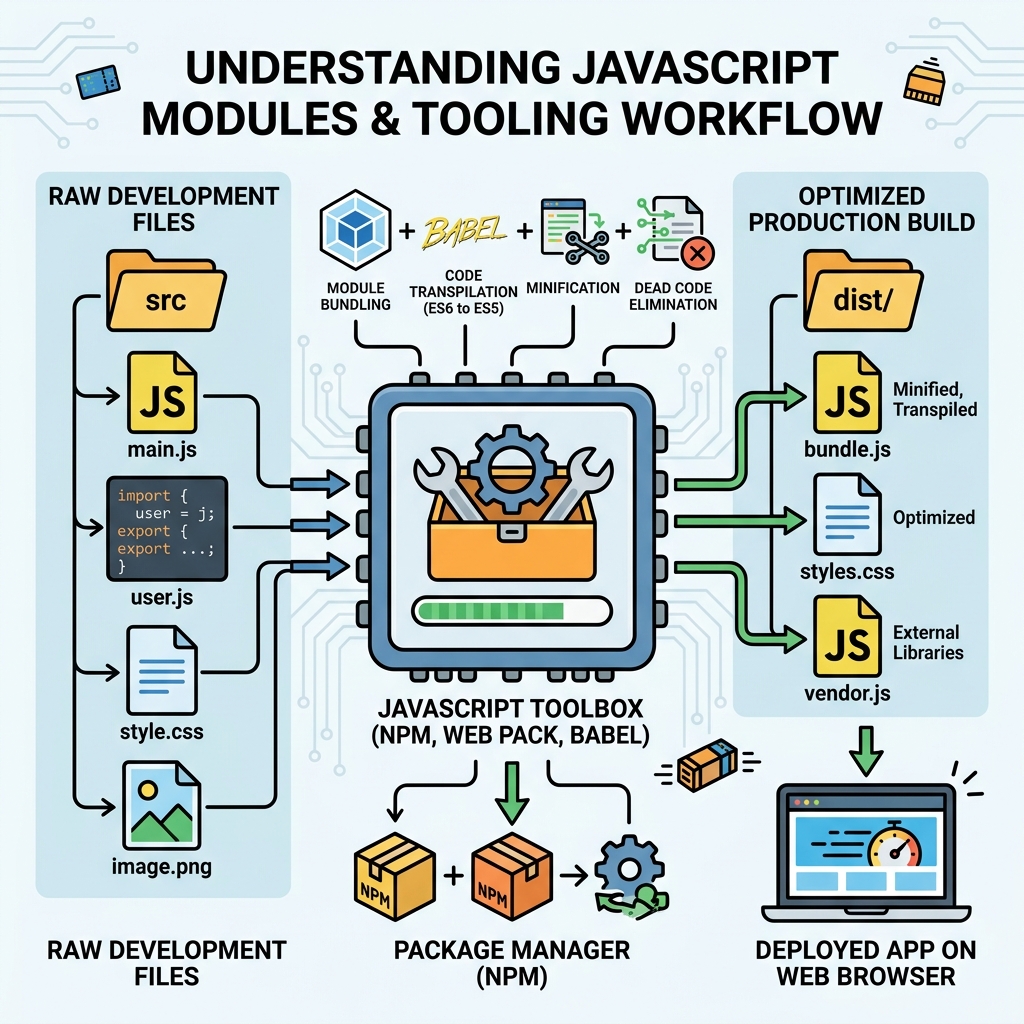
💡 What Are Modules?
Modules let you split code into reusable files, each with its own scope. They improve maintainability and avoid global namespace pollution.
ES Modules (ESM)
Native JavaScript modules use import and export statements to share code between files.
| Action | Syntax Example |
|---|---|
| Export named value | export const PI = 3.14; |
| Export named function | export function sum(a, b) { return a + b; } |
| Import named exports | import { PI, sum } from './math.js'; |
| Default export | export default class User { ... } |
| Import default export | import User from './User.js'; |
⚠️ Module Files Must Use type="module"
To use ES modules in browsers, your script tag should be <script type="module" src="app.js"></script>. Modules run in strict mode by default.
Advantages of Modules
- Encapsulation: Avoid global variable conflicts.
- Reusability: Import only what you need.
- Maintainability: Easier to navigate and update code.
- Lazy loading: Load modules on demand for performance.
Common Tooling in Module-Based Projects
Modules are often used with build tools and bundlers to optimize and transform code for browsers.
- Bundlers: Tools like
Webpack,Rollup, andParcelcombine modules into single or smaller files for faster loading. - Transpilers:
Babelconverts modern JS syntax into versions compatible with older browsers. - Package Managers:
npmoryarnmanage third-party libraries that are often modular. - Linters & Formatters:
ESLintandPrettierenforce code quality and style.
💡 Why Use Bundlers?
Browsers have limitations on loading many small files and older JS features. Bundlers optimize delivery by combining and transforming modules into browser-friendly code.
Example: Export and Import
File: math.js
📌 Deep Dive: math.js Module
export const PI = 3.14159;

export function circleArea(radius) {
  return PI * radius * radius;
}

export default function squareArea(side) {
  return side * side;
}
File: app.js
📌 Deep Dive: Importing from math.js
import squareArea, { PI, circleArea } from './math.js';

console.log('PI:', PI);
console.log('Circle area (r=3):', circleArea(3));
console.log('Square area (side=4):', squareArea(4));Module Resolution & File Extensions
By default, import paths need file extensions in browsers (./module.js). Node.js supports extensionless imports with certain settings.
⚠️ Relative vs Package Imports
Relative imports use ./ or ../. Package imports (like lodash) come from node_modules and require a bundler or Node.js environment.
Summary
- ES Modules use
exportandimportto share code. - Modules improve code organization and reuse.
- Tooling like bundlers and transpilers optimize and ensure compatibility.
- Use
type="module"in browsers for native module support.
Quick Knowledge Check
Test what you just learned
Question 1 of 2
Which statement correctly imports a default export named MyClass from a module file?
Question 2 of 2
Why are bundlers commonly used in JavaScript projects with modules?
Loading results...