APIs (Application Programming Interfaces) allow your JavaScript code to communicate with external services, fetching or sending data. JSON (JavaScript Object Notation) is the most common format for that data exchange.
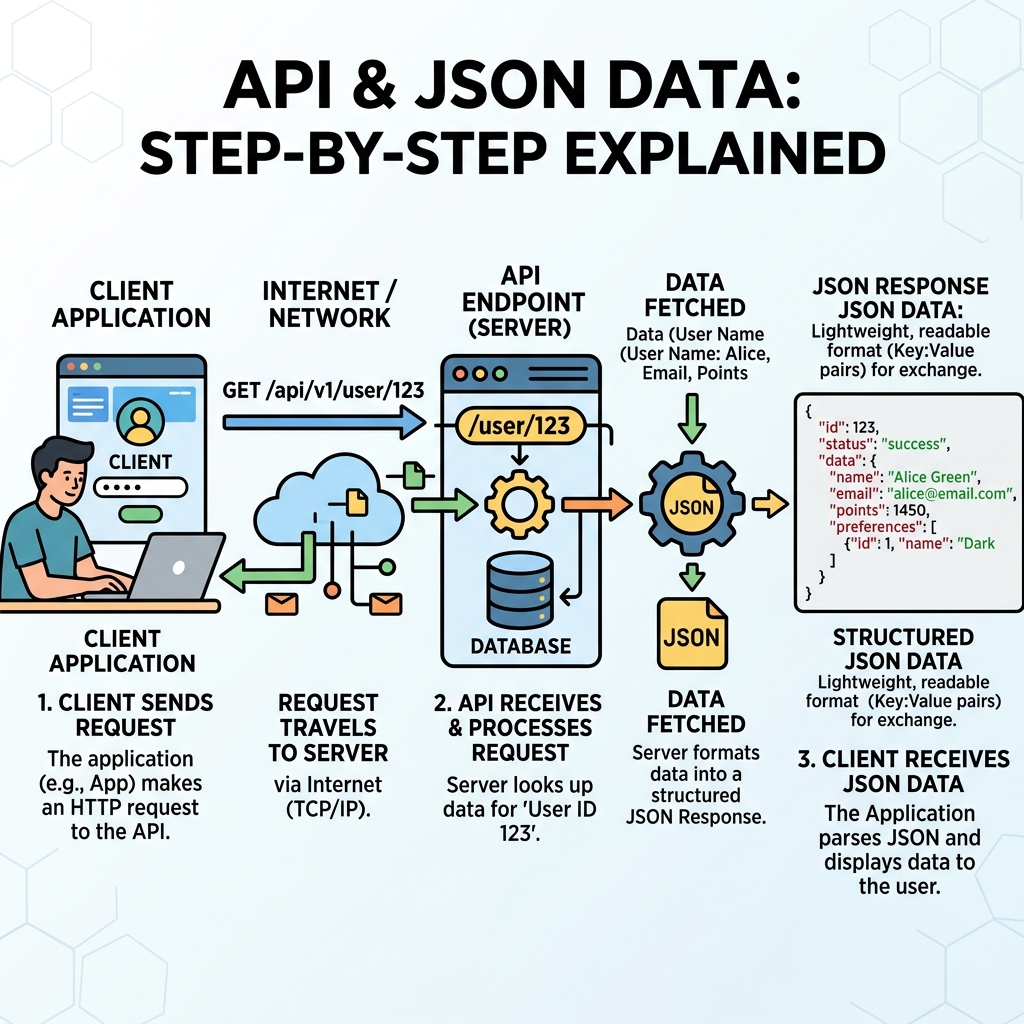
💡 What is an API?
An API is a set of rules that lets your app interact with other software, often over the internet. It defines how requests and responses are structured.
When working with APIs, you often fetch data from a URL, which returns JSON. JSON is a text-based format that represents data as objects and arrays with key-value pairs.
💡 Why JSON?
JSON is lightweight, easy to read/write, and natively supported by JavaScript, making it ideal for data transfer between servers and browsers.
| JSON | JavaScript Object |
|---|---|
| Keys must be double-quoted strings | Keys can be unquoted or single/double quoted |
| Supports only: strings, numbers, objects, arrays, true, false, null | Supports functions, undefined, symbols, etc. |
| Text format, used for data exchange | In-memory data structure |
To interact with APIs in JavaScript, use the fetch() function to request data asynchronously. The response is usually JSON, which you parse with response.json().
📌 Deep Dive: Fetching & Parsing JSON Data
fetch('https://api.example.com/data')
  .then(response => response.json())   // Parse JSON from the response
  .then(data => {
    console.log(data);                   // Use the JavaScript object
  })
.catch(error => console.error('Error:', error));To convert a JavaScript object to JSON (for sending data), use JSON.stringify(). To convert JSON text back to an object, use JSON.parse().
📌 Deep Dive: JSON Stringify & Parse
const obj = { name: "Alice", age: 25 };

// Convert object to JSON string
const jsonString = JSON.stringify(obj);
console.log(jsonString);  // '{"name":"Alice","age":25}'

// Convert JSON string back to object
const parsedObj = JSON.parse(jsonString);
console.log(parsedObj.name); // AliceAlice
⚠️ Common Pitfall
Do not confuse JavaScript objects with JSON strings. JSON is a string format. Always parse JSON strings to objects before use and stringify objects before sending.
APIs often require HTTP methods like GET, POST, PUT, DELETE. Fetch defaults to GET. To send JSON data with POST, specify headers and body:
📌 Deep Dive: Sending JSON Data with Fetch POST
fetch('https://api.example.com/users', {
  method: 'POST',
  headers: {
    'Content-Type': 'application/json'   // Tell API we send JSON
  },
  body: JSON.stringify({ name: 'Bob', age: 30 })  // Convert object to JSON string
})
.then(response => response.json())
.then(data => console.log('User created:', data))
.catch(error => console.error('Error:', error));To summarize, working with APIs and JSON involves:
- Using
fetch()to request data - Parsing JSON responses with
response.json() - Converting data to JSON strings with
JSON.stringify() - Sending JSON in request bodies with proper headers
💡 Remember
Always handle errors with catch() or try/catch when working with asynchronous API calls.
Quick Knowledge Check
Test what you just learned
Question 1 of 2
Which method parses a JSON response from a fetch request?
Question 2 of 2
What header should you include when sending JSON data in a POST request?
Loading results...