The fs (File System) module in Node.js provides an API to interact with the file system, enabling you to read, write, update, and delete files and directories.
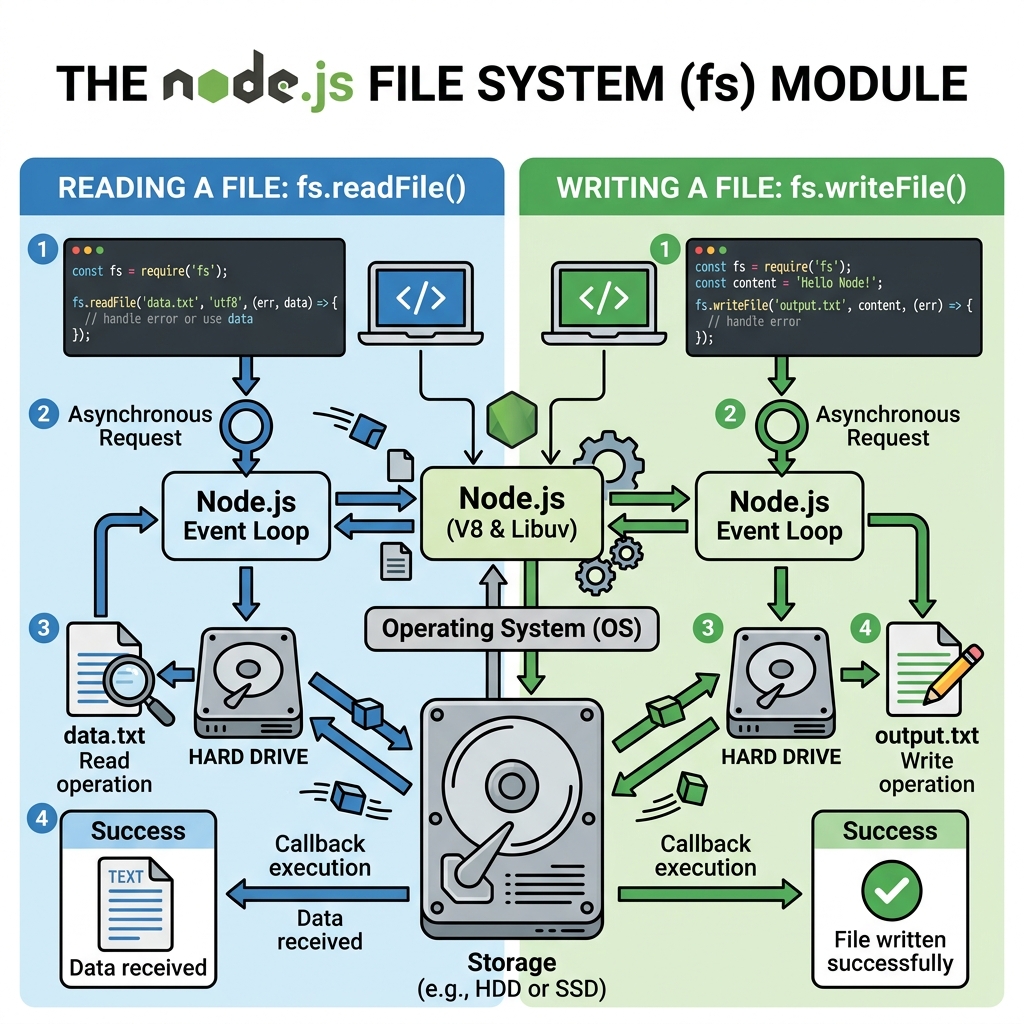
💡 Core Concept
The fs module is built-in and does not require installation. Use require('fs') to access its functions.
Importing the File System Module
📌 Deep Dive: Importing fs
const fs = require('fs');Key Methods in the File System Module
| Method | Description |
|---|---|
| fs.readFile() | Reads the contents of a file asynchronously. |
| fs.writeFile() | Writes data to a file asynchronously, replacing the file if it exists. |
| fs.appendFile() | Appends data to a file asynchronously, creating it if it doesn't exist. |
| fs.unlink() | Deletes a file asynchronously. |
| fs.mkdir() | Creates a new directory asynchronously. |
| fs.readdir() | Reads the contents of a directory asynchronously. |
Asynchronous vs Synchronous Methods
Most fs methods have both asynchronous and synchronous versions. Asynchronous methods accept callbacks and do not block the event loop. Synchronous methods block execution until complete and are named with the Sync suffix.
| Async Method | Sync Method |
|---|---|
| fs.readFile(path, callback) | fs.readFileSync(path) |
| fs.writeFile(path, data, callback) | fs.writeFileSync(path, data) |
| fs.mkdir(path, callback) | fs.mkdirSync(path) |
⚠️ Use Async Methods Preferably
Synchronous fs methods block the Node.js event loop and can degrade performance. Use asynchronous methods in production code.
Essential Examples
📌 Deep Dive: Reading a File Asynchronously
fs.readFile('example.txt', 'utf8', (err, data) => {
  if (err) {
    console.error('Error reading file:', err);
    return;
  }
  console.log(data);
});📌 Deep Dive: Writing to a File Asynchronously
const content = 'Hello, File System Module!';

fs.writeFile('output.txt', content, (err) => {
  if (err) {
    console.error('Error writing file:', err);
    return;
  }
  console.log('File written successfully.');
});📌 Deep Dive: Creating a Directory
fs.mkdir('new_folder', { recursive: true }, (err) => {
  if (err) {
    console.error('Error creating directory:', err);
    return;
  }
  console.log('Directory created successfully.');
});💡 Recursive Option in fs.mkdir()
Setting recursive: true ensures that nested directories are created if they don't exist, similar to mkdir -p in UNIX.
Reading Directory Contents
📌 Deep Dive: Listing Files in a Directory
fs.readdir('.', (err, files) => {
  if (err) {
    console.error('Error reading directory:', err);
    return;
  }
  console.log('Files in current directory:', files);
});⚠️ Error Handling
Always check the err parameter in callbacks to handle file system errors gracefully.
Summary
- Import the
fsmodule withrequire('fs'). - Use asynchronous methods like
fs.readFileandfs.writeFileto avoid blocking. - Use synchronous methods only for scripts or during startup when blocking is acceptable.
- Handle errors in callbacks to avoid crashes.
- Common tasks: reading, writing, appending files; creating directories; listing contents; deleting files.
Quick Knowledge Check
Test what you just learned
Question 1 of 2
Which fs method reads a file without blocking the Node.js event loop?
Question 2 of 2
What does the { recursive: true } option do when used with fs.mkdir()?
Loading results...