APIs (Application Programming Interfaces) are essential bridges that allow your JavaScript code to interact with web services and external data sources. Understanding how to use APIs unlocks powerful capabilities for dynamic web applications.
💡 What is a Web API?
A Web API is a set of rules and endpoints provided by a server that your browser or JavaScript code can request data from or send data to, usually over HTTP/S.
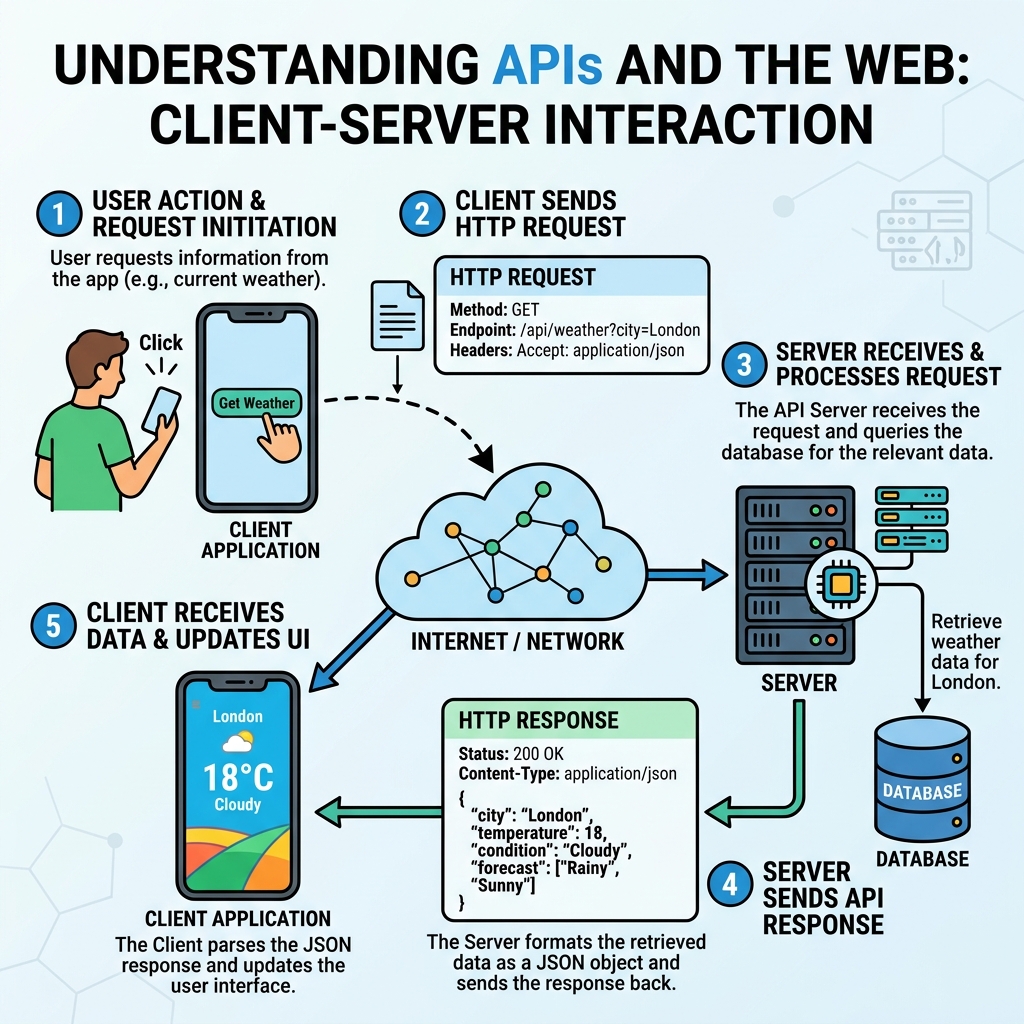
How APIs Work on the Web
- Request: Your JavaScript code sends an HTTP request (GET, POST, etc.) to an API endpoint URL.
- Response: The server processes the request and sends back data, often in JSON format.
- Use: Your code processes the response to update the webpage or perform actions.
💡 JSON is the Standard Data Format
Most Web APIs return data in JSON (JavaScript Object Notation), which can be easily parsed and used in JavaScript.
Common Methods to Access APIs in JavaScript
- fetch(): The modern, promise-based native method to make HTTP requests.
- XMLHttpRequest: The older method, now mostly replaced by fetch.
| fetch() | XMLHttpRequest |
|---|---|
| Returns a Promise for easier chaining and error handling | Uses event handlers and callbacks |
| Cleaner and modern syntax | Older, more verbose syntax |
| Supports streaming and other modern features | Limited to older browser capabilities |
Basic fetch() Usage
📌 Deep Dive: Fetching JSON Data
fetch('https://api.example.com/data')
  .then(response => response.json())
  .then(data => {
    console.log(data);  // Use the API data here
  })
  .catch(error => {
    console.error('Error fetching data:', error);
});💡 Handling Errors
Always include error handling with catch() to manage network issues or invalid responses gracefully.
Cross-Origin Resource Sharing (CORS)
APIs hosted on different domains may restrict access due to CORS security policies. The server must allow your domain to access its data.
⚠️ CORS Restrictions
If you get a CORS error, it means the API server isn’t configured to allow your web page’s domain to request data. This is a security feature in browsers.
Using APIs to Update the Webpage
- Fetch API data asynchronously.
- Parse the JSON response.
- Use DOM manipulation to display data dynamically.
📌 Deep Dive: Display API Data on a Webpage
fetch('https://api.example.com/users/1')
  .then(response => response.json())
  .then(user => {
    document.getElementById('username').textContent = user.name;
  })
.catch(console.error);💡 API Documentation
Always consult the API’s official documentation to understand available endpoints, request methods, and data formats.
Summary
- APIs enable your JavaScript to communicate with servers and external data.
- The fetch() API is the modern way to make HTTP requests and handle responses.
- JSON is the common data format used by web APIs.
- CORS policies can affect your ability to fetch data from external APIs.
- Use API data dynamically by manipulating the DOM.
Quick Knowledge Check
Test what you just learned
Question 1 of 2
Which method is the modern standard for making API requests in JavaScript?
Question 2 of 2
What data format do most web APIs return that JavaScript can easily parse?
Loading results...