Mastering asynchronous JavaScript goes beyond basic callbacks and promises. This lesson explores advanced async patterns to write cleaner, more efficient, and manageable code.
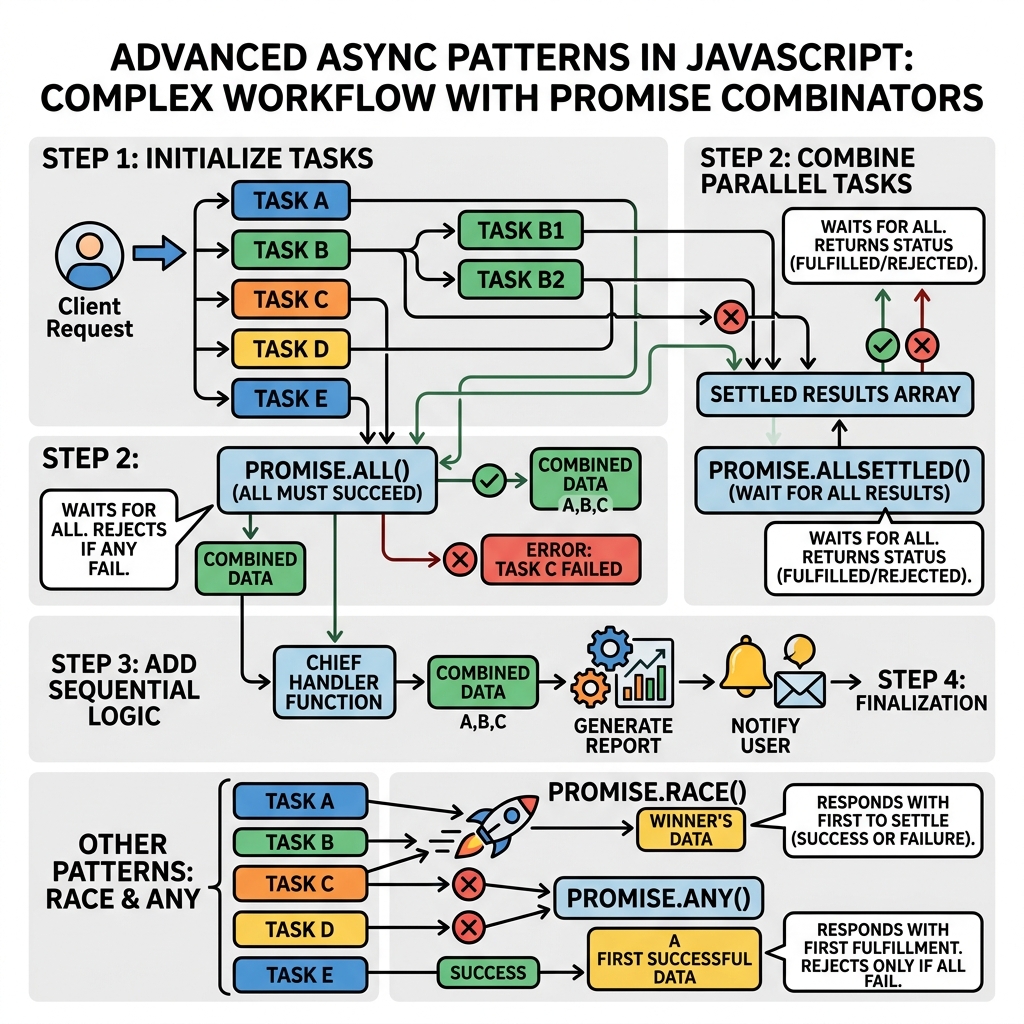
1. Promise Combinators
JavaScript provides methods to handle multiple promises simultaneously:
Promise.all(iterable): Waits for all promises to resolve or any to reject.Promise.race(iterable): Resolves/rejects as soon as one promise settles.Promise.allSettled(iterable): Waits for all promises to settle, regardless of outcome.Promise.any(iterable): Resolves as soon as one promise fulfills, rejects if all reject.
| Method | Behavior |
|---|---|
| Promise.all | Waits for all to resolve; rejects on first failure |
| Promise.race | Resolves/rejects as soon as first settles |
| Promise.allSettled | Waits for all to settle, gives results for each |
| Promise.any | Resolves with first fulfilled; rejects if all reject |
2. Async Iteration
Use for await...of loop to process asynchronous data streams sequentially:
📌 Deep Dive: Async Iteration with for await...of
async function* asyncGenerator() {
  const data = [1000, 500, 1500];
  for (const delay of data) {
    await new Promise(res => setTimeout(res, delay));
    yield `Waited ${delay}ms`;
  }
}

(async () => {
  for await (const msg of asyncGenerator()) {
    console.log(msg);
  }
})();Waited 500ms
Waited 1500ms
3. Cancellation with AbortController
AbortController allows aborting async operations such as fetch requests:
📌 Deep Dive: Using AbortController
const controller = new AbortController();
const signal = controller.signal;

fetch('https://jsonplaceholder.typicode.com/posts', { signal })
  .then(res => res.json())
  .then(data => console.log(data))
  .catch(err => {
    if (err.name === 'AbortError') {
      console.log('Fetch aborted');
    } else {
      console.error('Fetch error:', err);
    }
  });

// Cancel the fetch after 100ms
setTimeout(() => controller.abort(), 100);4. Async Queues and Throttling
Control concurrency by limiting the number of simultaneous async operations with an async queue or throttle pattern to optimize resource use.
- Throttling: Limit how often an async function runs.
- Queue: Maintain a queue to process async tasks in batches or limited parallelism.
📌 Deep Dive: Simple Async Throttle
function throttleAsync(fn, limit) {
  let active = 0;
  const queue = [];

  const next = () => {
    if (queue.length > 0 && active < limit) {
      active++;
      const { args, resolve } = queue.shift();
      fn(...args).then(resolve).finally(() => {
        active--;
        next();
      });
    }
  };

  return function(...args) {
    return new Promise(resolve => {
      queue.push({ args, resolve });
      next();
    });
  };
}

// Usage example: limit to 2 concurrent calls
const limitedFetch = throttleAsync(url => fetch(url).then(r => r.text()), 2);
5. Error Handling Patterns
Advanced async error handling improves reliability:
- Use
try/catchwithinasync/awaitfor synchronous style error catching. - Handle errors from multiple promises separately with
Promise.allSettled. - Consider custom retry logic for transient failures.
💡 Key Tip
Using Promise.allSettled helps continue processing even if some promises fail, giving full insight into all results.
Summary
- Use promise combinators to orchestrate multiple async operations.
- Leverage
for await...ofto process async iterables cleanly. - AbortController provides a way to cancel async tasks.
- Throttle and queue async calls to control concurrency.
- Robust error handling enhances stability and debuggability.
Quick Knowledge Check
Test what you just learned
Question 1 of 2
Which Promise combinator waits for all promises to settle regardless of success or failure?
Question 2 of 2
What JavaScript feature allows canceling a fetch request?
Loading results...