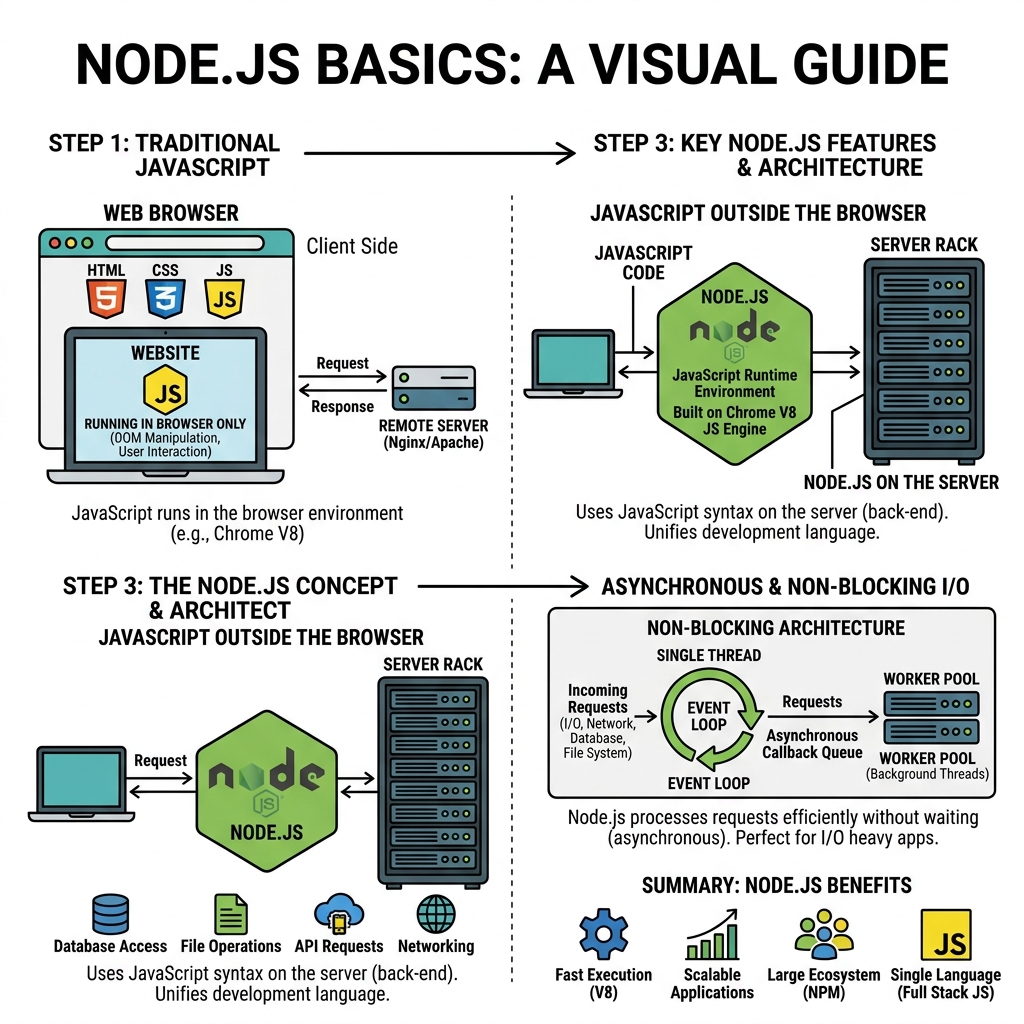
Node.js is a JavaScript runtime built on Chrome's V8 engine that allows you to run JavaScript on the server side. It enables building scalable network applications with event-driven, non-blocking I/O models.
💡 What is Node.js?
Node.js lets you execute JavaScript outside the browser, making it possible to build backend services, command-line tools, and more using JavaScript.
Key Features of Node.js
- Event-driven and Asynchronous: Handles many connections concurrently without blocking.
- Single-threaded: Uses a single thread with event looping for handling requests efficiently.
- Built-in Modules: Provides modules like
fsfor file system,httpfor server, andpathfor file paths. - NPM: Comes with Node Package Manager for managing third-party libraries.
Running JavaScript with Node.js
To run a JavaScript file using Node.js, use the terminal command:
📌 Deep Dive: Basic Execution
node filename.jsExample hello.js:
📌 Deep Dive: Simple Console Output
console.log('Hello from Node.js');Commonly Used Built-in Modules
| Module | Purpose |
|---|---|
| fs | File system operations (reading/writing files) |
| http | Creating web servers and handling HTTP requests |
| path | Working with file and directory paths |
| os | Operating system-related utility methods |
| events | Event emitter for handling asynchronous events |
Importing Modules
Use require() to include modules in Node.js:
📌 Deep Dive: Requiring Modules
const fs = require('fs');
const path = require('path');
💡 CommonJS Modules
Node.js uses the CommonJS module system by default, which relies on require and module.exports.
Creating a Simple HTTP Server
One of the first things to try in Node.js is creating a basic web server:
📌 Deep Dive: Minimal HTTP Server
const http = require('http');

const server = http.createServer((req, res) => {
  res.statusCode = 200;
  res.setHeader('Content-Type', 'text/plain');
  res.end('Hello, Node.js Server!');
});

server.listen(3000, () => {
  console.log('Server running at http://localhost:3000/');
});⚠️ Important
Node.js scripts run in a single thread. Use asynchronous APIs to avoid blocking the event loop and maintain performance.
Summary
- Node.js allows running JavaScript outside the browser for backend development.
- Use
node filename.jsto run scripts. - Core modules like
fsandhttpprovide essential functionality. - Modules are loaded using
require(). - Build servers easily with the
httpmodule.
Quick Knowledge Check
Test what you just learned
Question 1 of 2
Which command runs a JavaScript file named app.js using Node.js?
Question 2 of 2
What module would you use to create an HTTP server in Node.js?
Loading results...