In JavaScript, iterables are objects that can be looped over with constructs like for...of. An iterator is an object that provides access to the elements of an iterable, one at a time, via a standardized method.
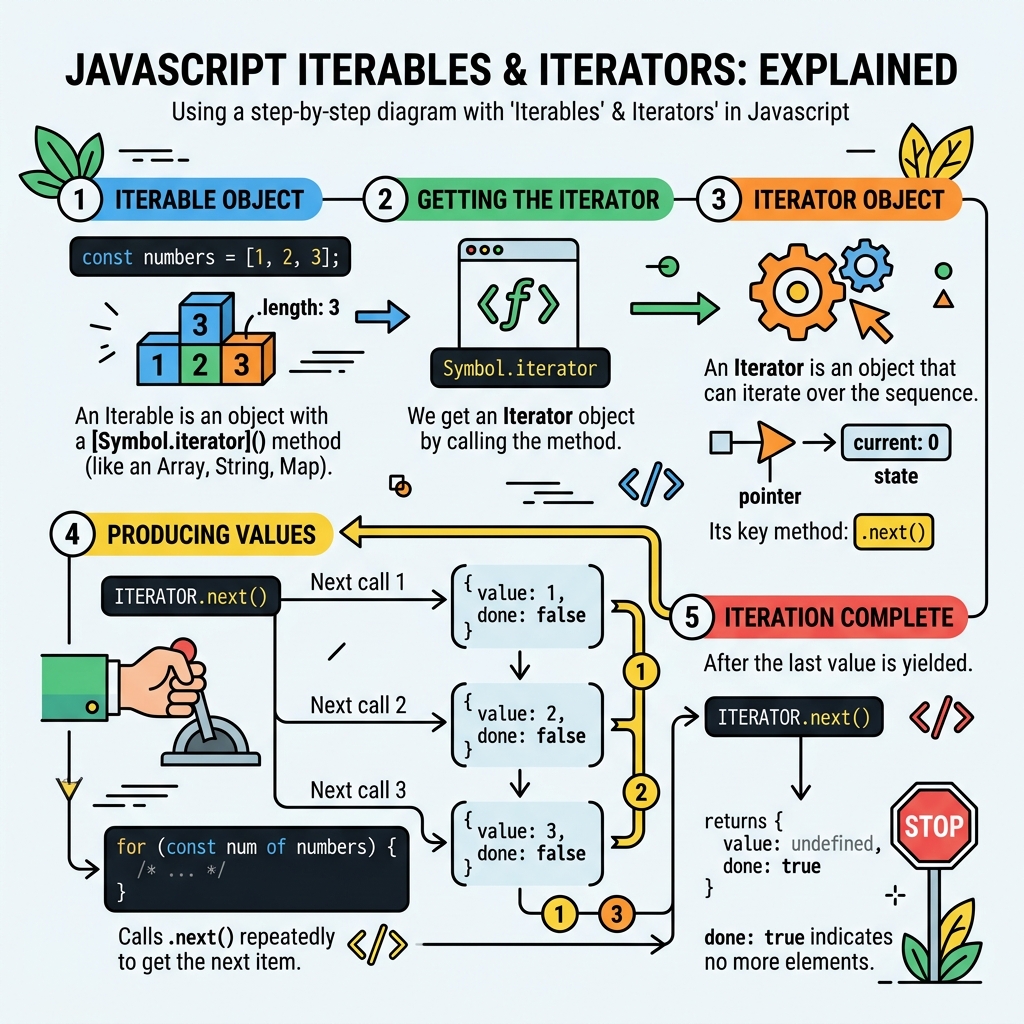
💡 What is an Iterable?
An object is iterable if it implements the Symbol.iterator method, which returns an iterator.
💡 What is an Iterator?
An iterator is an object with a next() method that returns an object with two properties: value (current element) and done (boolean indicating if iteration is complete).
| Feature | Iterable | Iterator |
|---|---|---|
Has Symbol.iterator | Yes | No |
Has next() method | No (usually) | Yes |
| Returns iteration object | Yes (iterator) | Returns {value, done} |
| Examples | Array, Set, String | Result of calling [Symbol.iterator]() |
Most built-in data structures like Array, String, Map, and Set are iterable.
📌 Deep Dive: Using an Iterator
const arr = ['a', 'b', 'c'];
const iterator = arr[Symbol.iterator]();

console.log(iterator.next()); // { value: 'a', done: false }
console.log(iterator.next()); // { value: 'b', done: false }
console.log(iterator.next()); // { value: 'c', done: false }
console.log(iterator.next()); // { value: undefined, done: true }{ value: 'b', done: false }
{ value: 'c', done: false }
{ value: undefined, done: true }
The for...of loop automatically uses the iterable's iterator:
📌 Deep Dive: Iterating with for...of
const str = 'Hi!';
for (const char of str) {
  console.log(char);
}i
!
⚠️ Important
Not all objects are iterable by default. Plain objects ({}) do not have a Symbol.iterator method and cannot be used in for...of loops without custom implementation.
You can create your own iterable by implementing [Symbol.iterator]:
📌 Deep Dive: Custom Iterable
const myIterable = {
  data: [10, 20, 30],
  [Symbol.iterator]() {
    let index = 0;
    const data = this.data;
    return {
      next() {
        if (index < data.length) {
          return { value: data[index++], done: false };
        } else {
          return { done: true };
        }
      }
    };
  }
};

for (const num of myIterable) {
  console.log(num);
}20
30
💡 Key Takeaway
The iterator protocol standardizes how JavaScript accesses elements sequentially. Understanding iterables & iterators helps you work with custom and built-in data structures efficiently.
Quick Knowledge Check
Test what you just learned
Question 1 of 2
Which method must an object implement to be iterable?
Question 2 of 2
What does the iterator's next() method return when iteration is finished?
Loading results...