Regular expressions (regex) are patterns used to match character combinations in strings. In JavaScript, regex patterns are created either with /pattern/flags syntax or the RegExp constructor.
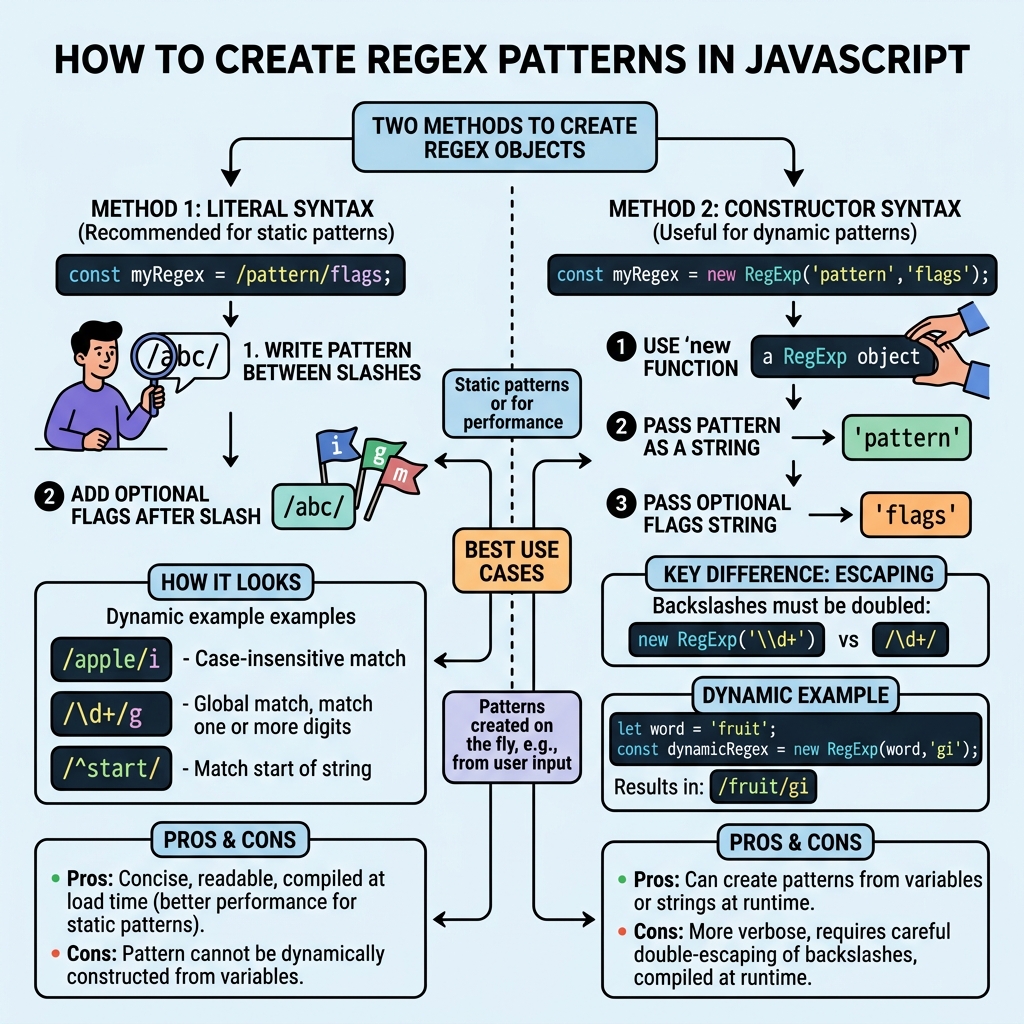
Basic Syntax for Regex Patterns
/pattern/— A regex literal enclosed between slashes.new RegExp('pattern', 'flags')— A constructor that creates a regex object from a string pattern.
| Method | Example | Notes |
|---|---|---|
| Regex Literal | /abc/ | Simple and concise, supports flags like i, g. |
| RegExp Constructor | new RegExp('abc', 'i') | Allows dynamic patterns but requires escaping backslashes. |
Common Regex Components
abc— Matches the exact characters "abc"..— Matches any single character except newline.\d— Matches any digit (0–9).\w— Matches any word character (letters, digits, underscore).\s— Matches any whitespace (spaces, tabs).[abc]— Matches any one character inside the brackets.[^abc]— Matches any character not inside the brackets.a*— Matches zero or more of the preceding element.a+— Matches one or more of the preceding element.a?— Matches zero or one of the preceding element (optional).{n}— Matches exactlynoccurrences.{n,m}— Matches betweennandmoccurrences.
💡 Regex Flags
Flags modify how the pattern behaves:
g — global search (find all matches),
i — case-insensitive,
m — multiline mode.
Escaping Special Characters
Characters like ., ?, *, +, ^, $, {}, [], (), and | have special meanings. To match them literally, prefix with a backslash \.
📌 Deep Dive: Creating a Simple Regex Pattern
// Literal regex to match 'cat' case-insensitively
const regex = /cat/i;

// Using RegExp constructor for dynamic pattern
const word = "dog";
const dynamicRegex = new RegExp(word, 'i');

// Test strings
console.log(regex.test('Cat'));       // true
console.log(dynamicRegex.test('DOG')); // truetrue
⚠️ Important
When using the RegExp constructor, backslashes must be escaped twice. For example, to match a digit: new RegExp('\\d').
Summary: Regex Creation
- Use
/pattern/flagsfor static regex patterns. - Use
new RegExp('pattern', 'flags')for dynamic patterns. - Escape special characters to match them literally.
- Apply flags (
g,i,m) to modify matching behavior.
Quick Knowledge Check
Test what you just learned
Question 1 of 2
Which syntax is used for creating a regex pattern with flags directly?
Question 2 of 2
How do you represent a literal period (.) character in a regex pattern?
Loading results...