In Python programming, one of the most essential tools for writing robust, user-friendly applications is exception handling. It allows your program to gracefully respond to unexpected errors or situations without crashing abruptly. The backbone of exception handling in Python revolves around three keywords: try, except, and finally.
This lesson will guide you through a comprehensive understanding of how these keywords work together to catch and manage errors, maintain program flow, and ensure cleanup actions are always executed.
Why Do We Need Exception Handling?
Imagine you are writing a program that asks users to input numbers and performs division. What happens if the user inputs a zero as the divisor or some non-numeric value? Without exception handling, your program would crash with a ZeroDivisionError or ValueError, confusing users and abruptly stopping the program.
Exception handling is like a safety net. It lets you detect errors, respond appropriately, and keep your program running smoothly.
💡 Analogy: Catching a Ball
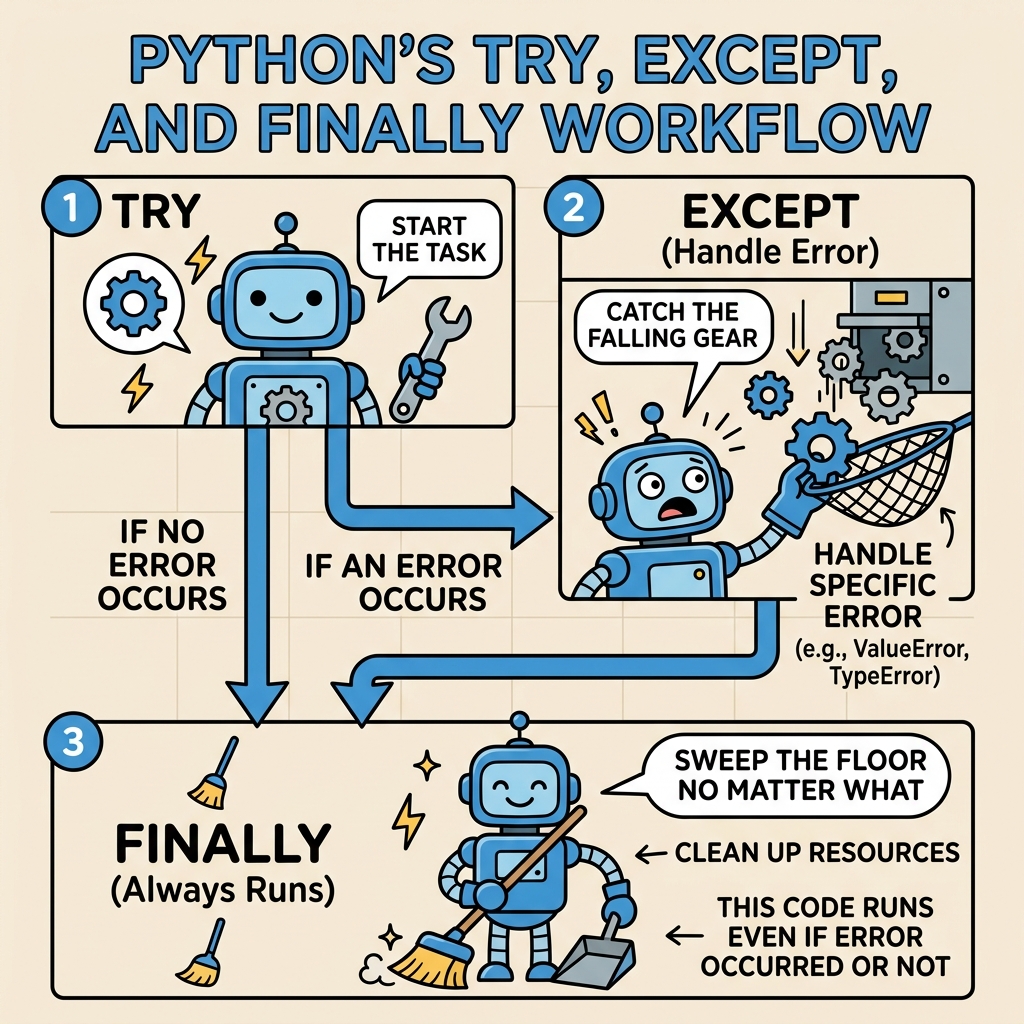
Think of your code inside a try block as throwing a ball. An exception is like the ball dropping unexpectedly. The except block is your hand catching that ball, preventing it from hitting the ground (crashing your program). The finally block is you cleaning up after the game, no matter if the ball was caught or dropped.
Basic Structure: try and except
The simplest form of exception handling includes a try block followed by one or more except blocks.
- try: This block contains code that might throw an exception.
- except: This block catches and handles the exception.
Here's a minimal example:
📌 Deep Dive: Basic try-except
try:
    number = int(input("Enter a number: "))
    result = 10 / number
    print(f"10 divided by {number} is {result}")
except ZeroDivisionError:
print("⚠️ Cannot divide by zero! Try again.")In this example:
- The
tryblock attempts to convert user input to an integer and divide 10 by that number. - If the user enters zero, a
ZeroDivisionErroroccurs. - The
except ZeroDivisionError:block catches this error and prints a friendly message instead of crashing.
Handling Multiple Exceptions
Sometimes your code can raise different types of exceptions. You can handle multiple exceptions by specifying several except blocks, each targeting a particular type of error.
📌 Deep Dive: Multiple except blocks
try:
    value = int(input("Enter a number: "))
    result = 10 / value
    print(f"Result is {result}")
except ZeroDivisionError:
    print("⚠️ Cannot divide by zero.")
except ValueError:
print("⚠️ That was not a valid number.")This way, you can give specific feedback depending on the exact problem encountered.
Using a Generic except
You can also catch any exception by using a bare except: block or by catching Exception. However, this is generally discouraged unless you have a good reason, because it can hide bugs and make debugging harder.
Instead, try to catch specific exceptions you expect might happen.
⚠️ Caution: Avoid bare except blocks
Using a bare except: without specifying an exception type catches all exceptions, including system-exiting exceptions like KeyboardInterrupt. This can make your program harder to debug and maintain.
Accessing Exception Details
Often, you want to know more about the exception — like what error message it carries. You can capture the exception object using the syntax except ExceptionType as e: and then use e inside the block.
📌 Deep Dive: Exception object
try:
    x = int(input("Enter a number: "))
    print(10 / x)
except Exception as e:
print(f"Oops! An error occurred: {e}")The finally Block: Guaranteed Execution
Sometimes, you want to ensure that certain code runs no matter what — whether an exception was raised or not. This is where the finally block shines.
The finally block is always executed after the try and except blocks, making it ideal for cleanup tasks like closing files, releasing resources, or resetting states.
📌 Deep Dive: Using finally
try:
    file = open('example.txt', 'r')
    content = file.read()
    print(content)
except FileNotFoundError:
    print("File not found.")
finally:
    file.close()
print("File closed.")Even if the file doesn't exist and an exception occurs, the finally block ensures that file.close() runs to release resources properly.
⚠️ Important: Be careful when calling methods like file.close() in finally if the variable might not have been assigned due to an earlier error.
Combining try, except, else, and finally
Python offers an additional clause called else for your exception handling blocks. The else block runs only if the try block did not raise any exceptions. This can make your code clearer by separating normal execution from error handling.
The typical flow is:
try: Code that might raise exceptionsexcept: Code that runs if an exception occurselse: Code that runs if no exception occursfinally: Code that always runs
📌 Deep Dive: try-except-else-finally
try:
    num = int(input("Enter a number: "))
    result = 10 / num
except ZeroDivisionError:
    print("Cannot divide by zero.")
except ValueError:
    print("Invalid input; not a number.")
else:
    print(f"10 divided by {num} is {result}")
finally:
print("Execution complete.")Here, the else block runs only if no exception occurs, providing a clean separation of concerns.
Exception Hierarchy and Catching Multiple Exceptions
Python exceptions inherit from a base class BaseException, with most user errors inheriting from Exception. You can catch multiple exceptions in a single except by using parentheses:
📌 Deep Dive: Catching multiple exceptions in one except
try:
    x = int(input("Enter a number: "))
    y = 10 / x
except (ZeroDivisionError, ValueError) as error:
    print(f"An error occurred: {error}")
else:
print(f"Result: {y}")| Keyword | Purpose |
|---|---|
| try | Wrap code that might raise exceptions |
| except | Handle specific exceptions |
| else | Run code if no exceptions occur |
| finally | Run cleanup code regardless of exceptions |
Best Practices for Using Try, Except & Finally
- Catch Specific Exceptions: Avoid catching generic exceptions unless necessary.
- Keep try blocks small: Only include code that might raise exceptions to avoid hiding bugs.
- Use finally for cleanup: Always release resources or do necessary cleanup here.
- Use else for code that should only run if no errors: This improves readability.
- Don’t suppress errors silently: Make sure your except blocks provide meaningful feedback or re-raise exceptions when appropriate.
When to Use try, except & finally?
Typical situations include:
- Reading or writing files
- Network operations
- Parsing user input
- Interacting with databases
- Any code that depends on external factors prone to failure
What Happens If You Don’t Handle Exceptions?
If an exception is not caught, Python will stop executing your program and print a traceback (error report). While useful for debugging, this is not user-friendly and can cause data loss or corrupted states in real-world applications.
⚠️ Uncaught exceptions cause program crashes
Always anticipate where errors might occur and handle exceptions appropriately to create robust software.
Practice Example: Safe Division Calculator
Let's combine everything learned into a simple calculator that safely divides two numbers:
📌 Deep Dive: Safe Division Calculator
def safe_divide():
    try:
        numerator = float(input("Enter numerator: "))
        denominator = float(input("Enter denominator: "))
        result = numerator / denominator
    except ZeroDivisionError:
        print("Error: Cannot divide by zero.")
    except ValueError:
        print("Error: Please enter valid numbers.")
    else:
        print(f"Result: {result}")
    finally:
        print("Thank you for using safe_divide.")

safe_divide()Enter denominator: 0
Error: Cannot divide by zero.
Thank you for using safe_divide.
This example shows how to build user-friendly programs using exception handling that anticipate and gracefully recover from common errors.
Summary
Mastering try, except, and finally is key to writing Python code that is resilient, user-friendly, and maintainable. You will:
- Use
tryto wrap risky operations. - Use
exceptto catch and handle specific errors. - Optionally use
elsefor code that executes when no exceptions occur. - Use
finallyto guarantee cleanup code runs.
With these tools, you can create programs that handle errors gracefully and always keep running smoothly.
Quick Knowledge Check
Test what you just learned
Question 1 of 2
What happens inside a finally block?
Question 2 of 2
Which of the following is a best practice when using try and except?
Loading results...