When writing Python programs, errors are inevitable. Whether it's a typo, a wrong data type, or an unexpected input, your code might sometimes break during execution. The art of error handling allows your programs to anticipate, detect, and gracefully recover from these errors instead of crashing abruptly. This lesson dives deep into Python’s powerful exception handling system, enabling you to write more robust and user-friendly code.
Imagine your program as a car driving down a road. Sometimes, unexpected potholes or obstacles appear. Without proper suspension or shock absorbers, the ride becomes jarring—or worse, the car breaks down. Similarly, error handling acts as the suspension system, cushioning your code against unexpected issues and keeping it running smoothly.
What Are Exceptions?
In Python, when something goes wrong during execution, an exception is raised. This is a signal that an error has occurred. Exceptions can be caused by many things, such as:
- Trying to divide by zero
- Accessing a file that doesn’t exist
- Using an invalid index in a list
- Calling a function with the wrong number or type of arguments
Without handling, these exceptions cause your program to stop immediately and display a traceback — a report showing where the error occurred.
📌 Deep Dive: Unhandled Exception Example
print(10 / 0)This traceback tells us exactly what type of error occurred (ZeroDivisionError) and where (line 1). But the program abruptly ended without any chance to recover.
Handling Exceptions with try and except
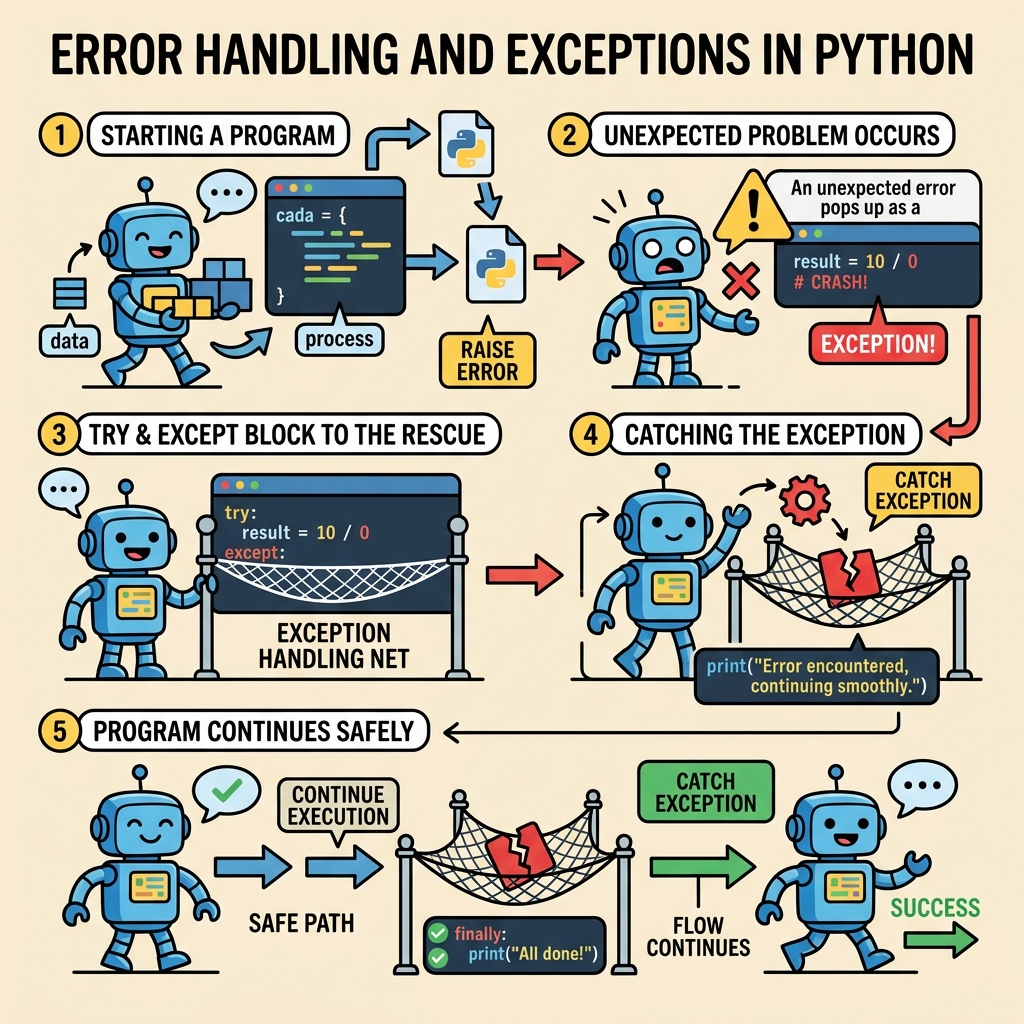
To prevent your program from crashing, you can use try and except blocks. Python will “try” to run the code inside the try block, and if an error occurs, it will jump to the except block for handling.
📌 Deep Dive: Basic Try-Except
try:
    print(10 / 0)
except ZeroDivisionError:
print("Oops! You can't divide by zero.")In this example, when Python encounters the division by zero, it raises a ZeroDivisionError. Instead of crashing, the program runs the code in the except block, printing a friendly message.
💡 Why Handle Specific Exceptions?
Handling specific exceptions (like ZeroDivisionError) is a good practice because you know exactly what kind of error you are prepared for. Catching all exceptions blindly can hide bugs and make debugging difficult.
Handling Multiple Exceptions
Sometimes, your code might raise different types of exceptions. Python allows you to handle multiple exceptions using multiple except blocks or a tuple of exceptions.
📌 Deep Dive: Multiple Except Blocks
try:
    num = int(input("Enter a number: "))
    result = 10 / num
except ValueError:
    print("That's not a valid number.")
except ZeroDivisionError:
print("You can't divide by zero!")Alternatively, you can catch multiple exceptions in one except clause by specifying a tuple:
📌 Deep Dive: Catching Multiple Exceptions in One Except
try:
    num = int(input("Enter a number: "))
    result = 10 / num
except (ValueError, ZeroDivisionError) as e:
print(f"An error occurred: {e}")The else Clause in Exception Handling
Python's try block can also include an else clause. The else block runs only if the try block didn’t raise any exceptions. This is useful for code that should only run when everything succeeded.
📌 Deep Dive: Using Else After Try-Except
try:
    num = int(input("Enter a number: "))
    result = 10 / num
except (ValueError, ZeroDivisionError) as e:
    print(f"Error: {e}")
else:
print(f"Success! Result is {result}")Using finally: Code That Always Runs
The finally block is always executed after the try and any except blocks, regardless of whether an exception was raised or caught. This is perfect for cleanup actions like closing files or releasing resources.
📌 Deep Dive: The Finally Clause
try:
    file = open("example.txt", "r")
    content = file.read()
except FileNotFoundError:
    print("File not found.")
else:
    print("File content read successfully.")
finally:
    print("Closing the file.")
file.close()⚠️ Beware of Exceptions in Finally Blocks
Even the finally block can raise exceptions (like closing a file that was never opened). To avoid this, make sure the operations inside finally are safe or use additional error handling.
Raising Exceptions Manually with raise
Sometimes your program logic requires you to trigger an exception intentionally. You can use the raise statement to do this. Raising exceptions is useful for enforcing constraints or signaling errors in your own functions.
📌 Deep Dive: Raising a Custom Exception
def set_age(age):
    if age < 0:
        raise ValueError("Age cannot be negative!")
    print(f"Age set to {age}")

try:
    set_age(-5)
except ValueError as e:
print(f"Caught an error: {e}")Common Python Exceptions You Should Know
Here's a quick glance at some common built-in exceptions you will encounter:
| Exception | Description |
|---|---|
ValueError | Invalid value passed to a function |
TypeError | Operation or function applied to an object of inappropriate type |
IndexError | Sequence index out of range |
KeyError | Dictionary key not found |
FileNotFoundError | File or directory not found |
ZeroDivisionError | Division or modulo by zero |
AttributeError | Attribute reference or assignment fails |
Best Practices for Exception Handling
- Catch only exceptions you can handle: Avoid blanket
except:clauses without specifying exceptions. - Don’t use exceptions for flow control: Use them for truly exceptional cases, not normal logic.
- Log exceptions: When handling exceptions, consider logging them for debugging and auditing.
- Use custom exception classes: For larger projects, define your own exception classes inheriting from
Exceptionto better categorize errors. - Keep
tryblocks small: Surround only the code that might raise exceptions, not large blocks of code.
💡 Thought Exercise
Consider a program that reads a user’s input, processes it, and writes to a file. Where would you place try-except blocks? How would you ensure the file is always closed properly?
Summary
Mastering error handling and exceptions in Python is essential for writing reliable, user-friendly programs. You learned how to catch and handle exceptions using try, except, else, and finally blocks. You also saw how to raise exceptions intentionally and got familiar with common Python exception types.
Remember, exceptions are not your enemy — they are signals that help you make your code stronger, safer, and more professional.
Quick Knowledge Check
Test what you just learned
Question 1 of 2
What is the purpose of the finally block in Python exception handling?
Question 2 of 2
Which of the following is the best practice for catching exceptions?
Loading results...