When writing Python programs, you often encounter situations where something unexpected happens — an error or a condition that the program can't handle automatically. Python's built-in error handling uses exceptions, and while many exceptions are raised automatically by Python, sometimes you want to raise exceptions explicitly to signal that something went wrong in your code.
This lesson will guide you through the concept of raising exceptions, how to use the raise statement effectively, and best practices to make your programs more robust and easy to debug.
What Does It Mean to Raise an Exception?
Raising an exception means deliberately causing an error to occur in your program. When Python encounters a raised exception, it immediately stops normal execution of the current block and begins searching for an exception handler to deal with it. If no suitable handler is found, the program crashes and prints the exception's traceback.
Why would you want to raise exceptions manually? Here are some common reasons:
- To enforce rules and validate input.
- To signal unexpected states or conditions in your code.
- To communicate errors from functions or modules to their callers.
- To provide clear, custom error messages that make debugging easier.
💡 Think of raising exceptions as a way to raise your hand in a classroom when something is wrong and needs attention.
By raising an exception, your program says: "Hey, something's not right here! Please handle this."
The raise Statement Syntax
In Python, you raise an exception using the raise keyword followed by an exception instance or an exception class. The most common usage is:
raise ExceptionType("Error message")For example, raising a ValueError with a custom message:
raise ValueError("Invalid input: must be a positive number")You can also raise exceptions without a message, or even re-raise the current exception inside an exception handler (more on that later).
Common Built-in Exceptions to Raise
Here are some frequently used built-in exceptions you might raise:
ValueError: when a function receives an argument with the right type but an inappropriate value.TypeError: when an operation or function is applied to an object of inappropriate type.IndexError: when a sequence subscript is out of range.KeyError: when a dictionary key is not found.RuntimeError: a generic error indicating something went wrong during runtime.
| Exception | When to Use |
|---|---|
| ValueError | Invalid value provided (e.g., negative age) |
| TypeError | Wrong type passed (e.g., string instead of int) |
| IndexError | List index out of range |
| KeyError | Missing dictionary key |
| RuntimeError | Generic runtime problems |
Raising Exceptions in Practice
Let's see how you might raise an exception in a function that requires a positive integer as input:
📌 Deep Dive: Raising an Exception for Input Validation
def set_age(age):
    if not isinstance(age, int):
        raise TypeError("Age must be an integer")
    if age <= 0:
        raise ValueError("Age must be a positive integer")
    print(f"Age set to {age}")

set_age(25)   # Valid input
set_age(-5) # Raises ValueErrorNotice how raising exceptions stops the program execution unless caught by a try-except block.
Creating and Raising Your Own Custom Exceptions
Sometimes built-in exceptions don’t clearly describe the error in your application. Defining your own exception classes helps create meaningful, domain-specific errors.
To create a custom exception, define a new class that inherits from Exception or one of its subclasses:
📌 Deep Dive: Custom Exception Class
class NegativeBalanceError(Exception):
    """Exception raised for errors in the bank account balance."""

    def __init__(self, balance, message="Balance cannot be negative"):
        self.balance = balance
        self.message = message
        super().__init__(self.message)

def withdraw(amount, balance):
    if amount > balance:
        raise NegativeBalanceError(balance)
    print(f"Withdrawal of {amount} successful.")

withdraw(150, 100) # Raises NegativeBalanceErrorCustom exceptions can carry additional information useful for debugging or handling, like the current invalid state.
Re-raising Exceptions
Sometimes you want to catch an exception temporarily—maybe to log it or to perform some cleanup—and then pass it on to be handled further up the call stack. You do this by using raise without any argument inside an exception handler:
📌 Deep Dive: Re-raising an Exception
try:
    x = int("abc")
except ValueError as e:
    print(f"Caught an error: {e}")
raise # Re-raise the caught exceptionRe-raising preserves the original exception traceback, which is very useful for debugging.
Best Practices for Raising Exceptions
- Choose the right exception type: Use built-in exceptions where appropriate. If none fit, create a custom exception.
- Provide informative messages: Always include clear, descriptive messages when raising exceptions to help users and developers understand the issue.
- Don't use exceptions for flow control: Exceptions should represent truly exceptional conditions, not regular program logic.
- Raise exceptions early: Validate input and conditions as soon as possible to avoid cascading errors.
- Document your exceptions: Make sure your functions document any exceptions they might raise so callers can handle them properly.
⚠️ Avoid Raising Generic Exceptions
Raising a bare Exception or overly broad exceptions like RuntimeError can make debugging difficult. Always prefer specific exception classes for clarity.
Understanding the Flow: How Raising Exceptions Works Internally
When Python executes a raise statement, it creates an exception object and begins searching for a matching except block starting from the current scope outward. If no matching handler is found, the program terminates and prints a traceback.
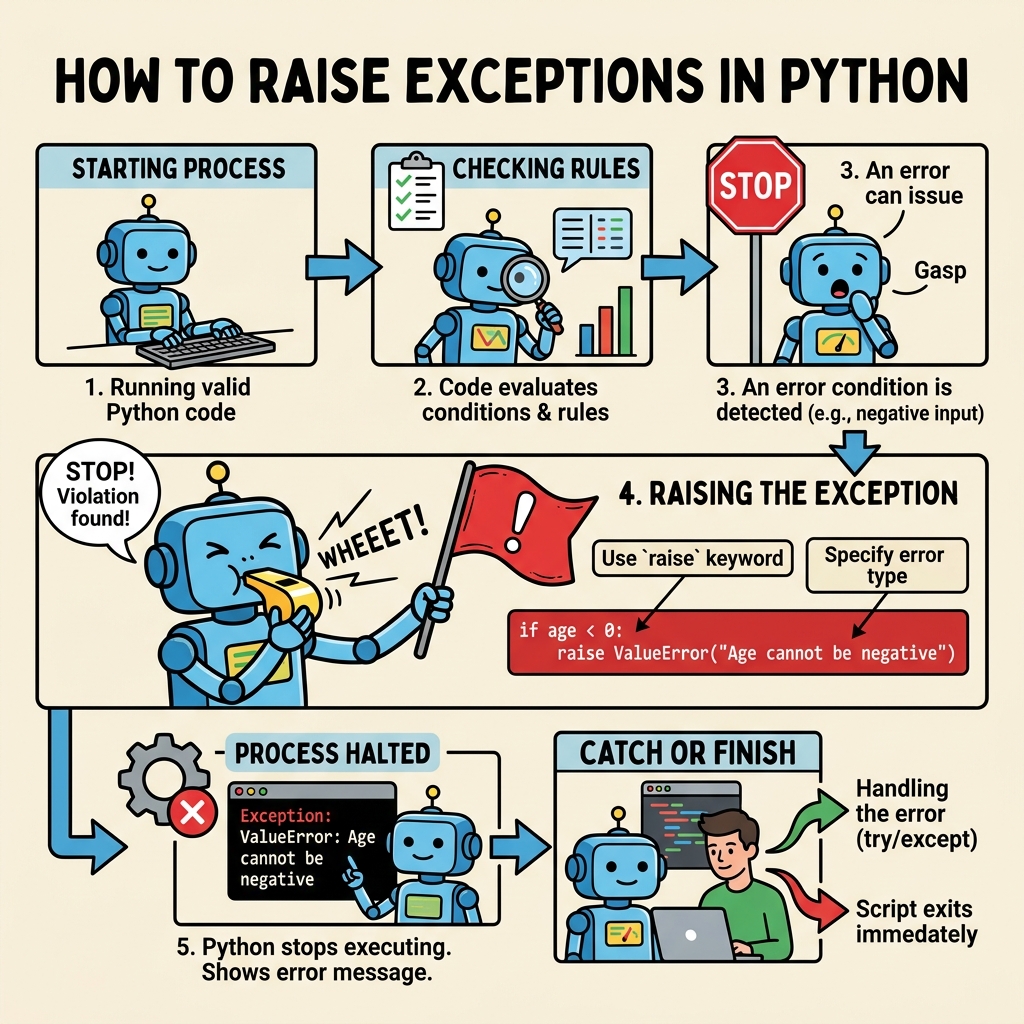
This propagation mechanism allows exceptions to be handled at the most appropriate level in your program, providing flexibility and control.
Summary
Raising exceptions is a fundamental skill in Python programming that enables your code to:
- Signal problems clearly and early
- Help callers handle error conditions gracefully
- Improve code readability and maintainability
- Create custom error handling suited to your application domain
Remember, use raise to actively tell your program when something is wrong rather than waiting for Python to discover an error. This leads to cleaner, more reliable, and easier-to-debug software.
Quick Knowledge Check
Test what you just learned
Question 1 of 2
What is the purpose of the raise statement in Python?
Question 2 of 2
Which of the following is a good practice when raising exceptions?
Loading results...