In Python, when your projects grow larger than a few scripts, organizing your code becomes essential for maintainability, readability, and scalability. This is where packages come into play. Packages allow you to structure your Python code into modules and submodules grouped in directories, making your projects cleaner and easier to navigate.
Think of packages as folders on your computer that neatly store related files. Instead of dumping all your code in a single file, you can split it into logical components and group them hierarchically. This approach reduces complexity and fosters code reuse.
What Exactly is a Package?
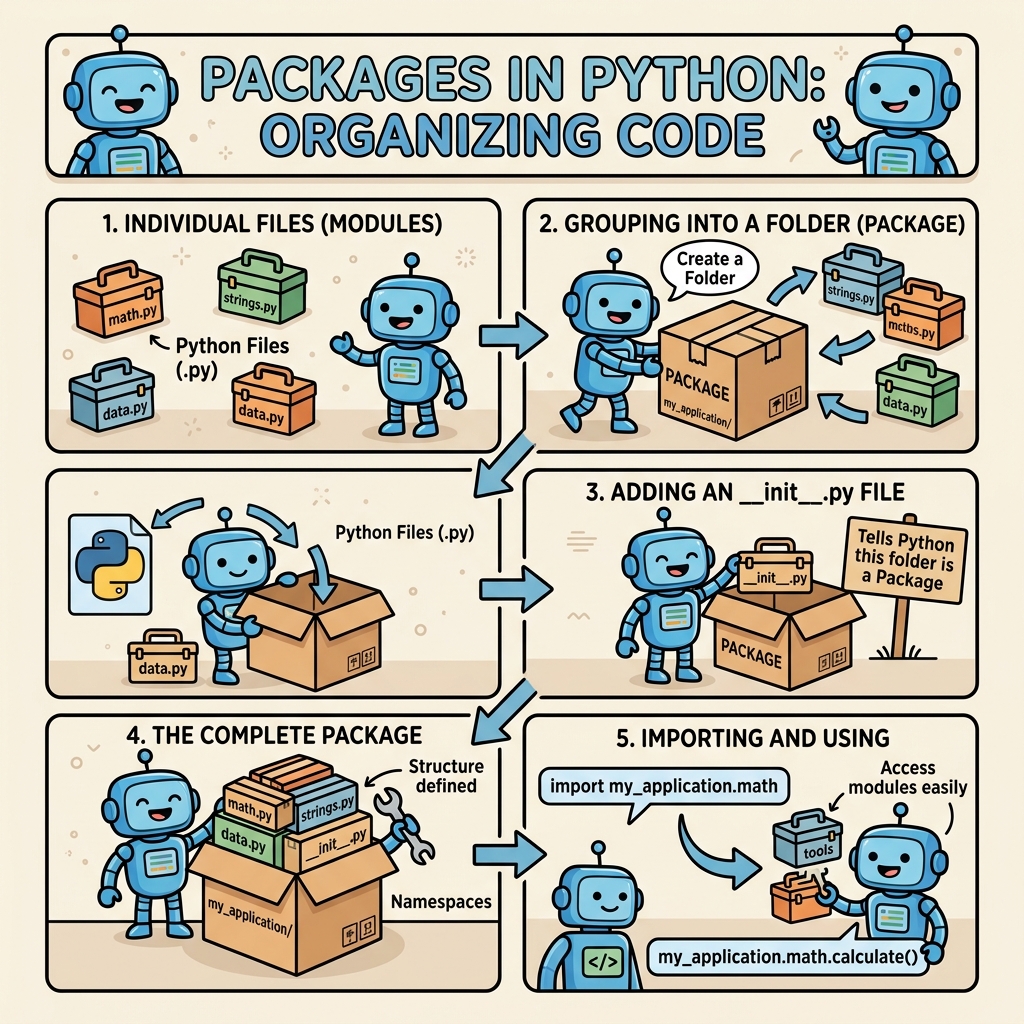
A package in Python is essentially a directory containing Python module(s) and a special file called __init__.py. This file tells Python that the directory should be treated as a package, allowing you to import modules from it.
Here’s a quick breakdown:
- Module: A single Python file, e.g.,
math_utils.py. - Package: A directory with an
__init__.pyfile and modules inside.
The __init__.py file can be empty, but it can also execute initialization code for the package or specify what is exposed when imported.
Basic Package Structure
Imagine you want to create a package called mypackage that contains two modules: math_ops.py and string_ops.py. Your folder structure would look like this:
mypackage/
│
├── __init__.py
├── math_ops.py
└── string_ops.py
Each module contains relevant functions or classes. The __init__.py file marks mypackage as a Python package.
How to Create and Use Packages
Let’s walk through the process of creating a simple package and importing its modules.
Step 1: Create the Package Folder
Make a directory named mypackage.
Step 2: Add __init__.py
Create an empty file called __init__.py inside mypackage. This tells Python this is a package.
Step 3: Add Modules
Create two modules in the package:
math_ops.py: Contains math-related functions.string_ops.py: Contains string manipulation functions.
📌 Deep Dive: Creating math_ops.py Module
def add(a, b):
    return a + b

def multiply(a, b):
    return a * b
📌 Deep Dive: Creating string_ops.py Module
def to_upper(text):
    return text.upper()

def to_lower(text):
    return text.lower()
Step 4: Using the Package
Now, suppose you have a script outside of mypackage — you can import the modules and use their functions:
📌 Deep Dive: Importing and Using Package Modules
from mypackage import math_ops
from mypackage.string_ops import to_upper

print(math_ops.add(5, 7))        # Output: 12
print(to_upper("hello world"))   # Output: HELLO WORLD
Alternatively, you could import the entire package or specific functions:
import mypackage.math_ops as mo— now usemo.add().from mypackage.string_ops import to_lower— useto_lower()directly.
Exploring __init__.py in Depth
Though the __init__.py file can be empty, it often serves as the package’s initializer. It can:
- Define what’s accessible when importing the package.
- Run setup code, like configuring variables or importing submodules automatically.
For example, if you want to let users import mypackage and access add and to_upper directly without specifying submodules, you could modify __init__.py like this:
📌 Deep Dive: Customizing __init__.py
from .math_ops import add, multiply
from .string_ops import to_upper, to_lower

__all__ = ['add', 'multiply', 'to_upper', 'to_lower']
Now, users can do:
from mypackage import add, to_upper

print(add(10, 20))
print(to_upper("package"))
Nested Packages and Subpackages
Packages can contain subpackages, which are just directories with their own __init__.py files inside the main package.
This allows deeper organization. For example:
mypackage/
│
├── __init__.py
├── math_ops/
│   ├── __init__.py
│   ├── basic.py
│   └── advanced.py
└── string_ops/
    ├── __init__.py
    └── formatting.py
Each subpackage can group related modules. You import from subpackages like this:
from mypackage.math_ops.basic import add
from mypackage.string_ops.formatting import to_upper
How Python Finds Packages
Python searches for packages and modules in the directories listed in sys.path, which usually includes:
- The directory containing the input script
- Standard library directories
- Directories in the
PYTHONPATHenvironment variable
Make sure your package folder is in one of these paths or in the current working directory to import successfully.
Comparing Modules vs Packages
It’s helpful to understand the differences and use cases for modules and packages:
| Aspect | Module | Package |
|---|---|---|
| Definition | A single Python file (.py) | A directory containing __init__.py and modules |
| Purpose | Organize code into reusable functions/classes | Organize related modules hierarchically |
| Example | math_utils.py | mypackage/ with modules inside |
| Import syntax | import math_utils | import mypackage.math_utils |
Installing and Using External Packages
Beyond your own packages, the Python ecosystem offers thousands of third-party packages available on the Python Package Index (PyPI).
You can install these packages easily using pip, Python’s package installer.
For example, to install the popular requests package for HTTP requests, run:
pip install requests
After installation, you can import it as usual:
import requests

response = requests.get('https://example.com')
print(response.status_code)
💡 Package vs Distribution
Note that a package refers to Python code organization in directories and files, while a distribution is how a package is bundled and distributed (usually via PyPI). When you install packages with pip, you are installing distributions that contain code packaged appropriately.
Best Practices When Working with Packages
- Keep your
__init__.pyfiles clean: Avoid cluttering with too much code. Use them for package-level imports or initialization only. - Use relative imports inside packages: Use
from .module import funcinstead of absolute imports to maintain portability. - Organize logically: Group related modules into subpackages for clarity.
- Name packages and modules clearly: Choose short, descriptive names that reflect their purpose.
Common Pitfalls and How to Avoid Them
⚠️ Forgetting __init__.py Files
Without __init__.py files, Python 3.3+ treats directories as “namespace packages,” which can behave differently and sometimes cause import errors. Always include __init__.py files to have explicit packages.
⚠️ Circular Imports
Be cautious about modules importing each other inside a package, which can lead to circular dependencies and runtime errors. Design your package structure to minimize or eliminate circular imports.
Summary
Packages are the backbone of scalable Python projects, enabling you to organize and modularize your code elegantly. By mastering packages, you create a solid foundation for writing maintainable, reusable Python code, whether for small scripts or large applications.
Start small: create your own package, experiment with __init__.py, and import modules. As you grow comfortable, explore nested packages and third-party packages through pip.
Quick Knowledge Check
Test what you just learned
Question 1 of 2
What is the purpose of the __init__.py file in a Python package?
Question 2 of 2
If you have a package mypackage with a module utils.py, how would you import the helper_func function defined inside utils.py?
Loading results...