Welcome to your first step into the world of Object-Oriented Programming (OOP) with Python! OOP is a programming paradigm that uses "objects" to design applications and programs. It’s a powerful approach that makes complex software easier to organize, maintain, and extend. By the end of this lesson, you'll understand the fundamental concepts of OOP and how to apply them in Python.
Imagine you want to build a program to represent a zoo. Without OOP, you'd have to manage a long list of animals and their properties and behaviors manually. With OOP, you can model each animal as an object with attributes and actions, making your code intuitive and scalable. Let’s explore how.
What Is Object-Oriented Programming (OOP)?
OOP is centered around the concept of objects, which bundle data and functionality together. Instead of writing code that only manipulates data, you define objects that contain both data (attributes) and behaviors (methods), mirroring real-world entities.
OOP helps in:
- Organizing code into reusable blocks
- Encapsulating data to prevent accidental modification
- Creating modular and extensible software
- Representing complex relationships through inheritance and polymorphism
The Four Pillars of OOP
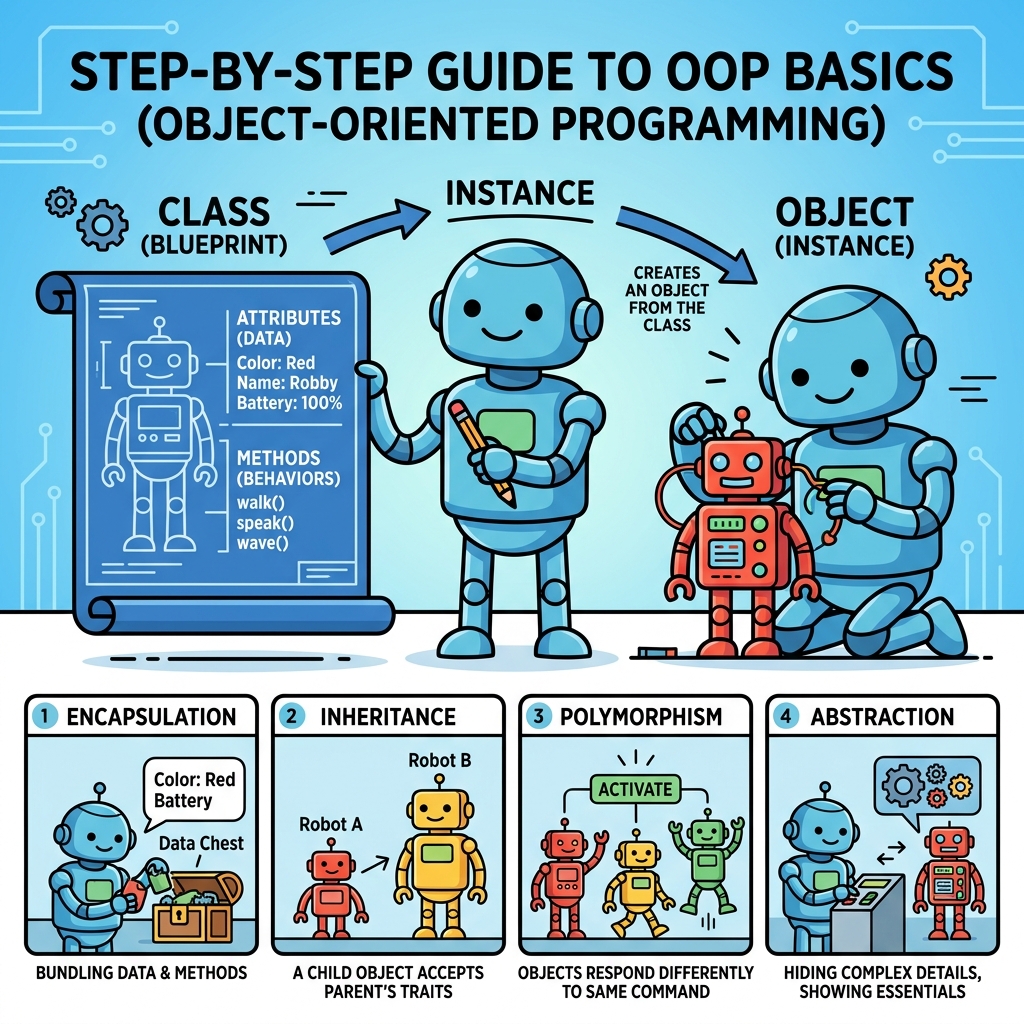
At the heart of OOP lie four foundational concepts that shape how you design and work with classes and objects:
- Encapsulation: Bundling data and methods that operate on the data within one unit, i.e., a class.
- Abstraction: Hiding complex internal details and exposing only the necessary parts.
- Inheritance: Creating new classes based on existing ones, inheriting their properties and methods.
- Polymorphism: Allowing different classes to be treated through the same interface, often by overriding methods.
Classes and Objects: The Heart of OOP
In Python, classes act as blueprints for objects. They define what attributes (data) and methods (functions) an object will have. When you create an instance of a class, you get an object, which is a concrete realization of that blueprint.
Consider a simple example:
📌 Deep Dive: Defining a Class and Creating Objects
class Dog:
    def __init__(self, name, age):
        self.name = name  # Attribute
        self.age = age    # Attribute

    def bark(self):
        print(f"{self.name} says Woof!")

# Creating objects (instances) of the Dog class
dog1 = Dog("Buddy", 3)
dog2 = Dog("Molly", 5)

dog1.bark()
dog2.bark()
Here’s what’s happening:
Dogis a class with two attributes:nameandage.- The
__init__method is a special initializer called when a new object is created. It sets up the object's attributes. selfrefers to the current instance of the class and is used to access attributes and methods.barkis a method that makes the dog "speak".- We create two Dog objects,
dog1anddog2, each with its own name and age.
Understanding self: The Instance Reference
The self parameter in methods might seem strange at first, but it's essential. It represents the instance of the object itself, allowing you to access or modify the object's attributes and methods. When you call dog1.bark(), Python automatically passes dog1 as the self argument.
💡 Why is self needed?
Think of self as a way for methods to know which specific object they are working on. Without it, methods wouldn’t know which instance's data to access or change.
Attributes and Methods
Inside a class, attributes hold data specific to each object, and methods define the behaviors or actions the object can perform. Attributes can be simple data types like strings and numbers or even other objects.
You can also add attributes outside the __init__ method, but initializing them in the constructor keeps your objects consistent.
Instance Attributes vs. Class Attributes
It's important to distinguish between attributes that belong to individual objects and those shared by the class itself.
| Instance Attribute | Class Attribute |
|---|---|
| Unique to each object | Shared across all instances |
Defined inside __init__ via self | Defined directly in the class body |
| Example: name, age of a dog | Example: species = "Canis familiaris" |
📌 Deep Dive: Class Attributes
class Dog:
    species = "Canis familiaris"  # Class attribute

    def __init__(self, name, age):
        self.name = name
        self.age = age

dog1 = Dog("Buddy", 3)
dog2 = Dog("Molly", 5)

print(dog1.species)
print(dog2.species)
print(Dog.species)
Using Methods to Model Behavior
Methods operate on the object's data and represent actions. You can define as many methods as needed to model your object’s behavior.
For example, let’s add a method to calculate a dog’s age in dog years:
📌 Deep Dive: Adding Behavior with Methods
class Dog:
    def __init__(self, name, age):
        self.name = name
        self.age = age

    def bark(self):
        print(f"{self.name} says Woof!")

    def dog_years(self):
        return self.age * 7

dog = Dog("Buddy", 3)
dog.bark()
print(f"{dog.name} is {dog.dog_years()} years old in dog years.")Creating Multiple Objects
Objects created from the same class can have different attribute values. Each object maintains its own state independently.
For example, two dogs with different names and ages:
📌 Deep Dive: Multiple Instances
dog1 = Dog("Buddy", 3)
dog2 = Dog("Molly", 5)

print(dog1.name, dog1.age)
print(dog2.name, dog2.age)
Inheritance: Reusing and Extending Classes
Inheritance allows you to create a new class that inherits attributes and methods from an existing class, known as the parent or base class. The new class is called a child or derived class.
This promotes code reuse and logical hierarchy. For example, if you want to model different types of dogs, you can create subclasses that extend the Dog class.
📌 Deep Dive: Simple Inheritance
class Dog:
    def __init__(self, name, age):
        self.name = name
        self.age = age

    def bark(self):
        print(f"{self.name} says Woof!")

class Bulldog(Dog):  # Inherits from Dog
    def run(self):
        print(f"{self.name} is running slowly.")

dog = Dog("Buddy", 3)
bulldog = Bulldog("Max", 5)

dog.bark()
bulldog.bark()
bulldog.run()
The Bulldog class inherits bark and attributes from Dog but also adds its own method, run.
Overriding Methods
Child classes can provide their own version of methods inherited from the parent class, a feature known as method overriding. This allows customizing or extending behavior.
📌 Deep Dive: Method Overriding
class Dog:
    def bark(self):
        print("Woof!")

class Chihuahua(Dog):
    def bark(self):  # Override bark method
        print("Yip!")

dog = Dog()
chihuahua = Chihuahua()

dog.bark()
chihuahua.bark()
Encapsulation: Keeping Data Safe
Encapsulation involves restricting access to an object's internal state and requiring all interaction to be performed through methods. This protects data integrity.
Python supports encapsulation via naming conventions for attribute visibility:
public_attribute: accessible everywhere_protected_attribute: intended for internal use (convention only)__private_attribute: name-mangled to discourage external access
⚠️ Important:
Python does not enforce strict access control like some other languages. The conventions rely on developer discipline, but name mangling provides a stronger hint that an attribute is private.
📌 Deep Dive: Encapsulation with Private Attributes
class BankAccount:
    def __init__(self, owner, balance):
        self.owner = owner
        self.__balance = balance  # Private attribute

    def deposit(self, amount):
        if amount > 0:
            self.__balance += amount
            print(f"Deposited {amount}.")

    def withdraw(self, amount):
        if amount <= self.__balance:
            self.__balance -= amount
            print(f"Withdrew {amount}.")
        else:
            print("Insufficient funds.")

    def get_balance(self):
        return self.__balance

account = BankAccount("Alice", 1000)
account.deposit(500)
account.withdraw(200)
print(f"Balance: {account.get_balance()}")

# Trying to access the private attribute directly
print(hasattr(account, '__balance'))
print(account._BankAccount__balance)  # Accessing name-mangled attribute (not recommended)
Abstraction: Hiding Complexity
Abstraction means exposing only essential features while hiding the internal details. In Python, this is often achieved by defining clear interfaces and hiding implementation details behind methods.
For example, users of the BankAccount class don’t need to know how the balance is stored or updated internally; they interact through deposit, withdraw, and get_balance methods.
Polymorphism: One Interface, Many Forms
Polymorphism lets objects of different classes be treated as instances of the same class through a common interface, typically by overriding methods.
For example, different animals might have a sound() method but produce different sounds:
📌 Deep Dive: Polymorphism Example
class Animal:
    def sound(self):
        pass  # Abstract method

class Dog(Animal):
    def sound(self):
        print("Woof!")

class Cat(Animal):
    def sound(self):
        print("Meow!")

def make_sound(animal):
    animal.sound()

dog = Dog()
cat = Cat()

make_sound(dog)
make_sound(cat)
In the example, the make_sound function accepts any object that has a sound method, demonstrating polymorphism.
Summary: How to Think in OOP
When designing with OOP, ask yourself:
- What real-world entities am I modeling? These become classes.
- What attributes and behaviors do these entities have? These become class attributes and methods.
- Are there hierarchical relationships? Use inheritance to avoid duplication.
- What details should be hidden from the user? Apply encapsulation and abstraction.
- How can different types share the same interface? Use polymorphism.
💡 Practical Tip:
Start small. Define simple classes and gradually add complexity. Experiment by creating objects, adding methods, and practicing inheritance to deepen your understanding.
Mastering OOP concepts unlocks the ability to write clean, modular, and maintainable Python code. As you proceed, try designing your own classes around everyday objects or concepts.
Quick Knowledge Check
Test what you just learned
Question 1 of 2
What is the purpose of the self parameter in class methods?
Question 2 of 2
Which OOP pillar allows a child class to customize or replace a method inherited from its parent?
Loading results...