Welcome to this comprehensive introduction to Classes & Objects in Python! If you've ever wondered how to organize your code so it models real-world concepts or complex systems, classes and objects are the key. They allow you to create your own custom data types with attributes (data) and behaviors (methods), unlocking the power of Object-Oriented Programming (OOP).
By the end of this lesson, you'll be able to design and implement your own classes, instantiate objects, and understand how these building blocks bring structure, reusability, and clarity to your Python programs.
Why Use Classes & Objects?
Imagine you want to create a program that manages a collection of books. Each book has a title, author, and a number of pages. Without classes, you might store this data in separate lists or dictionaries. But what if you want to add behaviors like marking a book as read, or printing its summary?
Classes let you group related data and functionality together, making your code more intuitive and easier to maintain.
💡 Real-World Analogy
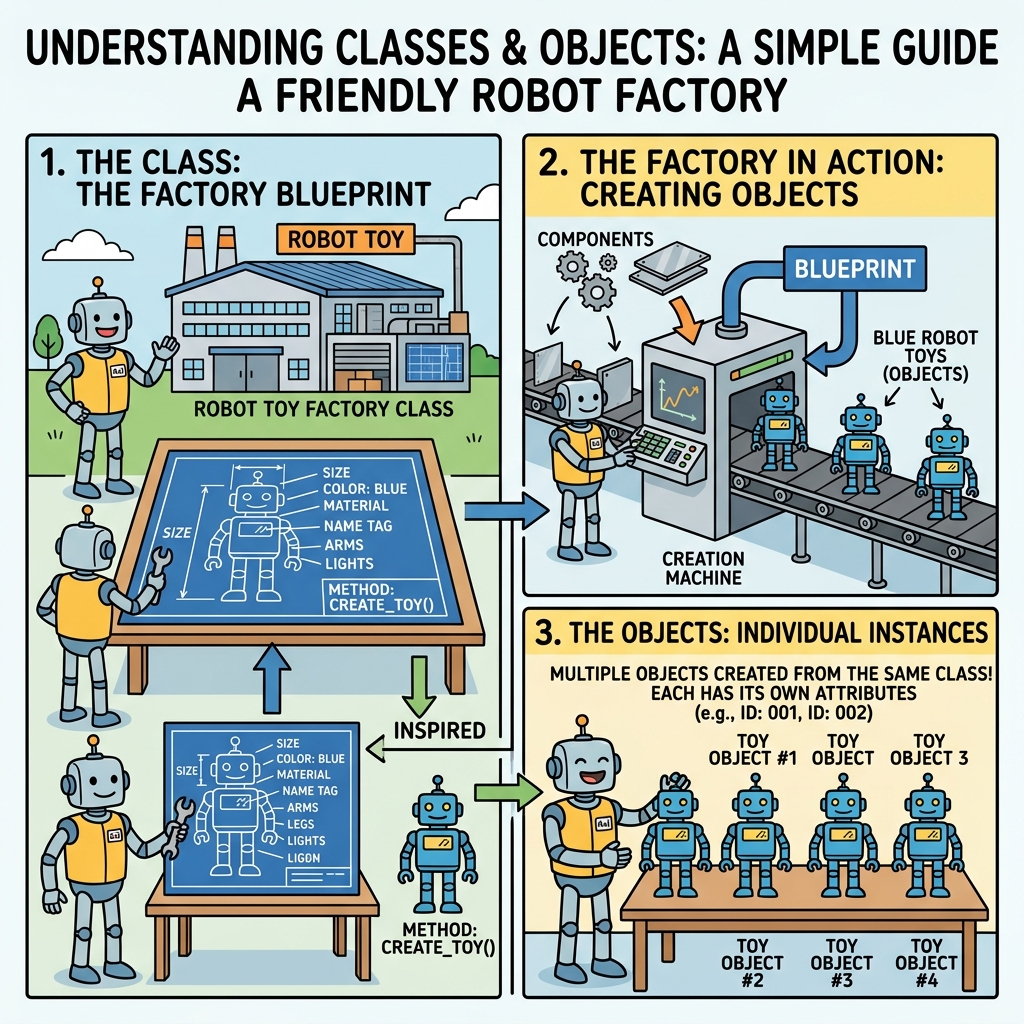
Think of a class as a blueprint for a house. It defines the structure, the rooms, the doors, and windows. An object is an actual house built from that blueprint. While the blueprint itself isn’t a house you can live in, the object is a tangible instance you can interact with.
Defining a Class in Python
In Python, you define a class using the class keyword, followed by the class name and a colon. By convention, class names use PascalCase (each word capitalized, no underscores):
📌 Deep Dive: Basic Class Syntax
class Book:
pass # Placeholder for an empty classThis code creates a class named Book but doesn't define any properties or methods yet. The pass keyword is used because Python expects an indented block after the class declaration.
Creating Attributes with __init__ Method
Classes often have properties (called attributes) that represent the object's state. These are usually set when an object is created. Python uses a special method named __init__ (called the constructor) for this purpose.
The constructor method automatically runs whenever you instantiate (create) an object from the class.
📌 Deep Dive: Adding Attributes with __init__
class Book:
    def __init__(self, title, author, pages):
        self.title = title
        self.author = author
        self.pages = pages

# Creating an object (instance) of Book
my_book = Book("1984", "George Orwell", 328)

print(my_book.title)   # Access the title attribute
print(my_book.author)  # Access the author attribute
print(my_book.pages) # Access the pages attributeGeorge Orwell
328
Explanation:
selfrefers to the current instance of the class. It lets you assign attributes to the object.title,author, andpagesare passed as arguments when creating the object.- Each object can have different values for these attributes.
Understanding self
self is a critical concept in Python classes. It's how methods access the instance's own attributes and other methods.
Every method inside a class must have self as its first parameter, though you don't pass it explicitly when calling the method.
💡 Remember
self is not a Python keyword — it's just a strong convention. You could name it anything, but always use self to keep your code readable and consistent.
Adding Methods (Behaviors)
Methods are functions defined inside a class that describe the behaviors or actions an object can perform.
Let's add a method that prints a summary of the book:
📌 Deep Dive: Defining Methods in a Class
class Book:
    def __init__(self, title, author, pages):
        self.title = title
        self.author = author
        self.pages = pages

    def summary(self):
        return f"'{self.title}' by {self.author}, {self.pages} pages"

my_book = Book("1984", "George Orwell", 328)
print(my_book.summary())Notice how the method summary accesses self.title, self.author, and self.pages to build the descriptive string.
Instantiating Multiple Objects
You can create as many objects from a class as you want, each with its own unique attribute values:
📌 Deep Dive: Multiple Instances
book1 = Book("1984", "George Orwell", 328)
book2 = Book("To Kill a Mockingbird", "Harper Lee", 281)
book3 = Book("The Great Gatsby", "F. Scott Fitzgerald", 180)

print(book1.summary())
print(book2.summary())
print(book3.summary())'To Kill a Mockingbird' by Harper Lee, 281 pages
'The Great Gatsby' by F. Scott Fitzgerald, 180 pages
Modifying Object Attributes
Attributes can be changed after the object is created simply by accessing them through the object reference:
📌 Deep Dive: Update Attributes
book = Book("Old Title", "Author Name", 100)
print(book.summary())

book.title = "New Title"
print(book.summary())'New Title' by Author Name, 100 pages
Class Attributes vs Instance Attributes
So far, we've worked with instance attributes, which belong to each object individually. Sometimes, you want to define attributes that are shared across all instances of a class — these are called class attributes.
For example, if you want to keep track of how many Book instances have been created, you can use a class attribute:
📌 Deep Dive: Class vs Instance Attributes
class Book:
    count = 0  # Class attribute shared by all instances

    def __init__(self, title, author, pages):
        self.title = title        # Instance attribute unique to each object
        self.author = author
        self.pages = pages
        Book.count += 1           # Increment class attribute when a new object is created

book1 = Book("1984", "George Orwell", 328)
book2 = Book("To Kill a Mockingbird", "Harper Lee", 281)

print(f"Total books created: {Book.count}")💡 Important
Access class attributes using the class name, like Book.count, or through any instance, e.g., book1.count. However, modifying a class attribute through an instance will create a new instance attribute instead, which can be confusing.
Encapsulation: Keeping Data Safe
In OOP, it's common to restrict direct access to some attributes to protect the object's state. Python uses naming conventions to indicate that an attribute should be treated as private.
_single_leading_underscore— indicates an attribute is intended for internal use (convention only).__double_leading_underscore— triggers name mangling to make it harder to access from outside.
Example:
📌 Deep Dive: Private Attributes
class BankAccount:
    def __init__(self, owner, balance):
        self.owner = owner
        self.__balance = balance  # Private attribute

    def deposit(self, amount):
        if amount > 0:
            self.__balance += amount

    def withdraw(self, amount):
        if 0 <= amount <= self.__balance:
            self.__balance -= amount
        else:
            print("Insufficient funds")

    def get_balance(self):
        return self.__balance

account = BankAccount("Alice", 1000)
account.deposit(500)
account.withdraw(200)

print(account.get_balance())  # 1300
print(account.__balance) # AttributeError: can't access private attributeAttributeError
The __balance attribute is name-mangled internally, so it's not accessible directly outside the class. Instead, you use a method like get_balance() to access it safely.
Working with Properties
Python offers a neat way to control attribute access using @property decorators, which let you define getter, setter, and deleter methods for attributes, while still accessing them like regular attributes.
📌 Deep Dive: Using @property
class Temperature:
    def __init__(self, celsius):
        self._celsius = celsius

    @property
    def celsius(self):
        return self._celsius

    @celsius.setter
    def celsius(self, value):
        if value < -273.15:
            raise ValueError("Temperature can't go below absolute zero!")
        self._celsius = value

temp = Temperature(25)
print(temp.celsius)  # 25

temp.celsius = 30    # Setter is called
print(temp.celsius)  # 30

# temp.celsius = -300 # Raises ValueError30
This approach lets you add validation or side effects whenever an attribute is changed, without changing how you access it.
Summary of Key Concepts
| Concept | Description |
|---|---|
| Class | A blueprint to create objects, defining attributes and methods |
| Object (Instance) | A unique entity created from a class, with its own attribute values |
__init__ method | Constructor that initializes object attributes during creation |
self | Reference to the current instance inside class methods |
| Instance Attributes | Data unique to each object |
| Class Attributes | Data shared among all instances of a class |
| Methods | Functions defined in a class describing object behavior |
| Encapsulation | Restricting access to some attributes to protect object integrity |
@property | Decorator to create managed attributes with getter/setter functionality |
Practical Tips for Working with Classes
- Name your classes carefully: Use descriptive names that reflect the purpose of the class.
- Keep methods focused: Each method should perform a clear, single task.
- Use
__str__and__repr__methods: These special methods help define how your objects are represented as strings, useful for debugging and user-friendly output. - Test your classes: Make sure all methods and attribute interactions behave as expected.
Extending Functionality: Special Methods (Optional Peek)
Python classes can implement special methods to customize behavior for built-in operations. For example, __str__ controls string representation when you print an object.
📌 Deep Dive: Adding __str__ to a Class
class Book:
    def __init__(self, title, author, pages):
        self.title = title
        self.author = author
        self.pages = pages

    def __str__(self):
        return f"'{self.title}' by {self.author}, {self.pages} pages"

book = Book("1984", "George Orwell", 328)
print(book) # Automatically calls __str__This makes printing objects more meaningful than the default output like <__main__.Book object at 0x7f8a2d3e1fa0>.
⚠️ Common Pitfall
Forgetting to include self in method parameters will cause errors because Python expects instance methods to receive the object reference first.
Next Steps
Once you're comfortable creating classes and objects, the next topics to explore include:
- Inheritance: Creating new classes based on existing ones to promote code reuse.
- Polymorphism: Designing methods that work differently depending on the object type.
- Composition: Building complex objects by combining simpler ones.
Mastering these concepts will elevate your Python programming to the next level and prepare you to build robust, scalable applications.
Quick Knowledge Check
Test what you just learned
Question 1 of 2
What does the self parameter represent in a class method?
Question 2 of 2
Which method is automatically called when you create a new object from a class?
Loading results...