When learning Python, you will quickly discover that lists are one of the most versatile and commonly used data structures. But what happens when you want to organize data in multiple layers or dimensions? That’s where nested lists come into play. In this lesson, we’ll explore what nested lists are, how to create and manipulate them, and why they are so useful in real-world programming.
What Are Nested Lists?
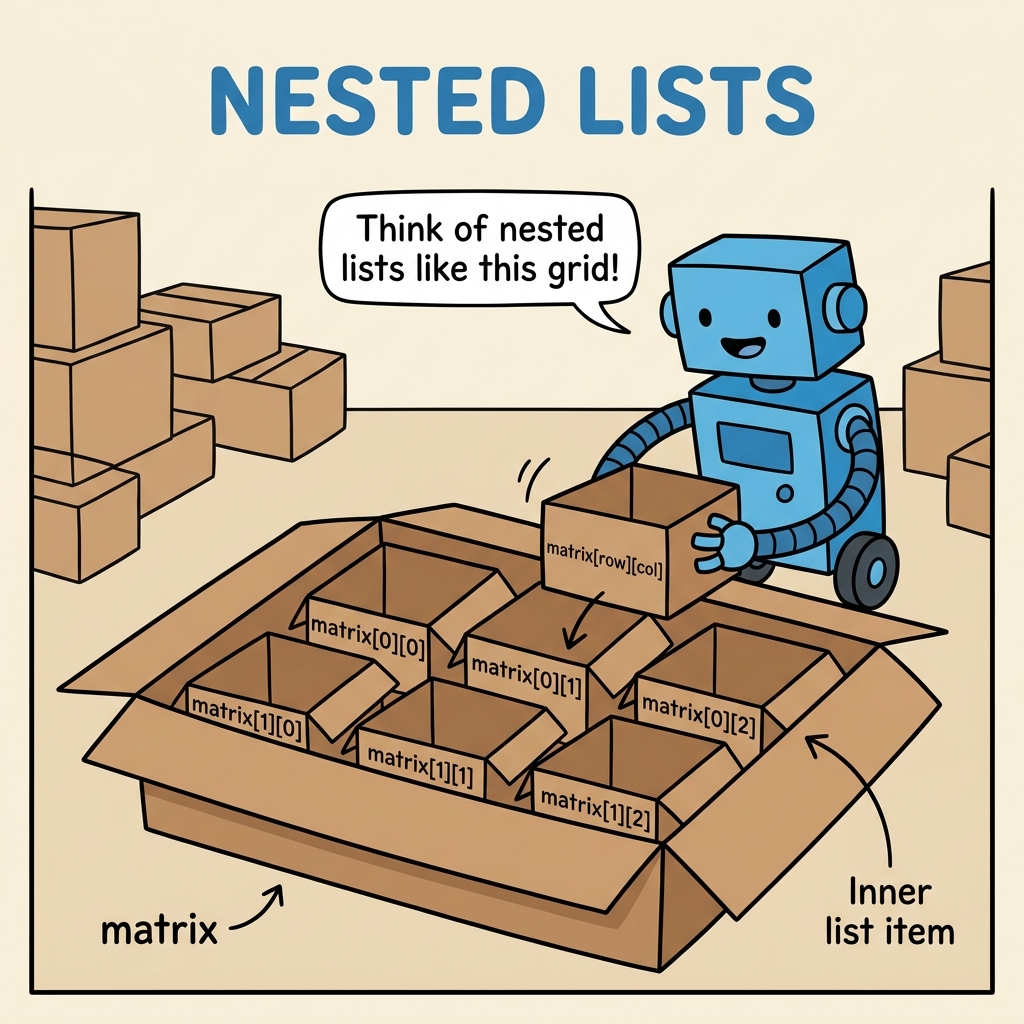
A nested list is a list that contains other lists as its elements. In simple terms, it’s like having a list inside another list. This nesting allows you to create complex, multi-dimensional data structures, such as matrices, grids, tables, or hierarchical data.
Imagine a classroom where each row of desks is a list, and the entire classroom is a list containing those rows. That’s a perfect analogy for a nested list — a list of lists.
💡 Why Use Nested Lists?
Nested lists let you represent structured data elegantly. For example, you can represent a chessboard, a calendar, or a spreadsheet, all of which have rows and columns, using nested lists.
Basic Syntax: Creating Nested Lists
Here is a simple example of a nested list in Python:
📌 Deep Dive: Creating a Nested List
matrix = [
    [1, 2, 3],
    [4, 5, 6],
    [7, 8, 9]
]This matrix variable holds a list of three lists, each containing three integers. You can visualize it as a 3x3 grid or matrix.
Accessing Elements in Nested Lists
Accessing elements inside nested lists requires multiple indexing operations. The first index selects the sublist, and the second index selects the element within that sublist.
Consider the example above. To access the number 5, which is in the second row, second column:
📌 Deep Dive: Accessing Nested List Elements
value = matrix[1][1]
print(value)  # Output: 5
Explanation:
matrix[1]accesses the second list:[4, 5, 6][1]accesses the second element of that list, which is5
💡 Remember
Python uses zero-based indexing, so the first element is at index 0.
Modifying Nested Lists
Just like regular lists, nested lists can be updated by assigning new values to specific positions.
📌 Deep Dive: Modifying Nested List Elements
# Change the 9 to 99
matrix[2][2] = 99
print(matrix)

# Output:
# [[1, 2, 3], [4, 5, 6], [7, 8, 99]]By targeting the exact indices, you can update the nested list’s content dynamically.
Iterating Through Nested Lists
One of the most powerful features of nested lists is that you can iterate through each element using loops. Typically, you'll use nested loops: an outer loop to iterate over each sublist, and an inner loop to iterate over elements within sublists.
📌 Deep Dive: Looping Over Nested Lists
for row in matrix:
    for num in row:
        print(num, end=' ')
    print()  # new line after each row

# Output:
# 1 2 3
# 4 5 6
# 7 8 99
4 5 6
7 8 99
This prints each number in the matrix row by row, demonstrating how nested loops work in tandem with nested lists.
Common Operations with Nested Lists
There are numerous operations you might want to perform on nested lists, including adding rows, adding elements within rows, or flattening the list.
- Adding a new row: Use
append()on the outer list. - Adding elements to a row: Use
append()on the sublist. - Flattening: Converting a nested list into a single list containing all elements.
📌 Deep Dive: Adding and Flattening Nested Lists
# Add a new row
matrix.append([10, 11, 12])
print(matrix)

# Add an element to the first row
matrix[0].append(4)
print(matrix)

# Flatten the matrix
flat_list = [num for row in matrix for num in row]
print(flat_list)
[1, 2, 3, 4, 4, 5, 6, 7, 8, 99, 10, 11, 12]
Notice how the first row now contains four elements after appending, and the flattened list contains every number in a single dimension.
Nested Lists vs. Multidimensional Arrays
Before we move forward, it’s useful to compare nested lists with multidimensional arrays (like those provided by the numpy library). While nested lists are native to Python and flexible, multidimensional arrays are optimized for numeric computations.
| Feature | Nested Lists | Numpy Arrays |
|---|---|---|
| Data Type | Can hold mixed types | Homogeneous numeric data |
| Performance | Slower for large numeric data | Optimized for speed and memory |
| Functionality | Basic list operations | Advanced math & linear algebra |
| Use Case | General purpose, flexible | Scientific computing |
If your project requires heavy numeric computations, consider learning numpy arrays after mastering nested lists.
Practical Use Case: Storing Student Grades
Let’s put nested lists to work with a practical example. Imagine you want to store grades for students across different exams.
📌 Deep Dive: Student Grades Storage
# Each sublist contains grades for a student
grades = [
    [88, 92, 79],  # Student 1
    [76, 85, 90],  # Student 2
    [91, 89, 94]   # Student 3
]

# Calculate average grade for student 2
student_2_grades = grades[1]
average = sum(student_2_grades) / len(student_2_grades)
print(f"Student 2's average grade: {average:.2f}")This example demonstrates how nested lists can organize related data neatly and how easy it is to access and perform calculations on such data.
Common Pitfalls When Working With Nested Lists
⚠️ Common Mistake: Using Multiplication to Initialize Nested Lists
Be cautious when initializing nested lists using multiplication, like matrix = [[0]*3]*3. This creates references to the same inner list, causing unexpected behaviors when modifying elements.
📌 Deep Dive: Avoiding Reference Pitfall
matrix = [[0]*3]*3
matrix[0][1] = 5
print(matrix)

# Output:
# [[0, 5, 0], [0, 5, 0], [0, 5, 0]]
Notice how changing one element affected all rows. This is due to all rows pointing to the same list object.
The correct way is to use a loop or list comprehension to create independent inner lists:
📌 Deep Dive: Proper Initialization
matrix = [[0 for _ in range(3)] for _ in range(3)]
matrix[0][1] = 5
print(matrix)

# Output:
# [[0, 5, 0], [0, 0, 0], [0, 0, 0]]
Summary
Nested lists are a fundamental concept in Python that allows you to manage multi-dimensional data structures gracefully. Understanding how to create, access, and manipulate nested lists will unlock many practical programming possibilities.
- Nested lists are lists containing other lists as elements.
- You can access elements using multiple indices, e.g.,
list[i][j]. - Nested loops are ideal for iterating through nested lists.
- Be careful initializing nested lists to avoid reference issues.
- Nested lists are versatile for a wide range of data representations.
With this solid foundation, you’re ready to explore more advanced data structures and algorithms that build on this concept!
Quick Knowledge Check
Test what you just learned
Question 1 of 2
How would you access the element 6 in the nested list matrix = [[1, 2, 3], [4, 5, 6], [7, 8, 9]]?
Question 2 of 2
What is the problem with initializing a nested list as matrix = [[0]*3]*3?
Loading results...