Dictionaries are among the most versatile and widely used data structures in Python. They store data in key-value pairs, allowing for rapid access and meaningful organization. But what happens when your data isn't just a simple list of pairs? What if you want to represent more complex information, such as a database of users, each with their own set of attributes or even multiple layers of data? Enter nested dictionaries.
In this lesson, we will explore nested dictionaries from the ground up: what they are, how to create and manipulate them, and best practices for working with them effectively. By the end, you'll be able to confidently handle multi-layered data structures — a critical skill for real-world Python programming.
What Are Nested Dictionaries?
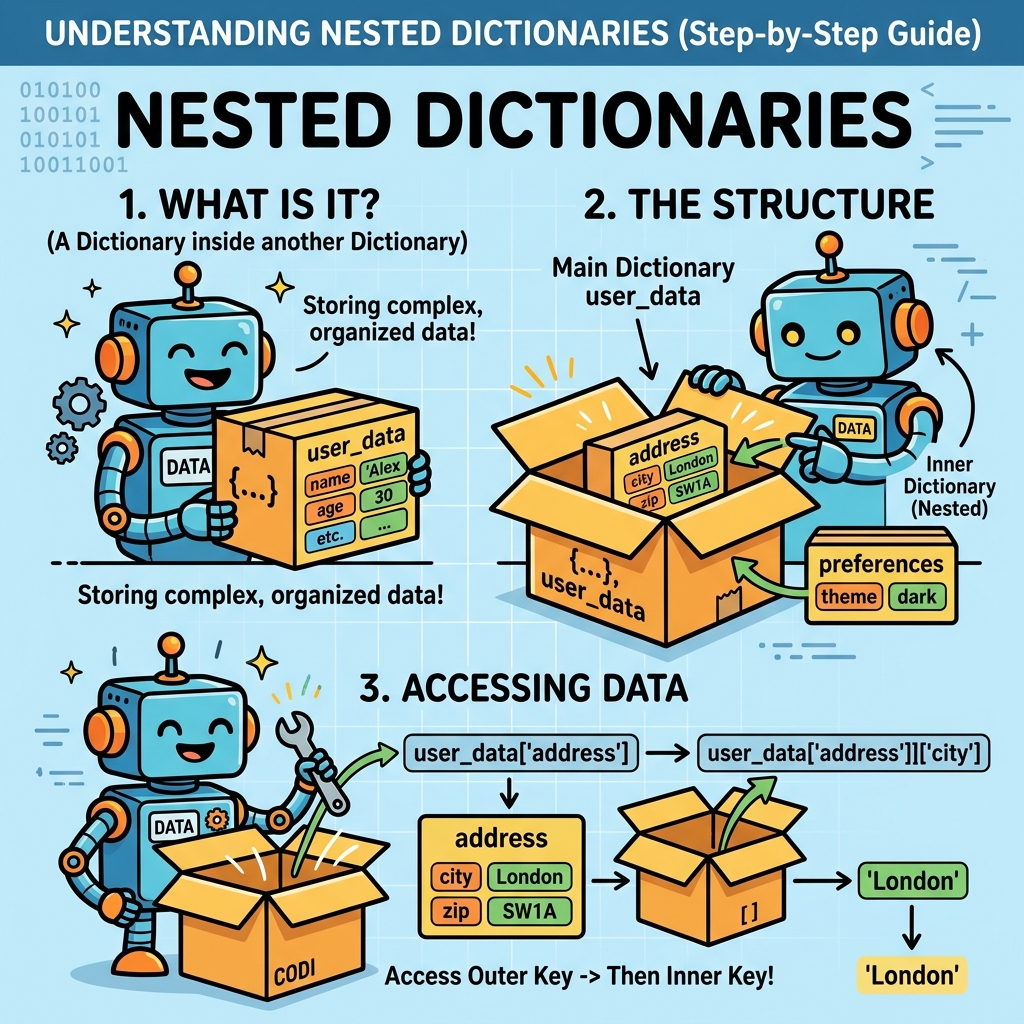
A nested dictionary is simply a dictionary where the values themselves are dictionaries. This allows you to build a hierarchical or multi-dimensional data model where each key can lead to another dictionary, potentially repeating this structure multiple times.
Think of it like a filing cabinet with folders inside folders, each folder containing more information. Nested dictionaries help you represent such structures in your code.
Simple Example
Consider storing information about two employees, where each employee has a name, age, and department. Using nested dictionaries, this looks like:
📌 Deep Dive: Creating a Nested Dictionary
employees = {
    "emp1": {"name": "Alice", "age": 30, "department": "HR"},
    "emp2": {"name": "Bob", "age": 25, "department": "IT"}
}
print(employees)
Here, the outer dictionary has keys like emp1 and emp2, each mapping to an inner dictionary containing employee details.
Accessing Values in Nested Dictionaries
To retrieve data, you chain the keys step by step. For example, to get the age of emp1:
📌 Deep Dive: Accessing Nested Dictionary Values
age_emp1 = employees["emp1"]["age"]
print(f"Age of emp1: {age_emp1}")
Notice how you first access the outer dictionary using employees["emp1"] which returns the inner dictionary, then immediately access the "age" key inside it.
What if a Key Doesn't Exist?
If you try to access a key that doesn't exist, Python will raise a KeyError. For nested dictionaries, this can happen at any level.
⚠️ Beware of Missing Keys
Accessing nested keys without checking if they exist can crash your program. To avoid errors, use methods like dict.get() or exception handling.
Example using get() safely:
📌 Deep Dive: Safe Access with get()
emp3 = employees.get("emp3", {})
age_emp3 = emp3.get("age", "Unknown")
print(f"Age of emp3: {age_emp3}")
Using get() returns {} or a default value if the key is missing, preventing exceptions.
Adding and Modifying Nested Dictionary Entries
You can add or update data within nested dictionaries by navigating to the level you want and assigning new values.
📌 Deep Dive: Adding New Entries
# Adding a new employee
employees["emp3"] = {"name": "Charlie", "age": 28, "department": "Finance"}

# Updating emp2's department
employees["emp2"]["department"] = "Marketing"

print(employees)
This flexibility lets you dynamically grow and update your data structure.
Looping Through Nested Dictionaries
Often, you'll want to process every item in the nested dictionary—for example, printing all employee names and their departments. This requires nested loops.
📌 Deep Dive: Iterating Over Nested Dictionaries
for emp_id, details in employees.items():
    name = details.get("name", "N/A")
    dept = details.get("department", "N/A")
    print(f"{emp_id}: {name} works in {dept}")
Here, employees.items() returns key-value pairs where values are dictionaries themselves, so we iterate inside each inner dictionary as needed.
Common Use Cases for Nested Dictionaries
Nested dictionaries shine in scenarios requiring structured, multi-level data representation:
- JSON-like data storage: Python dictionaries can mimic JSON objects, often nested to represent complex data.
- Configuration files: Settings with categories and subcategories.
- Databases in-memory: Storing records with multiple attributes.
- Graphs or trees: Representing nodes with children or attributes.
Their flexibility makes them essential for data parsing and storage tasks.
Comparing Dictionaries and Nested Dictionaries
| Feature | Flat Dictionary | Nested Dictionary |
|---|---|---|
| Structure | Key-value pairs with simple values | Key-value pairs where values can be dictionaries |
| Complexity | Simple, single-level | Multi-level, hierarchical |
| Use Case | Basic mappings | Hierarchical or grouped data |
| Access | Single key access | Multiple chained key access |
| Example | {'a': 1, 'b': 2} | {'a': {'x': 1}, 'b': {'y': 2}} |
Working with Deeply Nested Dictionaries
Sometimes dictionaries can be nested multiple levels deep — for example, a user profile inside a database, with contact details inside the profile. Consider this example:
📌 Deep Dive: Multi-Level Nesting
users = {
    "user1": {
        "name": "Diana",
        "contact": {
            "email": "diana@example.com",
            "phone": "555-1234"
        },
        "roles": ["admin", "editor"]
    },
    "user2": {
        "name": "Eli",
        "contact": {
            "email": "eli@example.com",
            "phone": "555-5678"
        },
        "roles": ["viewer"]
    }
}
print(users["user1"]["contact"]["email"])
Notice how accessing data requires multiple key lookups chained together.
💡 Tip: Use Variables for Readability
If you access deeply nested values multiple times, assign intermediate dictionaries to variables for clarity:
contact_info = users["user1"]["contact"]
email = contact_info["email"]
print(email)
Modifying Deeply Nested Data
You can update or add new keys at any level just by traversing to the dictionary you want and assigning values.
📌 Deep Dive: Updating Deep Nested Keys
# Change user2's phone number
users["user2"]["contact"]["phone"] = "555-9999"

# Add a new role to user1
users["user1"]["roles"].append("contributor")

print(users["user2"]["contact"]["phone"])
print(users["user1"]["roles"])
Python lets you easily mutate nested data structures in place.
Looping Through Deeply Nested Dictionaries
Processing deeply nested dictionaries often involves nested loops or recursion.
Here's a simple example iterating through users and printing all their roles:
📌 Deep Dive: Iterating Deeply Nested Data
for user_id, info in users.items():
    name = info.get("name")
    print(f"Roles for {name}:")
    for role in info.get("roles", []):
        print(f" - {role}")
Practical Tips When Using Nested Dictionaries
- Immutable keys: Dictionary keys must be immutable types like strings, numbers, or tuples. Values can be anything, including dictionaries.
- Use
defaultdictfor automatic nesting: Thecollections.defaultdictclass can simplify creating nested dictionaries by automatically initializing inner dictionaries. - Pretty-print for readability: When printing complex nested dictionaries, use the
pprintmodule to format output nicely. - Avoid too deep nesting: Deeply nested structures can be hard to maintain and read. Consider flattening data or using classes if complexity grows.
Example: Using defaultdict to simplify nested dictionaries
📌 Deep Dive: defaultdict for Nested Dictionaries
from collections import defaultdict

# Create a nested defaultdict where each value is another defaultdict of ints
nested_dict = defaultdict(lambda: defaultdict(int))

# Increment counts
nested_dict["fruits"]["apple"] += 1
nested_dict["fruits"]["banana"] += 2
nested_dict["vegetables"]["carrot"] += 3

print(nested_dict)
This can save you from writing code to check if inner dictionaries exist before adding keys.
Summary
Nested dictionaries allow you to create multi-level, hierarchical data structures using plain Python dictionaries. They are indispensable when you need to represent complex data like user profiles, configuration settings, or parsed JSON data.
Key takeaways:
- Create nested dictionaries by assigning dictionaries as values.
- Access nested values by chaining keys:
dict[key1][key2]. - Use safe access methods like
get()to avoidKeyError. - Add or modify nested data by navigating to the correct dictionary level.
- Loop through nested dictionaries with nested loops.
- Utilize tools like
defaultdictto ease dictionary creation. - Keep nested structures manageable and consider alternatives when complexity grows.
With these skills, you can model and manipulate intricate data elegantly and efficiently in Python.
Quick Knowledge Check
Test what you just learned
Question 1 of 2
Which of the following correctly accesses the value "Marketing" in the nested dictionary below?employees = { "emp2": {"department": "Marketing"} }
Question 2 of 2
What will the following code print?employees = {"emp1": {"name": "Alice"}}
print(employees.get("emp2", {}).get("name", "Not found"))
Loading results...