In the world of programming, exchanging data between applications, services, or even different parts of the same project is a common task. JSON, which stands for JavaScript Object Notation, is one of the most popular and widely used formats to store and transfer data in a structured way. Despite originating from JavaScript, JSON is language-independent and enjoys native support in Python through built-in libraries.
By the end of this lesson, you will understand what JSON files are, how to work with them using Python, and how to integrate JSON handling seamlessly into your projects. This foundational knowledge is essential for beginners stepping into data processing, web development, APIs, and more.
What is a JSON File?
A JSON file is a plain text file that stores data in a structured format, which resembles Python dictionaries and lists. It's human-readable and easy for machines to parse. JSON data is composed of key-value pairs and lists, making it ideal for representing complex nested information.
💡 Why JSON?
JSON is favored because of its simplicity, readability, and compatibility across platforms and languages. It’s lighter and easier to work with than XML and is the backbone of many REST APIs.
Here’s an example of JSON data representing a simple user profile:
{
  "name": "Alice",
  "age": 28,
  "is_student": false,
  "courses": ["Math", "Physics", "Computer Science"],
  "address": {
    "city": "New York",
    "zip": "10001"
  }
}
Notice how this JSON object closely mirrors a Python dictionary, except keys and string values are enclosed in double quotes.
Python and JSON: The Perfect Match
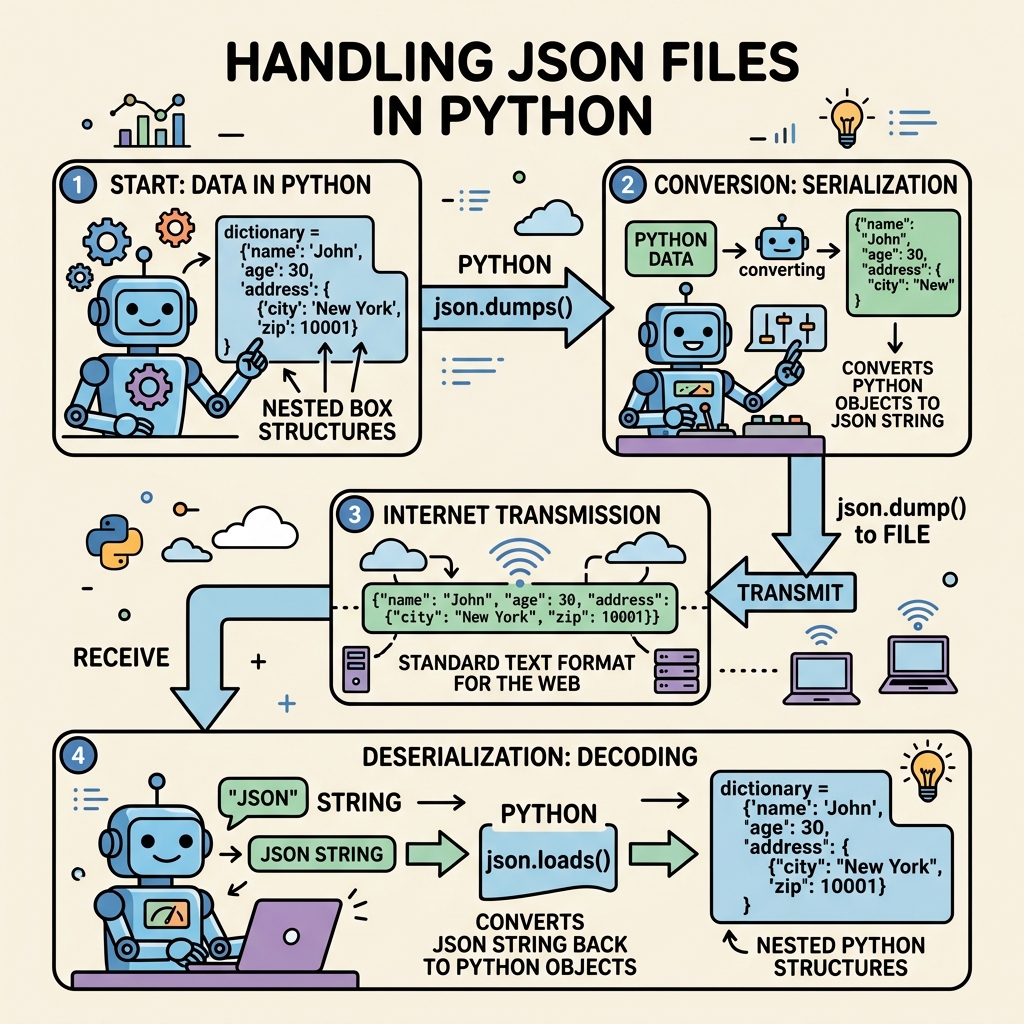
Python provides a built-in module called json to handle JSON data. It lets you easily convert between Python objects and JSON strings or files, a process known as serialization (to JSON) and deserialization (from JSON).
Core Functions in the json Module
json.load(file_object): Reads JSON data from a file-like object and converts it into corresponding Python data types.json.loads(json_string): Parses a JSON string and returns Python data structures.json.dump(python_object, file_object): Serializes a Python object and writes it to a file in JSON format.json.dumps(python_object): Serializes a Python object and returns it as a JSON-formatted string.
These functions form the foundation of JSON handling in Python and cover most use cases.
Reading JSON Files in Python
Imagine you have a JSON file named data.json that contains user information. To work with this data in Python, you first need to load it into a Python variable.
📌 Deep Dive: Loading JSON from a File
import json

# Open the JSON file for reading
with open('data.json', 'r') as file:
    data = json.load(file)

# Now data is a Python dictionary (or list) depending on your JSON structure
print(data)
print(type(data))Here’s what happens step-by-step:
- We import the
jsonmodule. - We open the
data.jsonfile in read mode. - We use
json.load()to parse the JSON content directly from the file handle. - The JSON is converted into Python objects — typically dictionaries and lists.
- We print the data and its type to confirm successful parsing.
Writing JSON to Files
Storing data in JSON format is just as straightforward. Use json.dump() to write Python data structures back to a JSON file.
📌 Deep Dive: Writing Python Data to JSON File
import json

# Data to be saved
user_info = {
    "name": "Bob",
    "age": 35,
    "is_student": True,
    "courses": ["Biology", "Chemistry"],
    "address": {"city": "Los Angeles", "zip": "90001"}
}

# Write data to a JSON file with pretty formatting
with open('user_info.json', 'w') as file:
json.dump(user_info, file, indent=4)Notice the indent=4 argument, which formats the JSON output with indentation for readability. This is very helpful when you want to review or share JSON files manually.
JSON Data Types vs Python Data Types
Understanding how JSON data types map to Python types is crucial for seamless data manipulation.
| JSON Type | Python Equivalent |
|---|---|
| object | dict |
| array | list |
| string | str |
| number (integer) | int |
| number (floating point) | float |
| true | True |
| false | False |
| null | None |
When you load JSON data, Python automatically converts these types for you, making it easy to work with the data natively.
Pretty Printing JSON Strings
Sometimes you might want to convert Python objects to a JSON string for debugging or logging. Using json.dumps() with some formatting options helps make the string clear and readable.
📌 Deep Dive: Using json.dumps() for Readable JSON Strings
import json

data = {
    "product": "Laptop",
    "price": 999.99,
    "available": True,
    "specs": {"cpu": "Intel i7", "ram": "16GB", "storage": "512GB SSD"}
}

json_string = json.dumps(data, indent=2, sort_keys=True)
print(json_string)In this example:
indent=2adds indentation for better readability.sort_keys=Truesorts the keys alphabetically.
Handling Errors When Working with JSON
Because JSON must follow strict syntax rules, improperly formatted data will cause errors. Python raises a json.JSONDecodeError when trying to parse invalid JSON.
⚠️ Common Pitfall: Invalid JSON Format
JSON keys and string values must be enclosed in double quotes " ", not single quotes ' '. Missing commas or trailing commas are also common sources of errors.
Here is how you can gracefully handle such errors:
📌 Deep Dive: Error Handling for JSON Parsing
import json

invalid_json = "{'name': 'Charlie', 'age': 30}"  # Incorrect single quotes

try:
    data = json.loads(invalid_json)
except json.JSONDecodeError as e:
print("Failed to parse JSON:", e)Always validate and sanitize JSON data coming from external sources to avoid unexpected crashes.
Real-World Use Case: Reading Configuration Files
Many projects store configuration options in JSON files for easy updates without changing the code. Let’s see how you might read a config.json file and use it in your program.
{
  "app_name": "MyApp",
  "version": "1.0",
  "debug_mode": true,
  "max_users": 100
}
📌 Deep Dive: Using JSON for Application Configuration
import json

def load_config(path):
    with open(path, 'r') as file:
        config = json.load(file)
    return config

config = load_config('config.json')

if config['debug_mode']:
print(f"Running {config['app_name']} in debug mode")This pattern is common in many Python applications and helps separate code from configuration.
Tips for Working with JSON Files in Python
- Use
withstatement to open files — it automatically closes the file, even if errors occur. - Indent your JSON output with
indentfor better readability when sharing files. - Validate JSON data if it comes from user inputs or external APIs to prevent security issues or parsing errors.
- Remember Python and JSON types mapping to avoid surprises when accessing data.
- Use exception handling to manage unexpected scenarios gracefully.
Summary
JSON files are a powerful and flexible way to store and transfer data across many domains. Python’s json module makes it easy to:
- Read JSON data from files and strings.
- Write Python data structures to JSON files or strings.
- Convert between JSON and Python native types effortlessly.
- Handle errors and format JSON output cleanly.
Mastering JSON file handling will empower you to interact with APIs, configure applications, and save data in a standardized, human-readable format.
Quick Knowledge Check
Test what you just learned
Question 1 of 2
Which function would you use to read JSON data directly from a file object in Python?
Question 2 of 2
If a JSON string contains keys enclosed in single quotes, what error do you expect when parsing it with json.loads()?
Loading results...