When working with sequences in Python—such as strings, lists, or tuples—being able to access specific elements or portions of data is essential. This powerful capability is enabled by indexing and slicing, two fundamental concepts that allow you to extract and manipulate data efficiently and elegantly.
In this lesson, we will take a comprehensive journey through indexing and slicing, exploring how they work, how to use them with different data types, and best practices to avoid common pitfalls.
Understanding Indexing: Accessing Individual Elements
Imagine a sequence like a row of lockers, each with a unique number. In Python, these numbers are called indices. Indexing lets you open one specific locker to get its contents.
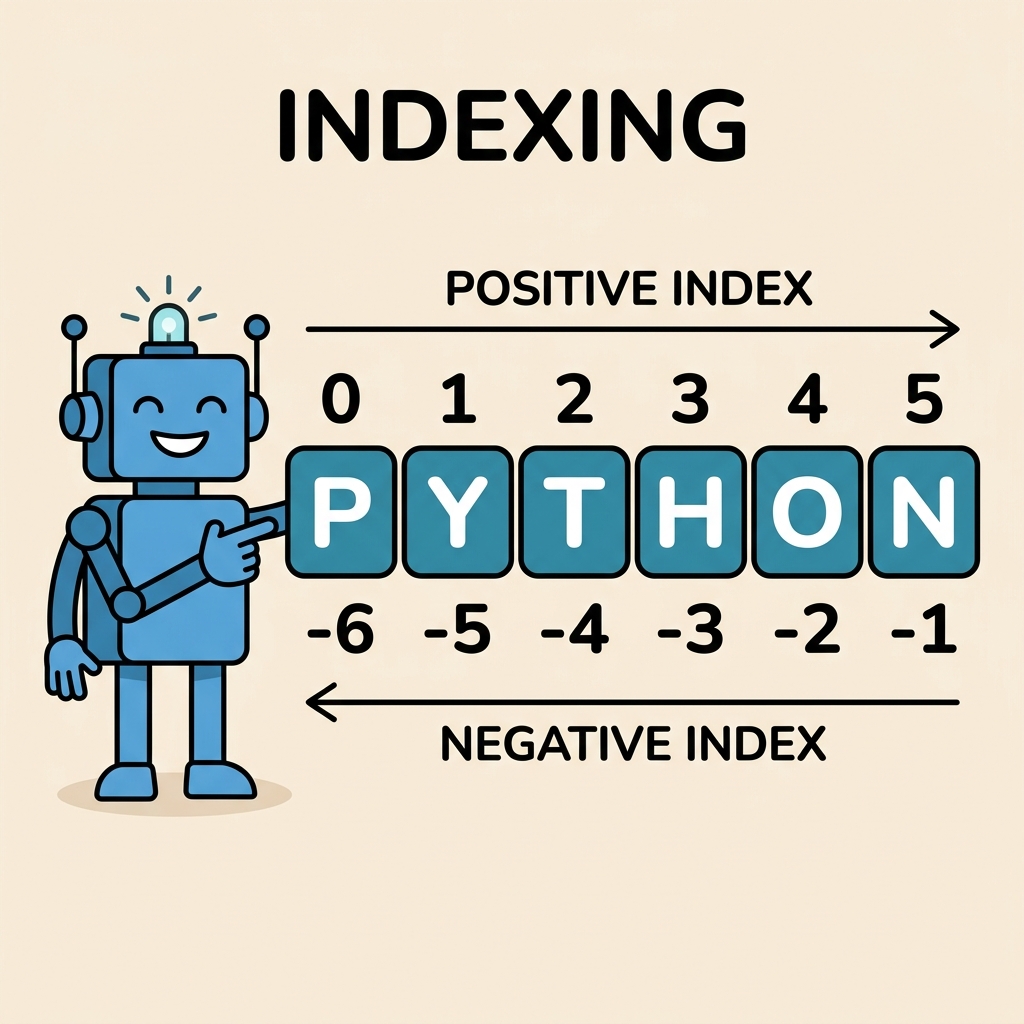
Python uses zero-based indexing, meaning the first element is index 0, the second is 1, and so on.
| Sequence | Indices |
|---|---|
| H e l l o | 0 1 2 3 4 |
| Negative Indices | -5 -4 -3 -2 -1 |
Python also supports negative indices, which count from the end of the sequence backwards. So, -1 refers to the last element, -2 the second last, and so forth.
💡 Why Negative Indices?
Negative indices provide a convenient way to quickly access elements from the end of a sequence without needing to know its length.
📌 Deep Dive: Indexing a String
word = "Python"
print(word[0])   # First character
print(word[3])   # Fourth character
print(word[-1])  # Last character
print(word[-3]) # Third from last characterIndexing with Lists and Tuples
Indexing works similarly with lists and tuples, which are ordered collections of elements. The syntax is the same: use square brackets [] with the index inside.
📌 Deep Dive: Indexing a List
numbers = [10, 20, 30, 40, 50]
print(numbers[1])   # Output: 20
print(numbers[-2]) # Output: 40Slicing: Extracting Subsections of a Sequence
While indexing extracts a single element, slicing lets you extract a range of elements from a sequence. Think of slicing as cutting out a slice from a loaf of bread—you specify where the slice starts and ends.
The syntax for slicing is:
sequence[start:stop:step]start(inclusive) is the index where the slice starts.stop(exclusive) is the index where the slice ends, but the element at this index is not included.stepis optional and defines the stride or step size between elements.
Each of these parameters is optional, and Python provides sensible defaults:
- If
startis omitted, slicing starts at index 0. - If
stopis omitted, slicing goes to the end of the sequence. - If
stepis omitted, the step size is 1 (every element).
💡 Exclusive Stop Index
Remember that the stop index is exclusive, meaning the slice will include elements up to but not including the stop index.
📌 Deep Dive: Basic Slicing
text = "Programming"
print(text[0:6])    # Characters from index 0 to 5
print(text[3:])     # From index 3 to the end
print(text[:4])     # From start to index 3
print(text[:]) # Whole string (copy)Using Step in Slicing
The step parameter controls how many positions the slice moves forward after selecting an element. By default, it is 1, which means consecutive elements.
You can use positive steps to move forward, or negative steps to move backward through the sequence.
📌 Deep Dive: Step Parameter Examples
numbers = [0, 1, 2, 3, 4, 5, 6, 7, 8, 9]

print(numbers[::2])   # Every second element
print(numbers[1:8:3]) # From index 1 to 7, step by 3
print(numbers[::-1]) # Reverse the listCommon Use Cases for Slicing
- Copying sequences:
new_seq = seq[:]creates a shallow copy. - Extracting substrings: Get portions of strings without loops.
- Reversing sequences: Use
[::-1]to reverse lists or strings easily. - Skipping elements: Extract items at intervals using steps.
Indexing and Slicing Across Different Data Types
Indexing and slicing are supported by many sequence types in Python, including:
- Strings — sequences of characters.
- Lists — mutable sequences of any objects.
- Tuples — immutable sequences similar to lists.
- Byte arrays and bytes — sequences of bytes.
The same principles apply, but the result type will match the original sequence type.
📌 Deep Dive: Slicing a Tuple
data = (10, 20, 30, 40, 50)
subset = data[1:4]
print(subset)
print(type(subset))Important Considerations and Pitfalls
- IndexError: Accessing an index outside the sequence range raises an error when indexing, but slicing gracefully handles out-of-range indices by truncating.
- Immutable vs Mutable: Strings and tuples are immutable, so you cannot assign to slices or indices directly (e.g.,
text[0] = 'X'will raise an error). - Copying vs Referencing: Slicing creates a new sequence (a shallow copy), but be cautious when slicing lists that contain mutable elements as internal references remain shared.
⚠️ Beware of IndexError
Attempting to access an index that doesn’t exist (e.g., my_list[10] when the list has 5 elements) will raise an IndexError. Always ensure your indices are within range or use slicing which is safer for ranges.
Advanced Slicing Examples
You can combine indexing and slicing to extract specific elements or patterns:
- Select every 3rd character from a substring:
📌 Deep Dive: Combining Slice Parameters
message = "Hello, Python World!"
slice = message[7:19:3]
print(slice)Explanation: This extracts characters starting at index 7, up to (but not including) index 19, stepping by 3.
Mutability and Slice Assignment
While you cannot assign to indices or slices in immutable sequences like strings, you can do so with mutable sequences such as lists.
📌 Deep Dive: Modifying a List Using Slice Assignment
nums = [1, 2, 3, 4, 5]
nums[1:4] = [20, 30, 40]  # Replace elements at indices 1,2,3
print(nums)

nums[::2] = [100, 200, 300]  # Replace every second element (indices 0,2,4)
print(nums)This powerful feature allows you to update multiple elements in one statement.
Summary: Your Indexing & Slicing Toolkit
| Operation | Syntax | Example |
|---|---|---|
| Access single element | seq[index] | word[2] |
| Slice from start to stop | seq[start:stop] | arr[1:4] |
| Slice with step | seq[start:stop:step] | text[::2] |
| Slice from start to end | seq[start:] | lst[3:] |
| Slice from beginning to stop | seq[:stop] | str[:5] |
| Reverse sequence | seq[::-1] | nums[::-1] |
| Assign to slice (mutable) | seq[start:stop] = new_values | lst[1:3] = [7,8] |
Mastering indexing and slicing will dramatically improve your ability to manipulate sequences in Python, making your code cleaner and more efficient. Remember, practice is key to internalizing these concepts, so try out different examples and experiment!
Quick Knowledge Check
Test what you just learned
Question 1 of 2
What will text[2:5] return if text = "Python"?
Question 2 of 2
What does numbers[::-1] do?
Loading results...