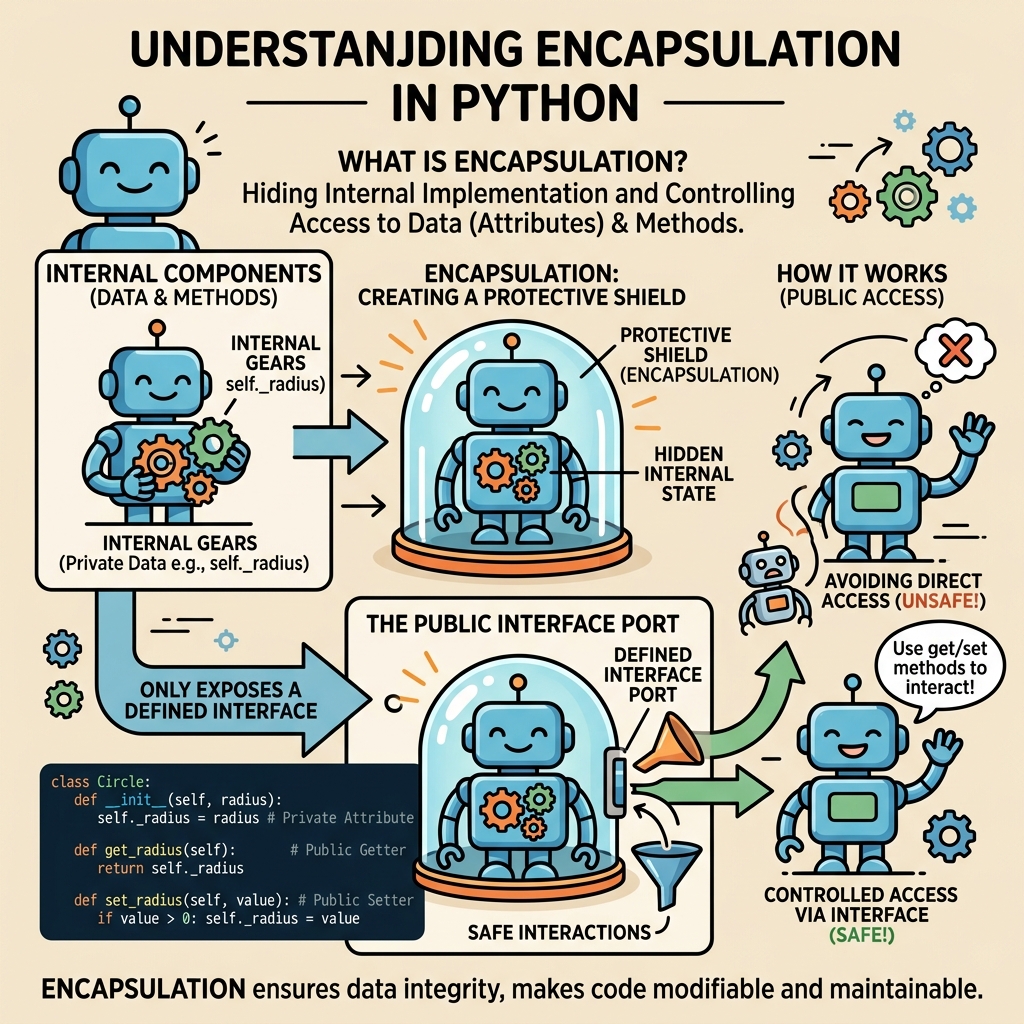
When diving into the world of Python and object-oriented programming (OOP), one of the foundational principles you'll encounter is encapsulation. At its core, encapsulation is about bundling data and the methods that operate on that data within a single unit — typically a class — and controlling access to that data from outside the unit.
But why is encapsulation so important? Imagine you have a complex machine with many intricate parts. You wouldn’t want just anyone to tinker directly with its inner workings, right? Instead, you provide a user-friendly interface to interact with the machine safely. Similarly, in programming, encapsulation protects the internal state of an object from unintended interference and misuse, ensuring your code remains robust, maintainable, and adaptable.
What Is Encapsulation in Python?
In Python, encapsulation means hiding the internal details of how a class works and exposing only what is necessary. This is done by marking some attributes or methods as private, so they can’t be accessed directly from outside the class. Instead, controlled access is provided through public methods.
Encapsulation helps:
- Protect data integrity: Prevents external code from modifying internal data in unexpected ways.
- Reduce complexity: Users of a class don’t need to know its internal details.
- Improve maintainability: Internal implementation can change without affecting external code.
💡 Encapsulation Analogy
Think of encapsulation like a TV remote control. You don't need to know how the remote works inside, just which buttons to press to change the channel or volume. The internal electronics are hidden, preventing you from accidentally breaking the device.
How Does Python Implement Encapsulation?
Python does not enforce strict access modifiers like some other languages (e.g., private, protected, public in Java or C++). Instead, it uses naming conventions and a mechanism called name mangling to suggest and enforce access restrictions.
Public Attributes and Methods
By default, all class attributes and methods are public, meaning they can be accessed freely from outside the class.
Protected Attributes and Methods
Attributes or methods prefixed with a single underscore (_) are treated as protected by convention. This means they are intended for internal use only, but this is not strictly enforced by Python.
Private Attributes and Methods
Attributes or methods prefixed with double underscores (__) become private through a process called name mangling. Python internally changes the name of these variables to include the class name, making it harder (but not impossible) to access them from outside.
| Access Level | Syntax | Access Description |
|---|---|---|
| Public | variable | Accessible from anywhere |
| Protected (convention) | _variable | Should be accessed only within class or subclasses |
| Private (name mangling) | __variable | Not easily accessible outside class, name mangled |
Practical Example: Encapsulation in Action
Let’s create a simple BankAccount class to demonstrate encapsulation. We want to protect the account balance from being changed arbitrarily while allowing deposits and withdrawals through controlled methods.
📌 Deep Dive: BankAccount with Encapsulation
class BankAccount:
    def __init__(self, owner, balance=0):
        self.owner = owner
        self.__balance = balance  # Private attribute

    def deposit(self, amount):
        if amount > 0:
            self.__balance += amount
            print(f"Deposited {amount}. New balance is {self.__balance}.")
        else:
            print("Deposit amount must be positive.")

    def withdraw(self, amount):
        if 0 <= amount <= self.__balance:
            self.__balance -= amount
            print(f"Withdrew {amount}. New balance is {self.__balance}.")
        else:
            print("Insufficient funds or invalid amount.")

    def get_balance(self):
        return self.__balance


# Usage
account = BankAccount("Alice", 100)
account.deposit(50)
account.withdraw(30)
print("Balance is:", account.get_balance())

# Trying to access private attribute directly
print(account.__balance) # This will raise an AttributeErrorIn this example, the __balance attribute is private. Attempts to access account.__balance directly will raise an error. Instead, the public methods deposit(), withdraw(), and get_balance() control how the balance changes and is viewed, ensuring the integrity of the account data.
How Does Name Mangling Work?
When you prefix an attribute with double underscores, Python changes the attribute name internally by adding the class name to it. This is to avoid accidental access and subclass overrides but can still be accessed if you know the mangled name.
For example, the attribute __balance in class BankAccount is internally stored as _BankAccount__balance.
📌 Deep Dive: Accessing Mangled Private Attributes (Not Recommended)
print(account._BankAccount__balance) # Accessing mangled private attributeImportant: Although this is possible, it breaks encapsulation principles and should be avoided. Always use public methods provided by the class to interact with its data.
Encapsulation vs Other OOP Principles
Encapsulation often works hand-in-hand with abstraction, which is about hiding complex details and showing only relevant features. While abstraction focuses on the interface, encapsulation focuses on data protection.
Let’s look at how encapsulation compares to inheritance and polymorphism, two other core OOP concepts:
| Concept | Focus | Purpose |
|---|---|---|
| Encapsulation | Data and methods | Protect data & control access |
| Inheritance | Class hierarchy | Reuse and extend behavior |
| Polymorphism | Interface | Use different classes interchangeably |
Best Practices for Using Encapsulation in Python
- Use single underscore (
_) for protected members: This signals to other developers that these attributes or methods are for internal use, even though they remain accessible. - Use double underscore (
__) for private members: When you want to strongly discourage external access and avoid name clashes in subclasses. - Provide public getter and setter methods: Use methods or
@propertydecorators to safely access or modify private attributes. - Don’t overuse private attributes: Python’s philosophy favors consenting adults — use encapsulation where it makes sense but don’t make your code unnecessarily complicated.
Using Properties to Encapsulate Access
Python offers a Pythonic way to encapsulate data using @property decorators, allowing you to define methods that act like attributes. This lets you control access and validation without changing how users interact with the class.
📌 Deep Dive: Encapsulation with Properties
class Person:
    def __init__(self, name, age):
        self.name = name
        self.__age = age  # private attribute

    @property
    def age(self):
        return self.__age

    @age.setter
    def age(self, value):
        if 0 <= value <= 150:
            self.__age = value
        else:
            print("Invalid age value")

# Usage
p = Person("Bob", 30)
print(p.age)   # Access via getter
p.age = 35     # Modify via setter
print(p.age)
p.age = -5 # Invalid ageHere, the age attribute is accessed like a public attribute, but internally uses private storage and validation logic. This is an elegant way to maintain encapsulation while keeping a clean interface.
⚠️ Important
Encapsulation in Python is mostly by convention. Developers can still access protected and private members if they choose to. The main goal is to signal intent and provide controlled interfaces rather than enforce strict barriers.
Summary
Encapsulation is a core principle of object-oriented programming that helps you protect your class’s internal data and expose safe, well-defined interfaces. In Python, this is primarily done through naming conventions (_ and __) and by providing public methods or properties to access or modify data.
Mastering encapsulation will help you write cleaner, safer, and more maintainable Python code, especially as your projects grow in size and complexity.
Quick Knowledge Check
Test what you just learned
Question 1 of 2
What does prefixing an attribute with double underscores (__) do in Python?
Question 2 of 2
Which of the following is the Pythonic way to safely expose a private attribute for reading and writing?
Loading results...