Dictionaries are one of Python’s most powerful and versatile data structures. They store data in key-value pairs, allowing you to organize information efficiently. But what really makes dictionaries shine are the built-in methods Python provides, enabling you to manipulate, query, and modify dictionaries with ease.
In this lesson, we'll explore the most essential dictionary methods, understand their purpose, and see practical examples of how and when to use them. Whether you’re adding new data, retrieving information safely, or merging dictionaries, mastering these methods will elevate your Python programming skills.
Understanding the Basics of Dictionary Methods
A dictionary in Python looks like this:
📌 Deep Dive: Creating a Simple Dictionary
person = {
    "name": "Alice",
    "age": 30,
    "city": "New York"
}{
'name': 'Alice',
'age': 30,
'city': 'New York'
}Here, person is a dictionary with keys like name, age, and city mapped to their respective values.
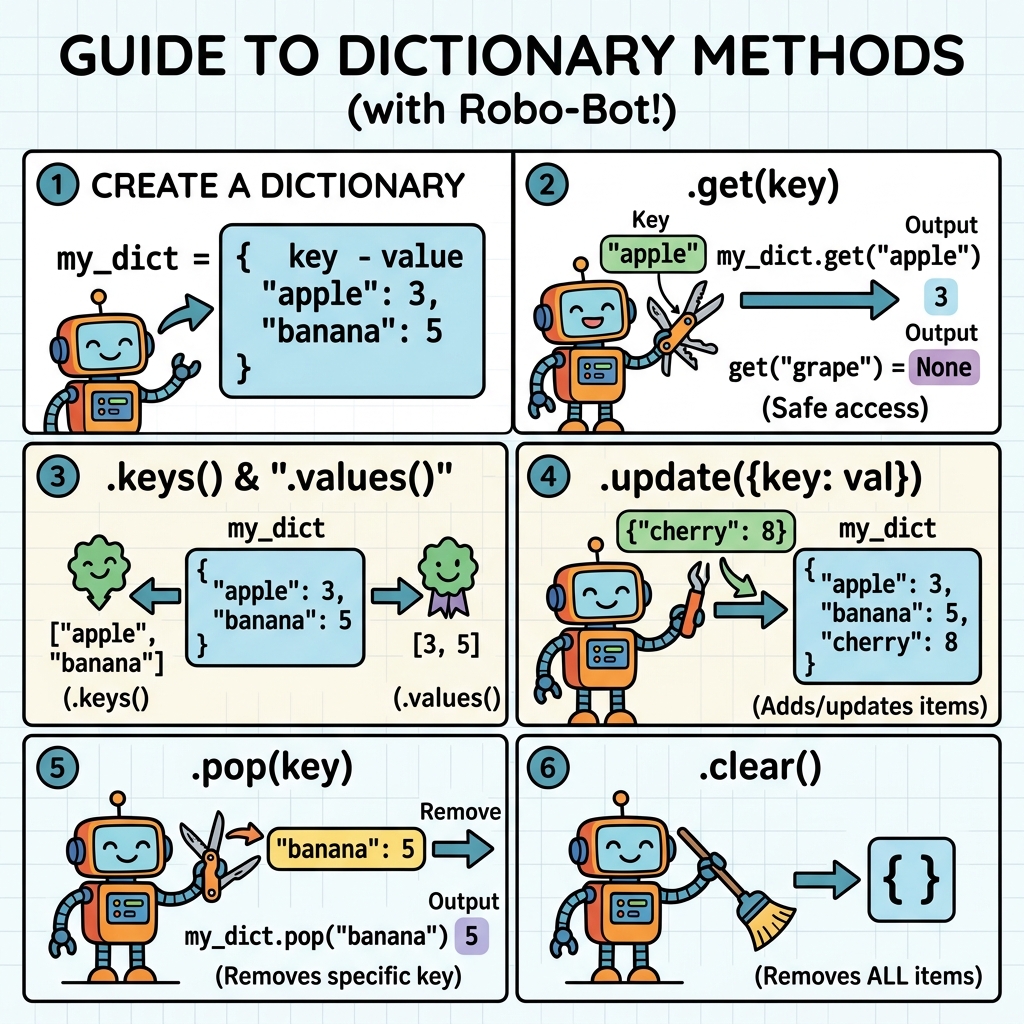
Dictionaries come with many useful methods. Let's explore them in groups based on their typical use cases.
Adding and Updating Elements
To add or update key-value pairs in a dictionary, you can use simple assignment or specific methods.
- Assignment: Add or update a key by assigning a value directly.
- update(): Update the dictionary with key-value pairs from another dictionary or iterable.
- setdefault(): Returns the value of a key if it exists; otherwise, sets it to a default and returns that.
📌 Deep Dive: Adding and Updating
person = {"name": "Alice", "age": 30}

# Add a new key
person["city"] = "New York"

# Update existing key
person["age"] = 31

# Use update() to add multiple key-value pairs
person.update({"job": "Engineer", "hobby": "Painting"})

# Use setdefault() to add a key only if it doesn't exist
person.setdefault("hobby", "Reading")  # Will not change since hobby exists
person.setdefault("country", "USA")    # Adds country key

print(person){'name': 'Alice', 'age': 31, 'city': 'New York', 'job': 'Engineer', 'hobby': 'Painting', 'country': 'USA'}Notice how setdefault only adds a key if it’s missing, otherwise it leaves the dictionary unchanged.
Accessing Elements Safely
Accessing dictionary values by key is straightforward, but trying to access a key that doesn’t exist will raise a KeyError. Python provides methods to avoid this:
- get(): Returns the value for the key if it exists; otherwise, returns a default value (which is
Noneif not specified). - keys(), values(), and items(): Retrieve all keys, values, or key-value pairs respectively.
📌 Deep Dive: Safe Access and Listing
person = {"name": "Alice", "age": 31, "city": "New York"}

# Using get() to avoid KeyError
print(person.get("name"))          # Alice
print(person.get("email"))         # None (key does not exist)
print(person.get("email", "N/A"))  # N/A (default value)

# Retrieving all keys, values, and items
print(list(person.keys()))   # ['name', 'age', 'city']
print(list(person.values())) # ['Alice', 31, 'New York']
print(list(person.items())) # [('name', 'Alice'), ('age', 31), ('city', 'New York')]Alice
None
N/A
['name', 'age', 'city']
['Alice', 31, 'New York']
[('name', 'Alice'), ('age', 31), ('city', 'New York')]Removing Elements
Sometimes you need to remove elements from a dictionary. Python offers several methods for this:
- pop(key[, default]): Removes the specified key and returns its value. If the key is not found, returns the default if provided; otherwise raises a KeyError.
- popitem(): Removes and returns the last inserted key-value pair as a tuple. Raises
KeyErrorif the dictionary is empty. - clear(): Removes all items from the dictionary.
📌 Deep Dive: Removing Elements
person = {"name": "Alice", "age": 31, "city": "New York", "job": "Engineer"}

# Remove 'job' and get its value
job = person.pop("job")
print(job)
print(person)

# Try removing a key that doesn't exist with default
email = person.pop("email", "Not Found")
print(email)

# Remove last inserted item
last_item = person.popitem()
print(last_item)
print(person)

# Clear all items
person.clear()
print(person)Engineer
{'name': 'Alice', 'age': 31, 'city': 'New York'}
Not Found
('city', 'New York')
{'name': 'Alice', 'age': 31}
{}
Merging Dictionaries
With Python 3.9+, you can merge dictionaries easily using | and |= operators. Alternatively, update() works in all versions.
💡 Python 3.9+ Feature
Starting with Python 3.9, the merge (|) and update merge (|=) operators provide a more intuitive way to combine dictionaries.
📌 Deep Dive: Merging Dictionaries
dict1 = {"a": 1, "b": 2}
dict2 = {"b": 3, "c": 4}

# Using update()
merged = dict1.copy()
merged.update(dict2)
print("Using update():", merged)

# Using | operator (Python 3.9+)
merged2 = dict1 | dict2
print("Using | operator:", merged2)

# Using |= operator to update dict1 in place
dict1 |= dict2
print("After |= operator:", dict1)Using update(): {'a': 1, 'b': 3, 'c': 4}
Using | operator: {'a': 1, 'b': 3, 'c': 4}
After |= operator: {'a': 1, 'b': 3, 'c': 4}
Other Useful Dictionary Methods
Here are some additional methods to enhance your dictionary work:
- copy(): Returns a shallow copy of the dictionary.
- fromkeys(iterable, value=None): Creates a new dictionary with keys from the iterable and values set to the given value (default
None). - dict comprehension: Not a method, but a powerful way to create dictionaries dynamically.
📌 Deep Dive: Copying and Creating Dictionaries
original = {"x": 10, "y": 20}

# Copy dictionary
copy_dict = original.copy()
print(copy_dict)

# Create dict with fromkeys()
keys = ["a", "b", "c"]
new_dict = dict.fromkeys(keys, 0)
print(new_dict)

# Dictionary comprehension example: squares of numbers
squares = {num: num**2 for num in range(1, 6)}
print(squares){'x': 10, 'y': 20}
{'a': 0, 'b': 0, 'c': 0}
{1: 1, 2: 4, 3: 9, 4: 16, 5: 25}
Summary Table of Core Dictionary Methods
| Method | Description |
|---|---|
get(key[, default]) | Returns value for key if exists, else default (None if omitted). |
setdefault(key[, default]) | Returns value if key exists, else inserts key with default and returns it. |
update(dict or iterable) | Adds or updates key-value pairs from another dictionary or iterable. |
pop(key[, default]) | Removes key and returns value; returns default if key not found. |
popitem() | Removes and returns last inserted (key, value) pair. |
clear() | Removes all items from dictionary. |
keys() | Returns a view object of all keys. |
values() | Returns a view object of all values. |
items() | Returns a view object of (key, value) tuples. |
copy() | Returns a shallow copy of the dictionary. |
fromkeys(iterable, value=None) | Creates a new dictionary with keys from iterable, all values set to value. |
💡 Key Insight
Dictionary methods often return views instead of lists (e.g., keys(), values(), items()). These views reflect changes in the dictionary dynamically, which can be very efficient for large datasets.
Best Practices When Working with Dictionary Methods
Here are some tips to keep your dictionary manipulations clean and efficient:
- Use
get()for safe access instead of direct key access when you’re not sure if a key exists. - Prefer
update()or merge operators when combining dictionaries to keep code readable. - Remember dictionaries are unordered prior to Python 3.7. Methods like
popitem()remove an arbitrary item before 3.7, but in 3.7+ they remove the last inserted item. - Use
setdefault()wisely when you want to ensure a key exists with a default value before modifying it. - Use
copy()to avoid modifying the original dictionary when you need a separate independent copy.
⚠️ Common Pitfall
Beware when using popitem() on empty dictionaries—it raises a KeyError. Always check if the dictionary is not empty before popping items.
Practice: Try It Yourself
Let's say you have the following dictionary representing a book:
📌 Deep Dive: Book Dictionary
book = {
    "title": "Python Programming",
    "author": "John Doe",
    "year": 2021,
    "pages": 350
}
Try these tasks:
- Use
get()to safely access thepublisherkey, and return "Unknown" if it doesn't exist. - Add a new key
publisherwith the value "Open Books" usingsetdefault(). - Remove the
pageskey and store its value. - Merge the book dictionary with another dictionary
{"genre": "Programming", "year": 2022}using the merge operator.
Afterwards, print the updated dictionary to verify your changes.
💡 Hint
Remember setdefault() only adds the key if it is not already present.
Try coding this on your own editor or interactive Python shell to solidify your understanding!
Wrapping Up
Dictionaries are an indispensable part of Python programming, and their methods provide the tools you need to manage data effectively. By using methods such as get(), update(), pop(), and the new merge operators, you can write clean, readable, and resilient code.
Practice these methods regularly, and soon handling complex data structures will become second nature.
Quick Knowledge Check
Test what you just learned
Question 1 of 2
What does the setdefault() method do in a dictionary?
Question 2 of 2
Which method safely retrieves a value for a key without raising a KeyError if the key doesn’t exist?
Loading results...