When learning Python, one of the most powerful and flexible data structures you'll encounter is the dictionary, often abbreviated as dict. Dictionaries allow you to store data in key-value pairs, enabling fast lookups, modifications, and organized storage of information. This lesson will guide you through the essentials of creating dictionaries and accessing their contents effectively.
Dictionaries are everywhere in programming—from storing user profiles, configurations, and JSON data, to mapping complex relationships. Understanding how to create and manipulate dicts is fundamental to becoming a proficient Python developer.
What is a Dictionary?
A dictionary in Python is an unordered, mutable collection of items. Each item consists of a key and a corresponding value. Keys must be unique and immutable (like strings, numbers, or tuples), while values can be any Python object.
💡 Key Idea
Think of a dictionary as a real-world dictionary: you look up a word (key) to find its definition (value). Similarly, in Python, you use a key to retrieve the associated value.
Creating Dictionaries
There are several ways to create dictionaries in Python, each suited for different scenarios. Let’s explore the most common methods.
1. Using Curly Braces {} with Key-Value Pairs
The most straightforward way to create a dictionary is by enclosing comma-separated key-value pairs inside curly braces. Each key is separated from its value by a colon.
📌 Deep Dive: Creating a Dictionary with Literal Syntax
# A dictionary representing a person
person = {
    "name": "Alice",
    "age": 30,
    "city": "New York"
}
print(person)Here, the dictionary person stores keys like "name" and "age" with their respective values.
2. Using the dict() Constructor
You can also create dictionaries by calling the built-in dict() function. This method is handy when keys are valid Python identifiers (strings without spaces or special characters).
📌 Deep Dive: Creating a Dictionary with dict()
# Creating a dictionary with dict()
person = dict(name="Bob", age=25, city="Chicago")
print(person)Note that keys are passed as keyword arguments, which means they must be valid identifiers (letters, numbers, underscores, and not starting with a number).
3. Creating an Empty Dictionary
Often you want to start with an empty dictionary and add entries later. Use empty curly braces or the dict() constructor without arguments.
📌 Deep Dive: Empty Dictionaries
empty_dict1 = {}
empty_dict2 = dict()
print(empty_dict1)
print(empty_dict2)Keys and Values: What Can They Be?
Dictionaries require keys to be immutable and hashable. Common key types include:
- Strings (most common)
- Numbers (integers, floats)
- Tuples (only if they contain immutable items)
Values, on the other hand, can be any Python object — strings, numbers, lists, other dictionaries, functions, and more.
⚠️ Important
Mutable types like list or dict cannot be used as dictionary keys because they are unhashable and their contents can change.
Accessing Dictionary Items
Once a dictionary is created, you’ll often want to retrieve values based on their keys. Python provides several ways to access dictionary values.
1. Accessing via Square Brackets []
The simplest method is using square brackets enclosing the key. This will return the value associated with that key.
📌 Deep Dive: Accessing Values by Key
person = {"name": "Alice", "age": 30, "city": "New York"}

print(person["name"])  # Output: Alice
print(person["age"]) # Output: 30Note: If you try to access a key that does not exist, Python raises a KeyError.
2. Using the .get() Method
To avoid errors when accessing potentially missing keys, use the get() method. It returns None or a specified default value instead of raising an error.
📌 Deep Dive: Using get() for Safe Access
person = {"name": "Alice", "age": 30}

# Accessing existing key
print(person.get("name"))  # Alice

# Accessing missing key returns None
print(person.get("city"))  # None

# Accessing missing key with default value
print(person.get("city", "Unknown")) # Unknown3. Using the in Keyword to Check Keys
Before accessing a key, you can check if it exists using the in operator, which returns a boolean.
📌 Deep Dive: Checking if a Key Exists
person = {"name": "Alice", "age": 30}

if "city" in person:
    print(person["city"])
else:
print("City not found")Modifying Dictionary Items
Dictionaries are mutable, meaning you can change their contents after creation.
- Add or update a key-value pair: Assign a value to a key, existing or new.
- Delete a key-value pair: Use
delor thepop()method.
📌 Deep Dive: Adding, Updating, and Deleting Items
person = {"name": "Alice", "age": 30}

# Update age
person["age"] = 31

# Add city
person["city"] = "Boston"

print(person)

# Delete city
del person["city"]
print(person)

# Using pop to remove and get value
age = person.pop("age")
print(age)
print(person)Looping Over Dictionaries
You can iterate through keys, values, or key-value pairs using loops.
| Iteration Type | Example Code |
|---|---|
| Keys | for key in dict: |
| Values | for value in dict.values(): |
| Key-Value Pairs | for key, value in dict.items(): |
📌 Deep Dive: Looping Over Keys and Values
person = {"name": "Alice", "age": 30, "city": "New York"}

print("Keys:")
for key in person:
    print(key)

print("
Values:")
for value in person.values():
    print(value)

print("
Items:")
for key, value in person.items():
    print(f"{key}: {value}")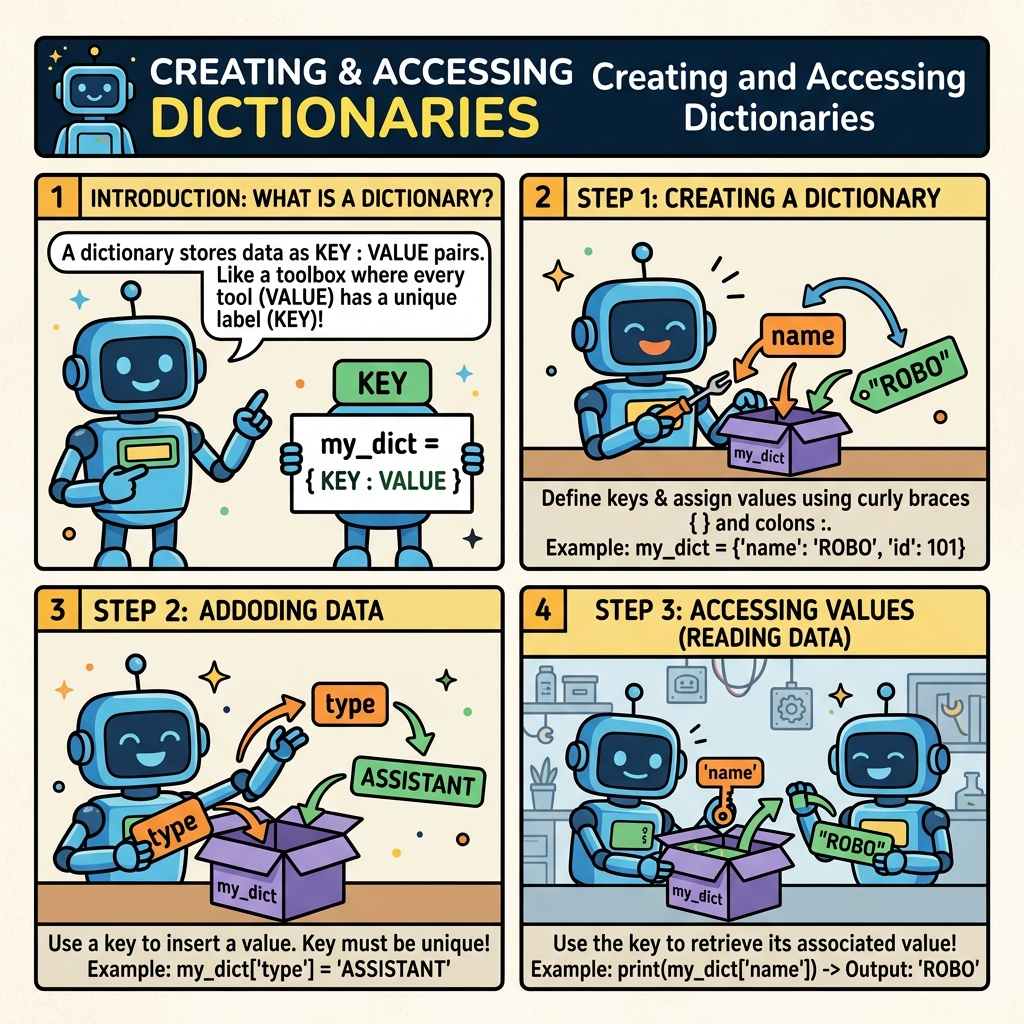
Common Dictionary Operations Summary
Here’s a quick reference table summarizing common dictionary operations:
| Operation | Syntax | Description |
|---|---|---|
| Create dict literal | {'key': value} | Define dictionary with key-value pairs |
| Create dict with constructor | dict(key=value) | Create dictionary with keyword args |
| Access value | dict[key] | Returns value for key, errors if missing |
| Safe access | dict.get(key, default) | Returns value or default if key missing |
| Add/Update | dict[key] = value | Assign or update key with value |
| Delete | del dict[key] | Remove key-value pair |
| Check existence | key in dict | Returns True if key present |
| Iterate keys | for key in dict: | Loop over keys |
| Iterate values | for val in dict.values(): | Loop over values |
| Iterate items | for k, v in dict.items(): | Loop over key-value pairs |
Advanced Tip: Nested Dictionaries
Dictionaries can store other dictionaries as values, allowing you to build complex, hierarchical data structures.
📌 Deep Dive: Nested Dictionaries
students = {
    "001": {"name": "Alice", "grade": "A"},
    "002": {"name": "Bob", "grade": "B"},
    "003": {"name": "Charlie", "grade": "C"},
}

print(students["002"]["name"]) # Output: BobThis structure is especially useful for representing real-world data, such as JSON objects or database entries.
💡 Pro Tip
When accessing deeply nested dictionaries, use the get() method carefully or consider data validation to avoid errors.
Summary
Dictionaries are a foundational data structure in Python that allow you to store and access data through unique keys. You can create dictionaries using literal syntax or the dict() constructor, access values using square brackets or the safer get() method, and modify dictionaries by adding, updating, or removing key-value pairs.
Mastering dictionaries will empower you to handle complex data efficiently and write more expressive Python code.
Quick Knowledge Check
Test what you just learned
Question 1 of 2
Which of the following is a valid way to create a dictionary with keys "name" and "age"?
Question 2 of 2
What happens if you access a dictionary key that does not exist using the square bracket notation?
Loading results...