As your Python programs grow larger and more complex, organizing your code becomes essential. Writing everything in a single file quickly becomes unmanageable. This is where modules come into play. Modules allow you to break your code into reusable, logically grouped files — making your projects easier to maintain, understand, and extend.
In this lesson, you will learn how to create your own modules, how to use them in other Python scripts, and best practices to structure your code with modules. By the end, you’ll be able to build clean, modular Python programs that scale beautifully.
What is a Python Module?
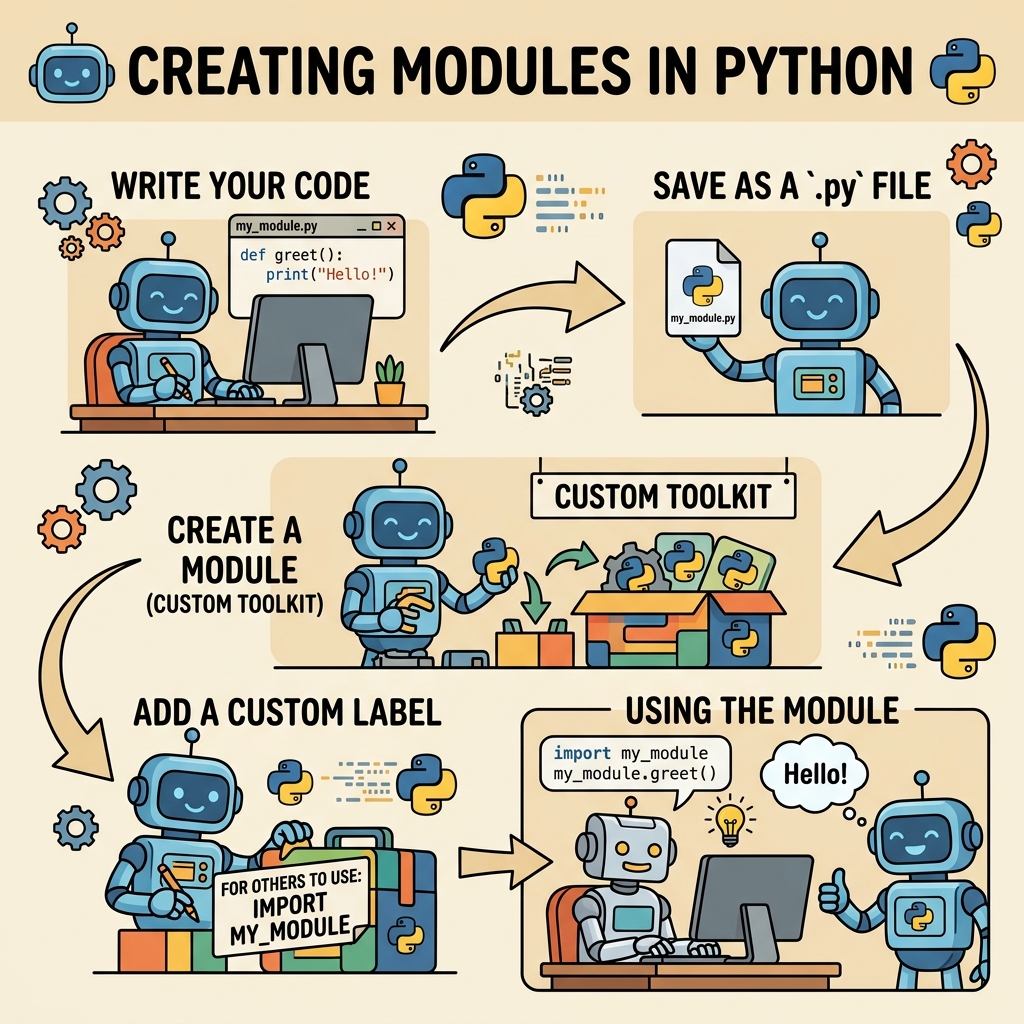
A module in Python is simply a file containing Python definitions and statements. The filename is the module name with the suffix .py. Modules let you organize functions, classes, and variables into separate files and namespaces.
For instance, if you create a file called math_helpers.py that contains some math-related functions, this file becomes a module named math_helpers. You can then import that module in other Python files and access its functions.
💡 The Power of Modules
Think of modules like toolboxes. Each toolbox holds a specific set of tools (functions, classes) for a particular job. Instead of carrying all tools everywhere, you just grab the toolbox you need.
Creating Your First Module
Let’s create a simple module to illustrate the concept. Follow these steps:
- Open your code editor and create a new file called
greetings.py. - Inside
greetings.py, add the following function:
📌 Deep Dive: greetings.py Module
def say_hello(name):
    return f"Hello, {name}!"

def say_goodbye(name):
    return f"Goodbye, {name}!"
This file defines two simple functions: say_hello and say_goodbye. Now that you have your module, you can use it in other Python scripts.
Importing and Using Your Module
Create a new Python file in the same directory called main.py. In this file, you will import the greetings module and call its functions.
📌 Deep Dive: Using greetings Module
import greetings

print(greetings.say_hello("Alice"))
print(greetings.say_goodbye("Bob"))Here, the import greetings statement loads the module, making its functions accessible via the greetings. prefix. When you run main.py, you get the expected greetings printed.
Different Ways to Import Modules
Python provides multiple ways to import modules depending on your needs. Understanding these styles helps you write cleaner and more readable code.
| Import Style | Example | Usage & Notes |
|---|---|---|
| Standard Import | import greetings |
Access using greetings.func(). Keeps namespace clear. |
| From Import | from greetings import say_hello |
Use function directly: say_hello(). Avoids module prefix. |
| Import All | from greetings import * |
Imports all names. Can clutter namespace; generally discouraged. |
| Alias Import | import greetings as gr |
Shortens module name for convenience: gr.say_hello(). |
Use the style that best fits readability and avoids name conflicts. For example, from module import * can overwrite existing names and is usually avoided in large projects.
Organizing Related Modules into Packages
When your project contains multiple modules, grouping them into packages improves structure. A package is just a directory containing modules and a special __init__.py file.
The __init__.py file can be empty or execute initialization code for the package. Its presence tells Python that the directory is a package and can be imported accordingly.
Here’s an example project structure:
my_project/
├── main.py
└── utilities/
    ├── __init__.py
    ├── greetings.py
    └── math_helpers.py
In main.py, you can import functions from the utilities package like this:
📌 Deep Dive: Importing from Packages
from utilities.greetings import say_hello

print(say_hello("Charlie"))How Python Finds Modules
When you write import module_name, Python searches for the module in a series of locations, collectively called the sys.path. This includes:
- The directory containing the script you’re running
- Directories listed in the
PYTHONPATHenvironment variable - Standard library directories
- Installed third-party packages paths
You can view and modify sys.path if necessary, but generally it’s best to place your modules in the same directory as your script or inside packages within the project structure.
Using Modules to Avoid Code Duplication
One of the main reasons to create modules is to write reusable code. Let's say you have utility functions used across multiple scripts. Putting them into a module means you write the function once and import it wherever needed.
For example, you might have a module string_utils.py:
📌 Deep Dive: string_utils.py
def reverse_string(s):
    return s[::-1]

def is_palindrome(s):
    return s == reverse_string(s)
Now any script can import string_utils and use these functions without rewriting them:
from string_utils import is_palindrome

print(is_palindrome("madam"))  # True
💡 Module Reusability
Modules help you avoid repeating yourself (DRY principle). They encourage clean, maintainable code by centralizing functionality.
Advanced: The __name__ == "__main__" Check
When creating modules, you might want to allow them to be run as standalone scripts for testing or demonstration purposes. Python provides a special variable __name__ for this.
Inside your module, add this block:
📌 Deep Dive: Module Entry Point
def say_hello(name):
    return f"Hello, {name}!"

if __name__ == "__main__":
    # This code runs only when the module is executed directly
print(say_hello("Tester"))Explanation:
- If you run the file directly (e.g.,
python greetings.py), the code inside this block executes. - If you import the module in another script, this block is skipped.
This is very useful for quick module testing without interfering with imports.
Module Naming Conventions and Best Practices
Following naming conventions and good practices ensures your modules are easy to collaborate on and maintain:
- Module names should be lowercase, with words separated by underscores if needed (e.g.,
data_processing.py). - Avoid using Python standard library names for your modules to prevent conflicts (e.g., don't name your file
math.py). - Keep modules focused on a single responsibility or theme.
- Use docstrings at the top of your module to describe its purpose.
Summary: Why Create Modules?
Creating modules in Python is foundational for writing organized, scalable, and maintainable code. Modules:
- Encapsulate related functions, classes, and variables
- Enable code reuse across multiple programs
- Improve readability by splitting large programs into manageable files
- Provide namespace separation, avoiding naming conflicts
- Support packaging and distribution of code libraries
As your projects grow, mastering modules and packages will become invaluable in building professional-grade Python applications.
⚠️ Common Pitfall: Circular Imports
Avoid importing modules that import each other directly, which leads to circular dependencies and errors. Plan your module relationships carefully and use package structures when needed.
Quick Knowledge Check
Test what you just learned
Question 1 of 2
What is a Python module?
Question 2 of 2
What does the condition if __name__ == "__main__": in a module do?
Loading results...