When learning Python, understanding sets is essential because they allow you to work with collections of unique elements efficiently. Sets are unordered collections that automatically eliminate duplicate values, and Python provides a rich suite of set operations to manipulate and analyze these collections.
This lesson will guide you through the core set operations in Python, including union, intersection, difference, and symmetric difference. By the end, you’ll be confident using these operations to solve real-world problems involving unique data grouping and comparison.
What Is a Python Set?
Before diving into operations, let's briefly recap Python sets. A set is created using curly braces {} or the set() constructor. Sets hold unordered and unique elements.
📌 Deep Dive: Creating Sets
# Creating sets with curly braces
fruits = {'apple', 'banana', 'cherry'}

# Creating an empty set requires the set() constructor
empty = set()

# Duplicate elements are automatically removed
numbers = {1, 2, 2, 3, 4, 4, 5}

print(fruits)
print(numbers)Note that sets do not preserve order, so the printed order may vary.
Core Set Operations
Now that you understand what sets are, let’s explore the main operations you can perform on them. These operations reflect mathematical set theory concepts and help you combine or compare sets effectively.
Union (|)
The union of two sets combines all unique elements from both sets.
📌 Deep Dive: Union Operation
a = {1, 2, 3}
b = {3, 4, 5}

union_set = a | b
print(union_set)Alternatively, you can use the union() method:
union_set = a.union(b)Intersection (&)
The intersection operation returns only elements common to both sets.
📌 Deep Dive: Intersection Operation
a = {'apple', 'banana', 'cherry'}
b = {'banana', 'kiwi', 'apple'}

intersection_set = a & b
print(intersection_set)Or use the method form:
intersection_set = a.intersection(b)Difference (-)
The difference between two sets a - b contains elements in a that are not in b. Note that the order matters here.
📌 Deep Dive: Difference Operation
a = {1, 2, 3, 4}
b = {3, 4, 5, 6}

diff_a_b = a - b
diff_b_a = b - a

print(diff_a_b)  # Elements in a but not in b
print(diff_b_a) # Elements in b but not in aMethod form:
diff_a_b = a.difference(b)Symmetric Difference (^)
The symmetric difference operation returns elements in either set, but not in both.
📌 Deep Dive: Symmetric Difference Operation
a = {1, 2, 3}
b = {2, 3, 4}

sym_diff = a ^ b
print(sym_diff)Method form:
sym_diff = a.symmetric_difference(b)Set Operation Methods vs. Operators
Python provides two ways to perform set operations: operators and methods. Both are valid, but each has its use cases. Operators are more concise and readable for simple expressions, while methods provide more flexibility and can accept any iterable (not just sets).
| Operation | Operator | Method |
|---|---|---|
| Union | | | union() |
| Intersection | & | intersection() |
| Difference | - | difference() |
| Symmetric Difference | ^ | symmetric_difference() |
For example, the union() method can take any iterable, such as lists or tuples:
📌 Deep Dive: Using union() with Non-Set Iterables
a = {1, 2, 3}
b = [3, 4, 5]  # List, not a set

result = a.union(b)
print(result)Practical Examples of Set Operations
Let’s see how these operations can be used in everyday tasks.
Removing Duplicates from a List
Sets automatically remove duplicates, so converting a list to a set and back is a quick way to clean duplicates.
📌 Deep Dive: Deduplicating a List
items = ['apple', 'banana', 'apple', 'orange', 'banana']
unique_items = list(set(items))
print(unique_items)Note: The order may change because sets are unordered.
Finding Common Interests
Imagine two friends have lists of their favorite movies. To find which movies both like, use intersection.
📌 Deep Dive: Finding Common Elements
alice = {'Inception', 'Titanic', 'Avengers'}
bob = {'Avengers', 'Titanic', 'Matrix'}

common_movies = alice & bob
print(common_movies)Identifying Unique Items
If you want to know which movies only Alice likes and Bob doesn't, use difference:
📌 Deep Dive: Identifying Unique Items
unique_to_alice = alice - bob
print(unique_to_alice)Finding Items Only One Person Likes
The symmetric difference can show items liked by either Alice or Bob, but not both:
📌 Deep Dive: Symmetric Difference in Practice
unique_movies = alice ^ bob
print(unique_movies)Set Operations Visualized
Visualizing set operations can make understanding easier. Imagine two overlapping circles representing two sets:
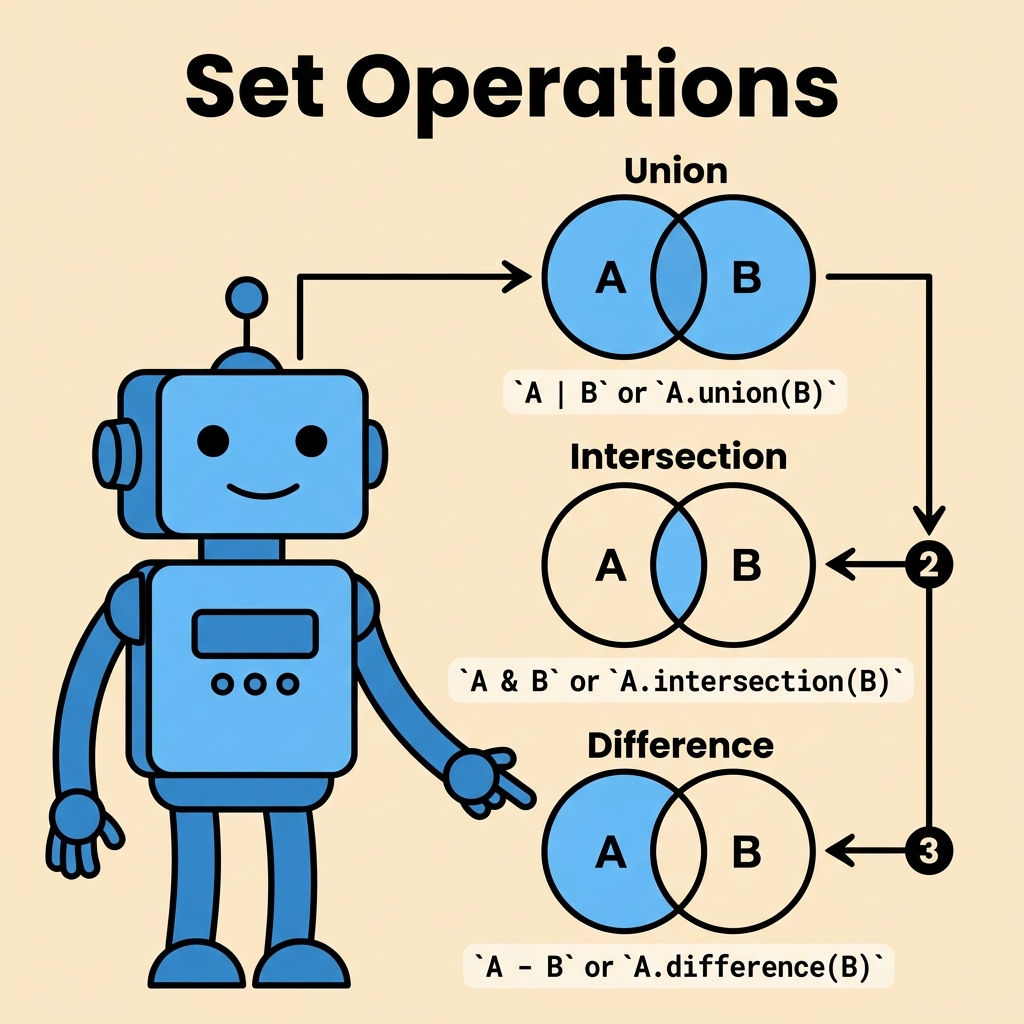
Each operation corresponds to a specific region in the diagram:
- Union: The entire area covered by both circles.
- Intersection: The overlapping area between both circles.
- Difference: The part of one circle excluding the overlapping area.
- Symmetric Difference: The areas covered by each circle but excluding the overlapping part.
Important Things to Remember
💡 Key Concept
Sets only contain unique elements, so any duplicates are automatically removed when creating or performing operations on sets.
⚠️ Mutability and Sets
Set elements must be immutable (e.g., strings, numbers, tuples). You cannot include lists or dictionaries as set elements.
⚠️ Order Is Not Guaranteed
Sets are unordered collections. When you print or iterate over a set, the items may appear in any order.
Advanced Set Operations
Python also supports in-place set operations, which modify the original set instead of creating a new one. These methods end with an _update suffix:
update()— in-place unionintersection_update()— in-place intersectiondifference_update()— in-place differencesymmetric_difference_update()— in-place symmetric difference
📌 Deep Dive: In-place Update Example
a = {1, 2, 3}
b = {3, 4, 5}

a.update(b)
print(a) # a is now the union of a and bThis can be useful to save memory or when you want to modify the original set directly.
Summary
Set operations are powerful tools that let you combine, compare, and filter collections of unique elements easily. To recap:
- Union (| or union()) merges sets without duplicates.
- Intersection (& or intersection()) finds common elements.
- Difference (- or difference()) finds elements in one set but not the other.
- Symmetric Difference (^ or symmetric_difference()) finds elements in either set but not both.
Understanding these fundamentals prepares you for more complex data manipulation tasks in Python.
Quick Knowledge Check
Test what you just learned
Question 1 of 2
Which set operation returns elements that are in either of the two sets but not in both?
Question 2 of 2
What will be the output of this code?a = {1, 2, 3}
b = {2, 3, 4}
print(a - b)
Loading results...