When you begin your journey with Python, you'll soon encounter two foundational concepts that often cause confusion for beginners: iterables and iterators. These are essential building blocks that underpin looping, data processing, and many core Python functionalities. Understanding them deeply not only clarifies how loops work under the hood but also empowers you to write cleaner, more efficient code.
Let's embark on a detailed exploration of what iterables and iterators are, how they differ, and how you can use them effectively in your Python programs.
What is an Iterable?
An iterable is any Python object capable of returning its elements one at a time, allowing you to loop over it. In simpler terms, if you can use a for loop directly on an object, it’s an iterable.
Common examples of iterables include:
listtuplestr(strings are sequences of characters)dict(iterates over keys by default)set- Any object implementing the
__iter__()or__getitem__()method
Behind the scenes, an iterable’s job is to provide an iterator when asked.
What is an Iterator?
An iterator is the actual object responsible for iterating over the data. It keeps track of where it is during iteration and knows how to fetch the next element.
An iterator implements two essential methods:
__iter__(): returns the iterator object itself (usuallyself)__next__(): returns the next item from the sequence; raisesStopIterationwhen no more items are available
When you call iter() on an iterable, Python returns an iterator object. This iterator is what the for loop uses internally to traverse the data.
Iterables and Iterators: Visualizing the Relationship
To understand the difference, think of an iterable as a book and the iterator as a bookmark. The book (iterable) contains the data (pages), and the bookmark (iterator) helps you keep track of your current position in the book as you read through it.
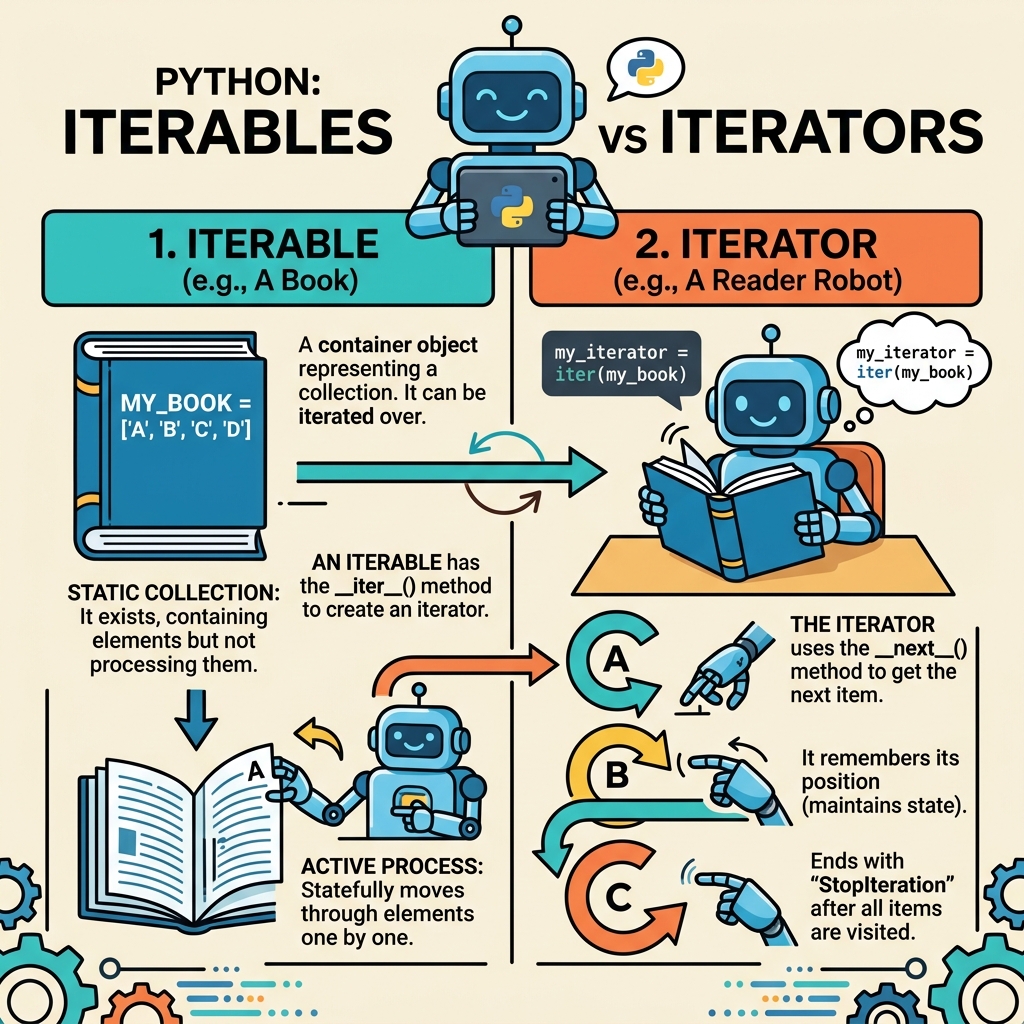
The iterable contains the full data set, while the iterator knows which element is next and returns it when requested.
💡 Key Insight
Every iterator is also an iterable (because it implements __iter__()), but not every iterable is an iterator. This subtlety often trips up newcomers.
Exploring Iterables and Iterators with Python Code
Let's see these concepts in action with some Python code.
📌 Deep Dive: Creating and Using an Iterator
# Create an iterable: a list
my_list = [10, 20, 30]

# Get an iterator from the iterable
my_iterator = iter(my_list)

print(next(my_iterator))  # Outputs: 10
print(next(my_iterator))  # Outputs: 20
print(next(my_iterator))  # Outputs: 30

# next(my_iterator) now would raise StopIteration because the iterator is exhausted20
30
Notice how iter() turns the list (an iterable) into an iterator object. We then manually call next() to retrieve each element one by one.
How For Loops Use Iterators Behind the Scenes
When you write a for loop in Python, it implicitly does the following:
- Calls
iter()on the iterable to get an iterator. - Repeatedly calls
next()on the iterator to get each item. - Stops looping when
StopIterationis raised.
For example:
📌 Deep Dive: For Loop Internals
my_list = ['a', 'b', 'c']

# Equivalent to:
it = iter(my_list)
while True:
    try:
        item = next(it)
        print(item)
    except StopIteration:
        break

# This is what Python does internally for:
# for item in my_list:
# print(item)b
c
Understanding this mechanism demystifies how loops operate and why iterators are so important.
Custom Iterators: Building Your Own
You can create your own iterator by defining a class with __iter__() and __next__() methods. This is especially useful when you want to iterate over complex data or implement custom iteration logic.
📌 Deep Dive: Custom Iterator Class
PYTHON
class CountDown:
def __init__(self, start):
self.current = start
def __iter__(self):
return self
def __next__(self):
if self.current <= 0:
raise StopIteration
else:
self.current -= 1
return self.current + 1
# Using the custom iterator
countdown = CountDown(5)
for number in countdown:
print(number)
Output5
4
3
2
1
Here, CountDown is both an iterable and an iterator. It keeps track of the current count and stops when it reaches 0.
Iterables vs Iterators: Side-by-Side Comparison
Iterables vs Iterators
Feature Iterable Iterator Definition An object you can loop over (e.g., list, tuple) An object that produces items one at a time Implements __iter__() and optionally __getitem__()__iter__() and __next__()Can be used in a for loop? Yes Yes State Stateless (does not track iteration position) Stateful (tracks current position) Returned by Built-in data structures, custom classes Result of calling iter() on an iterable Example [1, 2, 3]Iterator object from iter([1, 2, 3])
💡 Practical Tip
If you want to process elements just once and keep track of your position, use an iterator. If you want to loop multiple times, use an iterable (or get a fresh iterator each time).
Common Pitfalls and Gotchas
Being aware of certain behaviors can prevent bugs related to iterables and iterators.
- Exhausted iterators: Once an iterator is exhausted (all items consumed), you cannot reset it. You must create a new iterator by calling
iter() again.
- Multiple passes: Iterators generally only support one pass through the data. Iterables can provide new iterators for multiple passes.
- Functions expecting iterables: Many Python functions accept iterables but not necessarily iterators. For example,
len() works on iterables like lists but not on iterators.
⚠️ Warning
Don’t assume an iterator can be reused after it's exhausted. This leads to silent logic errors where loops appear to skip data.
Using Generators: A Special Kind of Iterator
Generators are a convenient way to create iterators using functions and the yield keyword. They automatically implement __iter__() and __next__() behind the scenes.
📌 Deep Dive: Generator Example
PYTHON
def countdown(n):
while n > 0:
yield n
n -= 1
gen = countdown(3)
print(next(gen)) # 3
print(next(gen)) # 2
print(next(gen)) # 1
# next(gen) now raises StopIteration
Output3
2
1
Generators provide a memory-efficient way to handle large data streams because they produce items on-demand.
Summary: Bringing It All Together
To master iteration in Python, remember this:
- Iterable: An object you can loop over multiple times. It knows how to create an iterator.
- Iterator: An object that traverses through elements one at a time and maintains iteration state.
- For loops: Use iterators internally to fetch items from iterables.
- Generators: Special iterators created using functions with
yield, great for efficient data streaming.
By understanding these core concepts, you gain deeper insight into Python's flexible iteration model and can create your own powerful, custom iterable and iterator objects.
Quick Knowledge Check
Test what you just learned
Question 1 of 2
Which of the following is true about iterators in Python?
Question 2 of 2
What method must an iterable implement to provide an iterator?
0/2Loading results...